Managing a multiplayer Rust community requires more than starting a dedicated server. Administrators need reliable tools to monitor players, enforce rules, restart services, and respond to problems without constantly logging into the hosting machine.
A proper Rust server RCON setup makes remote administration possible, while carefully assigned permissions help prevent unauthorized commands and accidental damage. However, exposing an administrative interface without appropriate security controls can create serious risks.
This practical guide covers Rust WebRCON configuration, administrator roles, essential commands, connection troubleshooting, and what to look for when choosing Rust server hosting.
What Is RCON in Rust Server Hosting?
RCON stands for Remote Console. It allows authorized administrators to communicate with a running game server through a remote management interface.
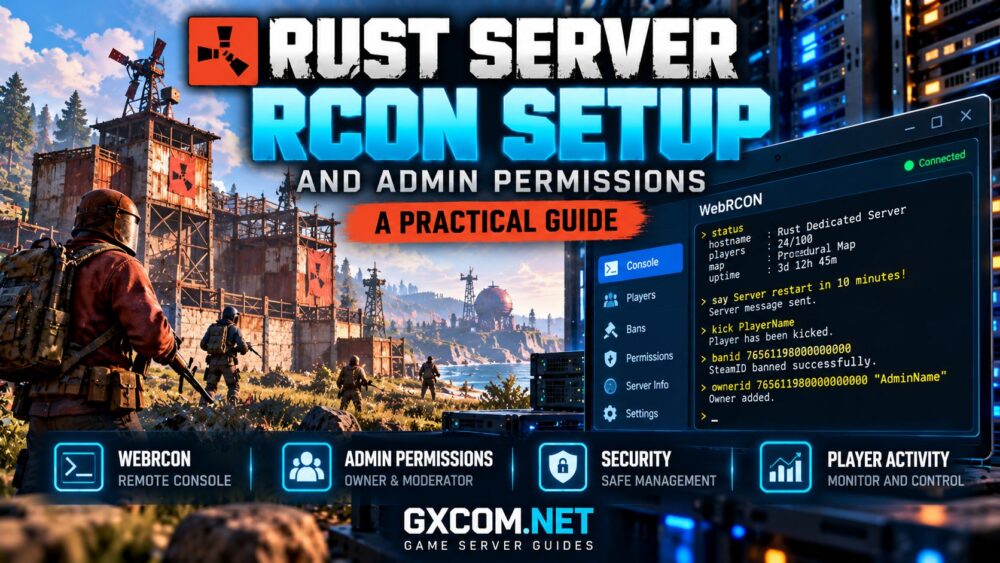
Rust supports a WebSocket-based RCON interface commonly called WebRCON. Administrators can connect using compatible clients to execute console commands and review server output.
Typical RCON tasks include:
- Checking connected players and server status.
- Managing player bans and administrative actions.
- Sending server-wide announcements.
- Saving the world before planned maintenance.
- Investigating errors and reviewing console output.
RCON access is powerful. Anyone who obtains valid credentials and network access may be able to execute administrative commands. Treat the interface as a privileged management service.
Rust WebRCON vs In-Game Admin Commands
Rust administrators can manage servers through in-game commands, a hosting control panel, or RCON clients. Each method serves a different purpose.
| Method | Primary Use | Requirement |
|---|---|---|
| WebRCON | Remote console management | Endpoint and credentials |
| In-game console | Player moderation | Authorized admin account |
| Hosting panel | Server operations | Panel account access |
| SSH | Operating system management | Server-level permissions |
Managed hosting can reduce the need for direct operating system administration. Compare these operational differences in our managed vs self-hosted game servers guide.
How to Configure Rust WebRCON
Before changing settings, stop the server when required and back up its configuration. The exact procedure depends on whether you use a hosting panel or manage the Rust Dedicated Server process yourself.
Step 1: Configure RCON Startup Parameters
A typical Rust server configuration includes the following startup arguments:
+rcon.port 28016
+rcon.password "REPLACE_WITH_STRONG_PASSWORD"
+rcon.web 1
The port number is an example. Select an available management port permitted by your hosting environment.
The rcon.web 1 setting enables the WebSocket-based RCON interface on supported Rust server builds.
Never use the example password in production. Generate a long, unique secret and avoid exposing it in screenshots, public scripts, or shared configuration files.
Step 2: Apply Network Restrictions
Allow the selected RCON port only from trusted management addresses wherever possible.
If your administration tools run from a fixed IP address, configure firewall rules to restrict incoming access accordingly.
Do not confuse the game connection port with the RCON management port. Opening an administrative endpoint to the entire internet unnecessarily increases exposure.
Step 3: Restart and Verify
Restart the server using the hosting panel or service manager, then inspect its startup logs for configuration errors.
Confirm that the management interface is listening on the expected port and that firewall rules permit access from your authorized administration system.

Connecting to a Rust RCON Client
To connect, use a compatible WebRCON client and supply the server address, configured RCON port, and password.
For example, a server using the address 203.0.113.10 and port 28016 would have those values entered into the client’s connection settings. The example IP address is reserved for documentation.
After authentication, begin with a read-only command:
statusIf the client displays server information, basic connectivity is working.
Remember that a password-authenticated WebSocket connection is not necessarily encrypted. For remote administration, prefer a trusted VPN, private management network, or appropriately secured gateway rather than exposing credentials over an unprotected connection.
Essential Rust Server RCON Commands
Administrators should learn a small set of commands before experimenting with advanced configuration changes.
| Command | Purpose |
|---|---|
status |
Display server and player information |
say "Message" |
Send a server announcement |
server.save |
Request a world save |
kick "PlayerName" |
Disconnect a player |
banid SteamID64 |
Ban an identified account |
Command availability and syntax may change with server updates or extensions. Confirm player identity before issuing moderation commands, particularly when display names are duplicated.
Use disruptive commands carefully and avoid running unverified command sequences on a live community server.
How to Assign Rust Admin and Moderator Permissions
Rust distinguishes between server owners and moderators. These roles are assigned using a player’s SteamID64 rather than relying on a changeable display name.
Grant Owner Permissions
ownerid 76561198000000000 "AdminName"
server.writecfg
Replace the sample SteamID64 with the correct account identifier. The numeric value above is illustrative and must not be copied as an actual administrator account.
Owner privileges provide extensive control and should be reserved for trusted personnel responsible for server administration.
Grant Moderator Permissions
moderatorid 76561198000000000 "ModeratorName"
server.writecfg
Moderator privileges provide administrative capabilities but are more limited than owner access. They are not equivalent to a fully customizable role-based permission system.
Remove Administrative Access
removeowner 76561198000000000
removemoderator 76561198000000000
server.writecfg
Use the relevant removal command for the account’s assigned role. Some permission changes may require the affected player to reconnect.
For more granular plugin permissions, compatible Rust modding frameworks may provide additional authorization mechanisms. These should be configured separately from Rust’s built-in owner and moderator roles.
Securing Rust RCON and Administrator Accounts
Remote management security should be treated as part of routine server maintenance rather than an optional advanced feature.
Follow these precautions:
- Use a strong, unique RCON password.
- Restrict management-port access with firewall rules.
- Prefer private network access for remote administration.
- Limit owner privileges to essential administrators.
- Remove permissions when staff members leave.
- Protect hosting-panel accounts with multifactor authentication where supported.
- Keep server software and compatible extensions updated.
RCON credentials should never be embedded in public websites or exposed through browser-based tools without suitable security protections.
Keep reliable backups before major configuration changes. Our game server security checklist covers broader protection measures.
Rust RCON Not Connecting? Common Fixes
Connection failures usually involve incorrect settings, authentication problems, or network restrictions.
Incorrect RCON Port
Confirm that the client uses the configured RCON port rather than the game server’s normal connection port.
WebRCON Not Enabled
Check whether +rcon.web 1 is applied to the running server process. Restart the service after modifying startup arguments when necessary.
Firewall or Network Restrictions
Verify that the hosting firewall permits the intended management connection. Do not disable firewall protection merely to make troubleshooting easier.
Authentication Failure
Confirm the password, check for unintended whitespace, and rotate credentials if exposure is suspected.
Unsupported Client
Ensure the management application supports Rust’s configured RCON protocol. A client designed exclusively for another RCON implementation may not connect successfully.
If problems continue, review server logs and contact the hosting provider with relevant error details, excluding passwords and other secrets.
Choosing Rust Server Hosting With RCON Access
When comparing hosting providers, consider how easily administrators can access the console, manage configuration, create backups, and recover from mistakes.
Host Havoc and Survival Servers are candidates worth investigating for Rust hosting. Verify their current Rust product availability, management interfaces, and permitted remote administration options.
Sparked Host and Godlike.Host are additional providers to evaluate for compatible game hosting configurations. Check whether your selected plan supports Rust, the required server version, and your intended administration workflow.
Managed hosting may simplify routine operations, but it does not eliminate the responsibility to protect administrator credentials and configure permissions correctly.

Our best Rust server hosting comparison provides a broader framework for evaluating providers.
RCON Monitoring and Maintenance Best Practices
Once remote management is working, establish a routine for checking server health and reviewing administrative activity.
Monitor player counts, unexpected restarts, CPU usage, memory pressure, and persistent errors. Schedule maintenance during quieter periods and notify players before planned interruptions.
For automated administration, avoid granting unrestricted RCON access to untrusted scripts or third-party services.
Combine remote console access with the monitoring techniques described in our game server monitoring tools guide.
Rust Server Administration Checklist
- Configure WebRCON with a unique password.
- Restrict access to trusted management networks.
- Test connectivity using a compatible client.
- Assign owner and moderator roles carefully.
- Remove inactive administrator accounts.
- Back up configuration and world data.
- Review logs and monitor server performance.
Frequently Asked Questions
What is the default Rust RCON port?
Port 28016 is commonly used in example configurations, but the actual RCON port depends on the server’s startup parameters and hosting environment.
Is Rust RCON the same as SSH?
No. RCON provides remote game-console administration, while SSH provides secure remote access to an operating system when supported and correctly configured.
Can moderators use every Rust admin command?
No. Built-in moderator permissions are more limited than owner privileges. Additional plugin-based permission systems may provide finer control.
Is exposing Rust RCON publicly safe?
Public exposure increases attack risk. Restrict access and use protected management connections whenever possible.
Final Thoughts
A secure Rust server RCON setup gives administrators practical control over multiplayer operations without requiring constant direct access to the hosting machine.
Configure WebRCON correctly, protect its credentials, assign only necessary permissions, and maintain reliable backups. Combined with suitable hosting and monitoring, these practices support safer and more manageable Rust communities.