A fast website is no longer just a technical advantage. Website speed affects user experience, conversions, engagement and how efficiently visitors can interact with your content.
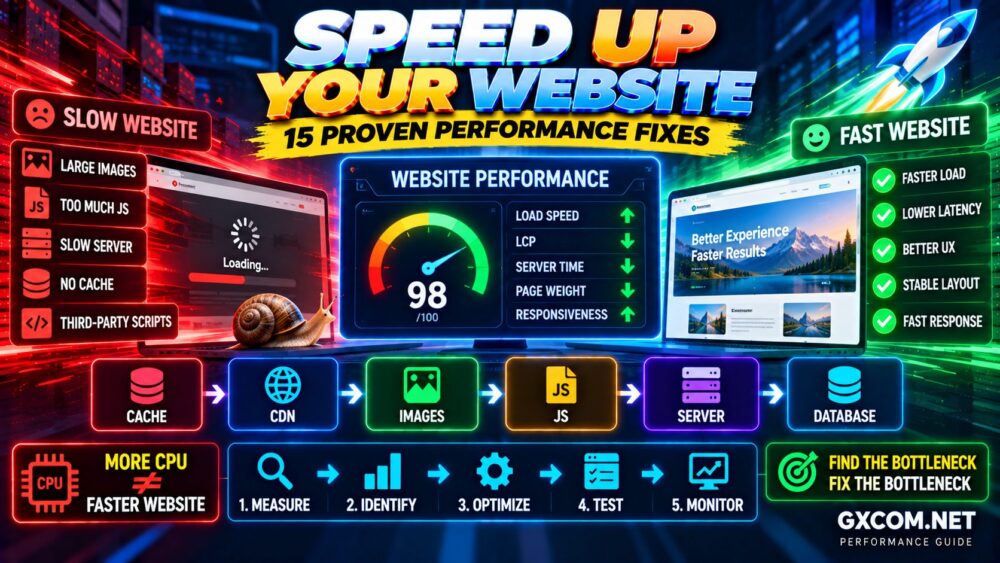
When a website feels slow, the cause is rarely one thing. Large images, excessive JavaScript, slow hosting, poor caching, third-party scripts, database delays and network latency can all contribute to poor performance.
The good news is that you usually do not need to rebuild your entire website.
本指南介绍了 how to speed up a website using 15 practical optimization methods that apply to blogs, business websites, e-commerce stores and web applications.
MEASURE → FIND THE BOTTLENECK → OPTIMIZE → TEST AGAIN
为什么网站速度很重要
Website performance affects almost every part of the visitor experience.
A faster website can help improve:
- 用户体验
- Page responsiveness
- Conversion opportunities
- 移动端易用性
- 抓取效率
- 核心网页指标
- Server resource efficiency
However, optimization should focus on real user experience rather than chasing a perfect score in a testing tool.
A website with a score of 100 is not automatically better than a website with a slightly lower score that loads important content faster for real visitors.
Optimize the Experience, Not Just the Score.
Test Website Speed Before You Optimize
Before changing hosting, installing optimization software or deleting scripts, establish a performance baseline.
有用的指标包括:
- 首次字节时间(TTFB)
- 最大内容绘制(LCP)
- 与下一次绘制交互(INP)
- 累积布局偏移(CLS)
- Total page weight
- Number of network requests
- 服务器响应时间
Test more than one page. Your homepage may behave differently from articles, product pages or application screens.
For a deeper look at Google's user-experience metrics, see our 核心网络指标优化指南.
1. Choose Faster Hosting
You can optimize HTML, images and JavaScript extensively, but a slow origin server can still delay every uncached request.
主机性能可能取决于以下因素:
- CPU性能
- 可用内存
- 存储性能
- 资源竞争
- 网络质量
- 服务器位置
- 软件配置
Cheap hosting is not automatically slow, and expensive hosting is not automatically fast. The important question is whether the infrastructure matches your workload.
If your server regularly experiences CPU, memory, disk or network bottlenecks, use our 服务器运行缓慢故障排除指南 before upgrading.
Faster Website Starts With a Responsive Origin.
2. Enable Page and Application Caching
Caching reduces the amount of work required to serve repeated requests.
Instead of generating the same content repeatedly, a caching layer can serve a previously generated response.
Depending on your architecture, caching may exist at several levels:
- Browser cache
- CDN edge cache
- Reverse proxy cache
- Page cache
- Application cache
- Object cache
A simplified request path might look like:
Visitor → CDN Cache → Server Cache → Application → Database
The earlier a valid response can be served, the less work the origin infrastructure needs to perform.
3. Optimize Images
Images are frequently among the largest resources on a web page.
Uploading a 4000-pixel image and displaying it at 800 pixels wastes bandwidth and processing.
Improve image performance by:
- Resizing images to appropriate dimensions
- 图片压缩
- Using efficient image formats where appropriate
- 提供响应式图片尺寸
- Lazy-loading below-the-fold images
- Avoiding unnecessary decorative images
Do not aggressively compress images until important text, product details or visual content becomes noticeably degraded.
Smaller File + Acceptable Quality = Better Optimization.
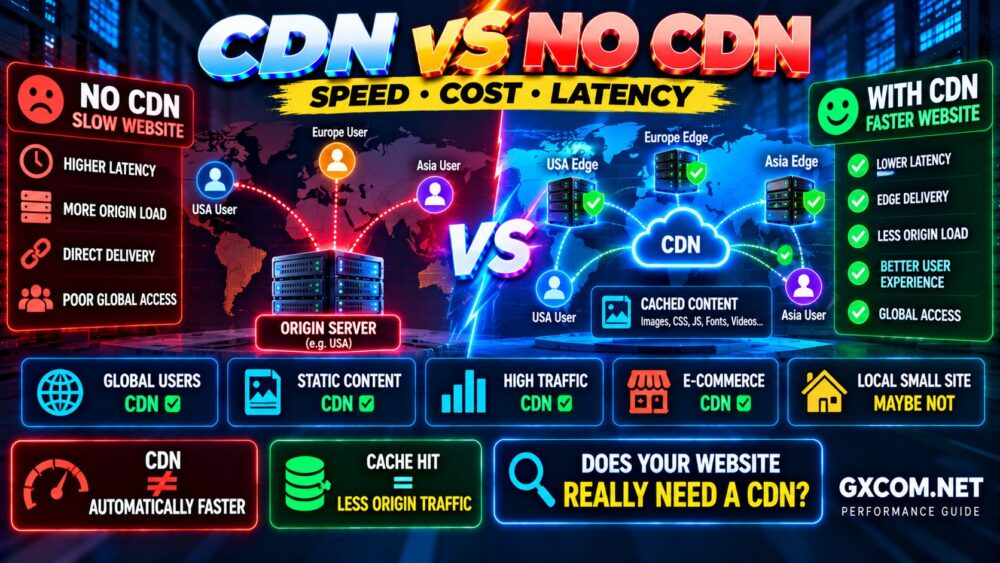
4. Use a CDN
A Content Delivery Network can cache static or cacheable resources across distributed edge locations.
Without a CDN:
Visitor → Origin Server
With a CDN:
Visitor → Nearby Edge → Cached Content
A CDN can reduce the distance between visitors and content, decrease origin traffic and improve resilience during traffic spikes.
It can be particularly useful when your visitors are geographically distributed.
However, a CDN cannot fix an application that takes several seconds to generate an uncached response. Origin optimization still matters.
5. Reduce JavaScript
JavaScript can create significant performance costs because browsers may need to download, parse, compile and execute it before completing important interactions.
Review:
- 未使用的 JavaScript
- Large libraries
- 功能重复
- Third-party widgets
- Analytics scripts
- 广告脚本
- Chat tools
- 社交媒体嵌入
Do not optimize by blindly combining or delaying every script. Some scripts are required for navigation, checkout, authentication or other critical functionality.
The goal is to reduce unnecessary JavaScript while preserving the user experience.
6. Minify CSS and JavaScript
Minification removes unnecessary characters such as whitespace and comments from production assets.
This can reduce transfer size, especially when combined with compression.
However, minification usually provides a smaller improvement than fixing oversized images, excessive JavaScript or slow server processing.
Prioritize the largest bottlenecks first.
100 Small Optimizations Cannot Always Fix One Big Bottleneck.
7. Remove Unused CSS
Large stylesheets may contain rules that are never used on a particular page.
Reducing unnecessary CSS can lower transfer size and decrease the amount of styling work the browser must process.
Be careful with automated unused-CSS removal.
Some styles are loaded dynamically after interactions, responsive breakpoints or application state changes. Removing them incorrectly can break menus, forms or mobile layouts.
Always test important page types after CSS optimization.
8. Enable Brotli or Gzip Compression
Text-based resources such as HTML, CSS, JavaScript and JSON can often be compressed before transmission.
Common compression technologies include:
- Brotli
- Gzip
This reduces the number of bytes transferred between the server and browser.
Many modern web servers, CDNs and hosting platforms can handle compression automatically when configured correctly.
Compression is particularly effective for text assets but should not be confused with image optimization.
9. Reduce Third-Party Scripts
Third-party scripts are one of the most overlooked causes of slow websites.
例如:
- 广告平台
- 分析
- 跟踪像素
- 聊天小工具
- 社交媒体嵌入
- A/B testing tools
- External video players
Each external service can add DNS lookups, network connections, JavaScript execution and dependencies outside your direct control.
Ask a simple question:
Does this script provide enough value to justify its performance cost?
Removing one unnecessary third-party service can sometimes produce a larger improvement than many small code optimizations.
10. Improve Server Response Time
If the browser waits too long for the initial server response, front-end optimization alone cannot fully solve the problem.
Slow server response may be caused by:
- Overloaded CPU
- Insufficient memory
- 数据库查询速度慢
- Disk I/O bottlenecks
- Uncached dynamic pages
- Slow application code
- 外部 API 调用
- 资源竞争
Measure first rather than automatically buying a larger server.
More CPU ≠ Faster Website If CPU Is Not the Bottleneck.
11. Optimize Database Performance
Dynamic websites often depend heavily on database performance.
A page may require multiple queries before HTML can be returned to the visitor.
数据库优化可能包括:
- Identifying slow queries
- Using appropriate indexes
- 减少不必要的查询
- Caching repeated results
- Cleaning unnecessary data
- Reviewing application query patterns
Do not treat database cleanup plugins or automated optimization commands as a substitute for understanding why queries are slow.
For WordPress-specific performance issues, use our Slow WordPress Troubleshooting Guide.
12. Lazy-Load Below-the-Fold Content
Resources that visitors cannot initially see do not always need to load immediately.
Lazy loading can defer resources such as:
- 图片
- 视频
- 嵌入内容
- Iframes
until they are closer to the visible viewport.
However, avoid lazy-loading the primary image or other important above-the-fold content when doing so delays the largest visible element.
Lazy Load What Can Wait—Not What the Visitor Needs First.
13. Optimize Fonts
Web fonts can add additional network requests and delay text rendering if poorly configured.
Improve font performance by:
- Using only required font families
- 减少不必要的字体粗细
- Using efficient font formats
- Loading only required character sets
- Preloading truly critical fonts when appropriate
- Using sensible fallback fonts
Five font families with multiple weights can add significant complexity for little visual benefit.
Typography should support the design—not become the website's largest performance dependency.
14. Reduce Redirects and Request Chains
Redirects are sometimes necessary, especially after URL changes or migrations.
But unnecessary redirect chains add extra network round trips.
Avoid situations such as:
URL A → URL B → URL C → Final URL
when:
URL A → Final URL
would work.
Also review dependency chains where one resource must load before another can even be discovered.
Reducing unnecessary chains can improve the critical loading path.
15. Monitor Performance Continuously
Website optimization is not a one-time project.
A site can become slow again after:
- Adding plugins
- Changing themes
- Installing advertising
- Adding analytics
- Uploading larger images
- 交通量增长
- 应用程序更新
- Infrastructure changes
Record important performance metrics and retest after major changes.
This helps answer the most useful question:
What Changed When the Website Became Slower?
Website Performance Optimization by Bottleneck
| 问题 | 可能区域 | 优化 |
|---|---|---|
| Slow initial response | Server/Application | Caching, server and database optimization |
| Large page size | Images/Assets | Compression and asset optimization |
| Slow visual loading | Critical content | Optimize LCP resource and delivery |
| Slow interactions | JavaScript | Reduce main-thread work |
| Layout movement | Page structure | Reserve dimensions and stabilize content |
| 全球访问者速度较慢 | 网络 | CDN and regional infrastructure |
| Slow dynamic pages | Application/Database | Query optimization and caching |
Website Speed vs Server Speed
These terms are related but not identical.
服务器性能 determines how efficiently the backend processes requests.
网站性能 includes the entire user journey:
DNS → Network → Server → HTML → CSS → JavaScript → Images → Rendering → Interaction
This explains why moving to a powerful dedicated server may not dramatically improve a page overloaded with JavaScript and large images.
Likewise, perfect front-end optimization cannot fully compensate for a backend that takes several seconds to generate every page.
Fast Server + Slow Front End = Slow Website.
Fast Front End + Slow Server = Slow Website.
How to Speed Up a WordPress Website
WordPress follows the same general performance principles, but it introduces additional variables such as plugins, themes, PHP workers, database queries and WordPress caching.
For WordPress, prioritize:
- Fast hosting
- 整页缓存
- 优化后的图片
- Efficient themes
- Necessary plugins only
- Current PHP versions supported by your stack
- 数据库优化
- CDN delivery where useful
For the complete WordPress-specific process, read How to Speed Up WordPress.
Should You Upgrade Hosting to Make a Website Faster?
Sometimes—but not always.
Upgrade hosting when measurements show that infrastructure is actually limiting performance.
示例可能包括:
- Persistent CPU saturation
- 内存耗尽
- High disk I/O wait
- Insufficient PHP/application capacity
- Resource throttling
- Network limitations
But if the main problem is a 5 MB hero image or excessive third-party JavaScript, buying more CPU will not address the root cause.
Measure → Identify → Upgrade.
非:
Slow → Buy Bigger Server → Hope.
Common Website Speed Optimization Mistakes
Chasing a Perfect Performance Score
Use performance tools to diagnose problems, not as a game where 100 is the only acceptable result.
Installing Too Many Optimization Tools
Overlapping caching, minification and optimization systems can conflict with each other.
Optimizing Everything at Once
If you change ten things simultaneously, you may not know which change improved—or broke—the website.
Ignoring Mobile Performance
A website that feels fast on a powerful desktop and broadband connection may perform very differently on mobile hardware and networks.
Buying Better Hosting Before Finding the Bottleneck
Infrastructure upgrades help when infrastructure is actually the problem.
Ignoring Third-Party Scripts
Your own code can be highly optimized while external scripts still create substantial delays.
Website Speed Optimization FAQ
How can I make my website load faster?
Start by measuring performance, then optimize the largest bottlenecks. Common improvements include caching, image compression, CDN delivery, faster hosting, reduced JavaScript, fewer third-party scripts and better database performance.
What is the most important website speed optimization?
There is no universal answer because websites have different bottlenecks. A slow server needs a different solution from an image-heavy page or JavaScript-heavy application. Measure before optimizing.
Does a CDN make a website faster?
A CDN can improve delivery by serving cacheable resources closer to visitors and reducing origin traffic. It is particularly useful for geographically distributed audiences, but it cannot fix every backend or application bottleneck.
Does faster hosting improve website speed?
Yes, when server performance is a limiting factor. Faster CPU, storage, networking or additional resources may reduce backend processing time, but hosting upgrades cannot fix oversized images or inefficient front-end code.
网站速度会影响SEO吗?
Performance and page experience can matter for search and users, but website optimization should not focus on one metric alone. Relevant content, crawlability, indexing, mobile usability and other SEO factors remain important.
How fast should a website load?
Instead of relying only on a single total-load-time target, focus on how quickly important content becomes visible, how responsive the page feels and whether the layout remains stable for real visitors.
Why is my website still slow after using a CDN?
The slow component may be an uncached backend response, application processing, database query, third-party script or other resource that the CDN cannot fully optimize.
15-Point Website Performance Checklist
- ✓ Test performance before changing anything
- ✓ Use hosting appropriate for the workload
- ✓ Enable effective caching
- ✓ Optimize images
- ✓ Use a CDN where appropriate
- ✓ Reduce unnecessary JavaScript
- ✓ Minify production assets
- ✓ Remove unnecessary CSS carefully
- ✓ Enable Brotli or Gzip compression
- ✓ 减少不必要的第三方脚本
- ✓ Improve server response time
- ✓ Optimize database performance
- ✓ Lazy-load non-critical content
- ✓ Optimize fonts and request chains
- ✓ Monitor performance continuously
最终建议
The best way to speed up a website is not to install every optimization tool you can find.
Use a systematic process:
MEASURE
Establish a performance baseline.
↓
IDENTIFY
Find the real bottleneck.
↓
OPTIMIZE
Fix the highest-impact problem first.
↓
TEST
Measure the result after each major change.
↓
MONITOR
Make sure performance remains healthy as the website evolves.
Do not assume:
MORE CPU = FASTER WEBSITE
或者:
MORE PLUGINS = BETTER OPTIMIZATION.
Instead, remember:
FIND THE BOTTLENECK → FIX THE BOTTLENECK.