Does every website need a CDN?
No. But for the right website, a Content Delivery Network can reduce latency, decrease origin-server traffic, improve resilience and deliver static content faster to visitors around the world.
The important question is not simply whether a CDN is good or bad. It is whether your website's audience, content, infrastructure and traffic pattern can actually benefit from one.
在这篇 CDN vs no CDN comparison, we explain how a CDN changes website delivery, where the performance improvements come from, what it can cost and when your website actually needs one.
LOCATION → LATENCY → CACHE → ORIGIN LOAD → COST
What Is a CDN?
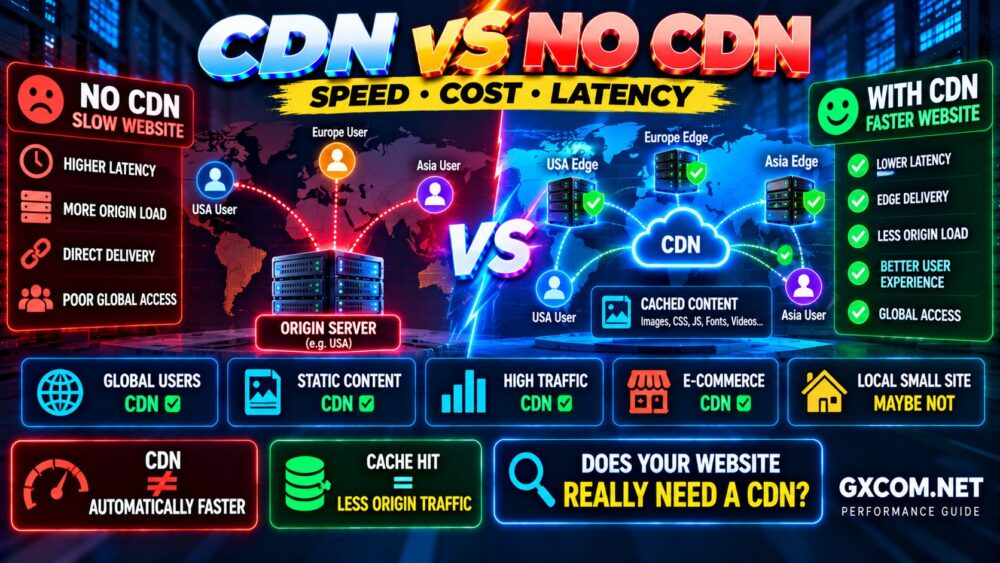
A Content Delivery Network, or CDN, is a distributed network of servers designed to deliver website content closer to users.
Without a CDN, a visitor normally requests content from your origin server:
VISITOR → ORIGIN SERVER
If your server is in the United States and the visitor is also nearby, that may work perfectly well.
But if your visitors are spread across North America, Europe and Asia, some users may be thousands of miles away from the origin.
A CDN changes the delivery path:
VISITOR → NEARBY CDN EDGE → CACHED CONTENT
When the requested resource is available at the edge, the CDN can return it without requiring the origin server to serve the same content again.
CDN vs No CDN at a Glance
| 因子 | With CDN | Without CDN |
|---|---|---|
| Content Delivery | Distributed edge locations | Primarily origin server |
| Global Latency | Usually lower for cached content | Depends heavily on origin distance |
| Origin Load | Can be significantly reduced | Origin handles requests directly |
| 交通流量激增 | Edge can absorb cacheable requests | More pressure on origin |
| 配置 | More complexity | Simpler architecture |
| Cache Management | 必填 | Less edge-cache complexity |
| 成本 | Free to usage-based or premium | Origin bandwidth/resources |
| 最适合 | Distributed audiences and cacheable content | Small/local or highly dynamic workloads |
How a CDN Can Make a Website Faster
The most obvious CDN advantage is reducing the distance between the visitor and the content.
Imagine a website hosted in Los Angeles.
A nearby visitor may already have relatively low network latency:
Los Angeles Visitor → Los Angeles Origin
Now consider someone visiting from London:
London Visitor → Los Angeles Origin → London
Network distance creates additional round-trip latency.
With a CDN, cacheable content may instead be delivered from an edge location much closer to the visitor:
London Visitor → Nearby Edge Cache
This is particularly valuable for:
- 图片
- CSS 文件
- JavaScript
- 字体
- 下载
- 视频
- Cacheable HTML
The result can be faster content delivery and fewer requests reaching the origin.
CDN Performance Depends on Cache Hits
A CDN does not magically make every request fast.
One of the most important concepts is the cache hit ratio.
A simplified CDN request looks like:
REQUEST
↓
EDGE CACHE
↓
HIT?
If yes:
EDGE → VISITOR
If no:
EDGE → ORIGIN → EDGE → VISITOR
A cache hit can eliminate a trip to the origin for that resource.
A cache miss still requires the CDN to retrieve the resource upstream.
因此:
CDN ENABLED ≠ EVERYTHING CACHED.
The quality of your caching strategy matters almost as much as whether you use a CDN at all.
When a CDN Provides the Biggest Performance Benefit
1. Your Visitors Are Geographically Distributed
This is one of the strongest reasons to use a CDN.
If your server is in the United States but significant traffic comes from Europe, Asia and other regions, an edge network can reduce the distance traveled by cacheable resources.
Global Audience → CDN Usually Makes More Sense.
2. Your Website Uses Many Static Assets
Websites containing substantial amounts of images, JavaScript, CSS, fonts or downloadable files are natural CDN candidates.
These resources can often be cached efficiently.
A media-heavy website may therefore benefit more than a tiny text-only site with a primarily local audience.
3. Your Origin Server Handles Significant Traffic
Every request served from the CDN cache is potentially one less request your origin needs to process.
This can reduce:
- Origin bandwidth
- Web-server connections
- 应用程序工作负载
- Infrastructure pressure
If origin capacity is becoming a concern, CDN offloading can be an important part of the solution.
4. Your Traffic Has Sudden Spikes
Websites can experience sudden traffic growth from:
- Social media
- 新闻报道
- 产品发布
- 营销活动
- 病毒式传播的内容
- Search traffic
If a large percentage of requested content is cacheable, edge delivery can reduce how much of that traffic reaches the origin infrastructure.
5. You Serve Large Files
Images, software downloads, videos and other large static resources can consume substantial origin bandwidth.
A CDN can move much of that delivery closer to users and away from the primary web server.
When You May Not Need a CDN
A CDN is useful technology, but adding infrastructure that provides little measurable benefit creates unnecessary complexity.
1. Your Website Has a Small Local Audience
Suppose your business serves only customers in one city and your server is already located in the same region.
The geographic latency advantage of a global CDN may be relatively small.
A CDN could still provide caching or security benefits, but global distribution may not be necessary for performance alone.
2. Your Website Is Very Small
A lightweight website with a few optimized assets and low traffic may already load quickly from good hosting.
If performance is already excellent for your actual visitors, adding another layer may provide limited practical improvement.
3. Most Content Is Personalized or Dynamic
Some applications generate responses specifically for each user.
示例包括:
- Account dashboards
- 购物车
- Personalized applications
- Authenticated SaaS platforms
- Real-time data
A CDN can still accelerate static resources and provide other edge services, but full-page caching may require much more careful configuration.
4. Your Origin Is Already Close to Almost Every User
If your visitors and origin are concentrated in one region, the reduction in geographic distance may be modest.
Test before assuming that a CDN will produce a dramatic improvement.
CDN vs No CDN: Origin Server Load
Performance is only one side of the comparison.
A CDN can also change how much work your origin server performs.
Without CDN:
100 VISITORS
↓
ORIGIN SERVER
With effective caching:
100 VISITORS
↓
EDGE CACHE
↓
FEWER ORIGIN REQUESTS
This does not mean a CDN eliminates origin load.
Dynamic pages, cache misses, expired resources and uncached API requests may still reach the server.
But reducing repetitive static requests can leave more origin capacity available for work that genuinely requires application processing.
CDN vs No CDN: Cost
A CDN can either reduce or increase total infrastructure cost depending on the workload and provider.
Without a CDN, your costs may include:
- Origin bandwidth
- 服务器资源
- Additional infrastructure for traffic spikes
- Higher-capacity hosting
With a CDN, costs may include:
- CDN subscription
- Bandwidth or data transfer
- Request charges
- Premium routing
- 图片优化
- 高级安全功能
Some CDN services offer free tiers suitable for smaller websites, while high-volume enterprise platforms may use more complex usage-based pricing.
Therefore, compare:
CDN COST
against:
ORIGIN BANDWIDTH SAVINGS + LOWER SERVER LOAD + PERFORMANCE VALUE + RESILIENCE
Do not assume that adding a CDN automatically saves money—or automatically costs more.
Can a CDN Reduce Hosting Bandwidth Costs?
Potentially, yes.
If the CDN serves a significant percentage of your traffic from cache, fewer bytes need to leave the origin server.
This is especially relevant when your hosting or cloud provider charges for outbound data transfer.
However, the economics depend on:
- Your cache hit ratio
- CDN pricing
- Origin bandwidth pricing
- 交通流量
- Content size
- Geographic distribution
The correct comparison is total delivery cost—not simply the CDN's monthly price.
CDN and Core Web Vitals
A CDN can contribute to better performance, but it does not automatically fix every Core Web Vitals problem.
For example, faster delivery of the main image may help improve loading performance.
But a CDN cannot automatically fix:
- Excessive JavaScript execution
- Long main-thread tasks
- Poor layout design
- Missing image dimensions
- Slow application logic
- Badly optimized third-party scripts
Google recommends looking at page experience as a whole rather than trying to optimize one metric in isolation.
For LCP, INP and CLS specifically, use our 核心网络指标优化指南.
CDN vs Faster Hosting: Which Should You Choose?
This is the wrong question if it is treated as an either/or decision.
A CDN and faster hosting solve different performance problems.
| 问题 | CDN | Faster Hosting |
|---|---|---|
| Global network latency | Strong solution | 限量版 |
| Static asset delivery | Strong solution | Helpful |
| Slow PHP/application execution | 限量版 | Potentially strong |
| CPU bottleneck | May reduce some load | Potential solution |
| 数据库查询速度慢 | 通常有限 | May help, but query optimization matters |
| Origin traffic spikes | Strong for cacheable content | More capacity |
If your uncached page takes three seconds to generate because of a database problem, putting a CDN in front of it does not automatically repair the database.
If the server is fast but users on another continent wait on network distance for large static assets, a CDN may provide exactly the improvement you need.
NETWORK BOTTLENECK → CDN
SERVER BOTTLENECK → FIX THE SERVER
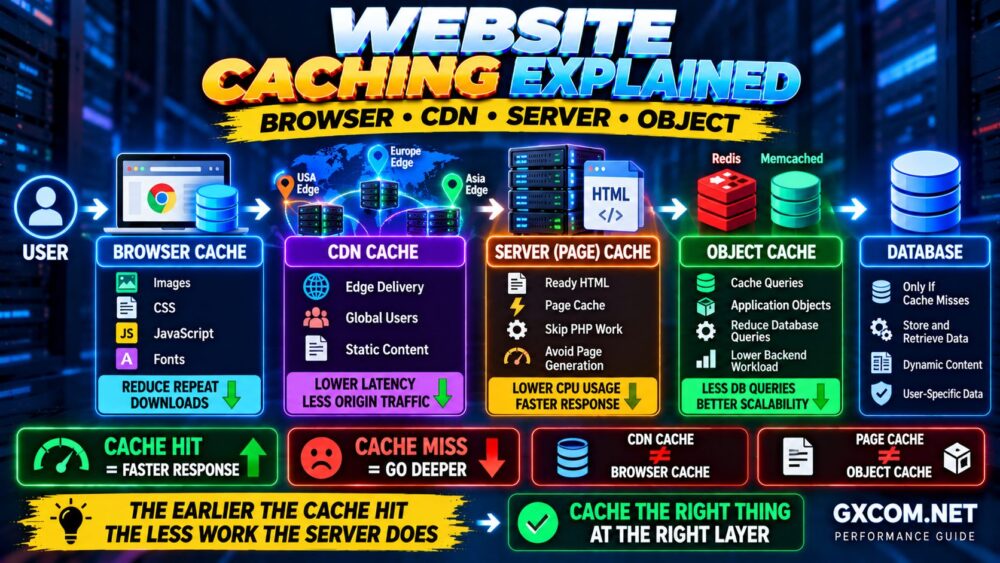
CDN vs Website Caching
A CDN and origin caching should not be viewed as competing technologies.
They can work together.
A strong architecture might be:
VISITOR
↓
CDN EDGE CACHE
↓
SERVER PAGE CACHE
↓
APPLICATION
↓
DATABASE
If the CDN has the resource, it can respond immediately.
If it does not, the origin's own cache may still avoid expensive application and database processing.
EDGE CACHE + ORIGIN CACHE = DIFFERENT LAYERS.
Does WordPress Need a CDN?
Not every WordPress website needs one.
A CDN becomes more attractive when a WordPress site has:
- Visitors from multiple countries
- Large numbers of images
- Significant static assets
- 不断增长的流量
- High origin bandwidth usage
- 流量激增
For a small local WordPress site already hosted close to its audience, caching and hosting optimization may deserve higher priority.
For WordPress-specific optimization, see How to Speed Up WordPress.
Can a CDN Improve Website Security?
Performance is not the only reason websites use edge networks.
Depending on the CDN provider and plan, additional capabilities may include:
- DDoS mitigation
- Web Application Firewall
- Bot management
- 速率限制
- TLS termination
- Origin protection
However, these features vary significantly between providers and plans.
Do not assume that simply enabling CDN caching provides every security capability.
If DDoS resilience is important, read our Website and Server DDoS Protection Guide.
Can a CDN Make a Website Slower?
Yes, especially when poorly configured.
可能的原因包括:
- Low cache hit ratio
- Frequent cache misses
- Incorrect cache rules
- Unnecessary proxy layers
- Poor routing
- Origin connectivity problems
- Excessive cache revalidation
For example, if content repeatedly misses the edge cache, the request may still need to travel through the CDN to the origin before returning to the visitor.
This is why CDN performance should be measured after deployment.
USE A CDN → MEASURE IT.
Do not assume:
USE A CDN → AUTOMATICALLY FASTER.
How to Decide If Your Website Needs a CDN
Ask these seven questions:
- Are visitors geographically far from the origin?
- Do you have visitors from multiple countries or continents?
- Does the website serve many cacheable assets?
- Is origin bandwidth significant?
- Does the website experience traffic spikes?
- Would reducing origin load improve scalability?
- Would edge security features provide additional value?
If you answered yes to several of these questions, testing a CDN is reasonable.
If almost every answer is no and your website already performs well for its target audience, adding a CDN purely because “every website needs one” may not be necessary.
CDN Decision Matrix
| 网站类型 | CDN Priority | Reason |
|---|---|---|
| Global content website | 高 | Distributed visitors and cacheable content |
| Image-heavy website | 高 | Large static asset delivery |
| International e-commerce | 高 | Global latency and traffic resilience |
| Software download site | 高 | Bandwidth-intensive static files |
| Global WordPress blog | Medium-High | Static assets and international visitors |
| Local small business website | Low-Medium | Depends on audience and existing performance |
| Private internal application | 低 | May have limited edge-cache benefit |
| Highly personalized application | Depends | Static assets benefit; dynamic caching needs care |
How to Test a CDN Properly
Do not compare one speed test before and one after and declare a winner.
Use a more systematic process:
1. MEASURE WITHOUT CDN
Record your baseline.
↓
2. ENABLE CDN
Configure caching correctly.
↓
3. WARM THE CACHE
Do not judge every resource on its first cache miss.
↓
4. TEST MULTIPLE LOCATIONS
Especially regions where your real visitors live.
↓
5. CHECK CACHE HIT RATIO
Determine how much traffic is actually being served from edge cache.
↓
6. CHECK ORIGIN LOAD
Measure whether bandwidth and requests decreased.
↓
7. COMPARE COST
Include both CDN and origin infrastructure costs.
CDN vs No CDN FAQ
Does every website need a CDN?
No. A small website serving users close to its origin may already perform well without a CDN. CDNs become more valuable as geographic distribution, traffic, static content and origin load increase.
Will a CDN make my website faster?
It can, particularly for cacheable content delivered to visitors far from the origin. The actual improvement depends on geography, cache configuration, cache hit ratio, routing and the existing performance bottleneck.
Is a CDN good for SEO?
A CDN is not an automatic SEO ranking boost. It can contribute to faster delivery and better user experience, but Google recommends evaluating page experience broadly rather than focusing on a single technology or performance metric.
Is a CDN expensive?
Not necessarily. CDN pricing ranges from free tiers to usage-based and enterprise plans. Whether it saves or increases total cost depends on traffic, bandwidth, features and how much origin traffic it offloads.
Do I need a CDN for WordPress?
Not always. A CDN is particularly useful for WordPress websites with international visitors, many static assets, substantial traffic or high origin bandwidth usage.
Can a CDN replace web hosting?
Usually no. Traditional CDN caching works in front of an origin that hosts the website or application. Some modern edge platforms can run applications directly at the edge, but that is a different architecture from simply adding a CDN to a conventional website.
Does a CDN reduce server load?
Yes, when requests are served from cache instead of the origin. The amount of reduction depends heavily on the percentage of traffic that is cacheable and the resulting cache hit ratio.
Can a CDN fix a slow server?
Not necessarily. A CDN can reduce some origin traffic and accelerate cached resources, but slow application execution, database queries, CPU saturation and other backend problems still need to be fixed at the server or application layer.
Final Verdict: CDN or No CDN?
A CDN is most valuable when it solves a real delivery problem.
USE A CDN when your audience is geographically distributed, your website serves significant cacheable content, origin traffic is growing or edge delivery provides meaningful performance and resilience benefits.
CONSIDER NO CDN when your audience is highly localized, the origin is already close to users, traffic is low and the website already performs well.
Most importantly, do not treat CDN as a substitute for website optimization.
A strong performance architecture looks like:
FAST ORIGIN
↓
EFFECTIVE CACHE
↓
CDN WHEN NEEDED
↓
OPTIMIZED FRONT END
↓
CONTINUOUS MONITORING
If your website is slow, start with our Website Performance Optimization Guide and identify the bottleneck before adding more infrastructure.
CDN ≠ AUTOMATICALLY FASTER.
RIGHT WORKLOAD + RIGHT CACHE + RIGHT CDN = BETTER DELIVERY.