A distributed denial-of-service attack can make a website, VPS or application unavailable by overwhelming network capacity, connections or server resources with more traffic than the infrastructure can handle.
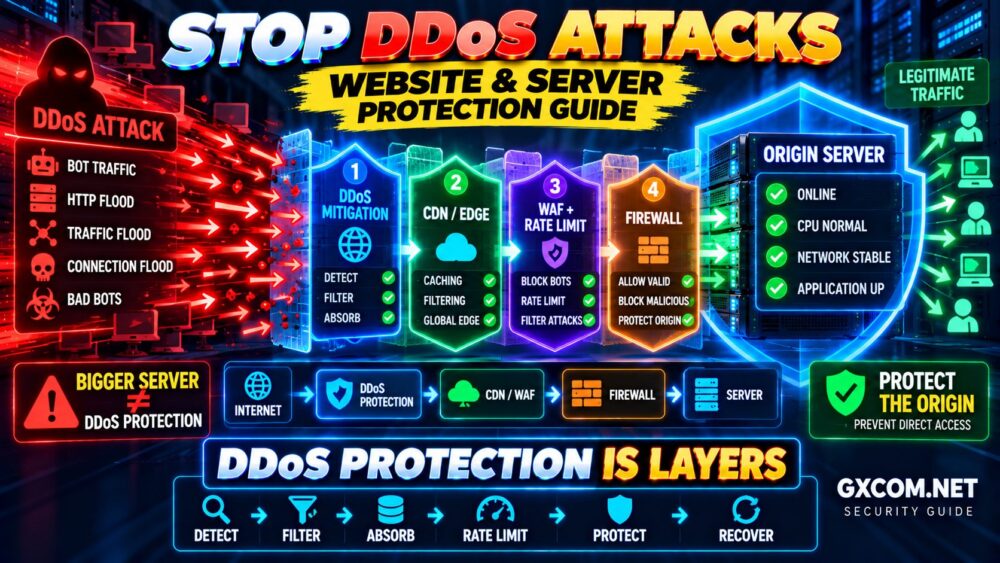
There is no single firewall rule or security tool that can stop every type of DDoS attack. Effective protection requires multiple layers working together—from upstream network mitigation and edge filtering to rate limiting, origin protection and monitoring.
本指南介绍了 how to prevent DDoS attacks, reduce unnecessary exposure and build a more resilient website or server.
DETECT → FILTER → ABSORB → RATE LIMIT → PROTECT ORIGIN → RECOVER
什么是DDoS攻击?
DDoS stands for Distributed Denial of Service. Instead of relying on one source, an attacker can generate unwanted traffic from many distributed systems and direct it toward a website, server or online service.
The objective is usually to disrupt availability by exhausting resources such as:
- 网络带宽
- Connection capacity
- Web server workers
- CPU 和内存
- Application resources
- Database capacity
This is different from an intrusion where the primary goal is to gain unauthorized access. A DDoS attack focuses on making a service difficult or impossible for legitimate users to reach.
常见的DDoS攻击类型
| 攻击类型 | Primary Target | Typical Defense Layer |
|---|---|---|
| Volumetric | 网络带宽 | Upstream mitigation |
| Protocol | 网络基础设施 | Provider/network filtering |
| Application Layer | Website or API | WAF, caching, rate limiting |
| Connection Exhaustion | 服务器资源 | Edge filtering and connection controls |
This distinction is important because a defense designed for excessive HTTP requests may not help when an attack saturates the network connection before the traffic reaches your server.
Different Attack → Different Defense.
Can You Completely Prevent a DDoS Attack?
You cannot normally prevent someone from attempting to send malicious traffic toward a public service.
The practical objective of DDoS防护 is to reduce the impact by detecting abnormal traffic, filtering malicious requests as early as possible and maintaining availability for legitimate users.
A strong strategy combines several layers:
Internet → Provider Protection → CDN / Edge → WAF → Firewall → Server → Application
If one layer cannot handle an attack, another layer may help absorb or filter it.
1. Choose Hosting With Appropriate DDoS Protection
DDoS protection begins with infrastructure.
Your hosting provider controls the network upstream from your VPS or dedicated server. Depending on the service, provider-level protection may include traffic monitoring, filtering, mitigation capacity or traffic scrubbing.
This is particularly important for large volumetric attacks.
If an attack is large enough to saturate the network connection leading to your server, blocking packets with the Linux firewall does not restore the bandwidth that has already been consumed upstream.
Large Network Attack → Upstream Problem → Upstream Defense.
When comparing hosting providers, look beyond a simple “DDoS protected” label. Consider what protection is included with the plan, whether limits apply and what happens when an attack exceeds those limits.
2. Put a CDN or Reverse Proxy in Front of Your Website
A CDN or reverse proxy can create an additional layer between visitors and your origin server.
The traffic path becomes:
Visitor → Edge Network → Filtering / Cache → Origin Server
This architecture can help absorb traffic across distributed infrastructure and prevent every request from reaching the origin.
Caching is especially valuable because a request served at the edge does not need to consume PHP workers, database queries or other origin resources.
A CDN is not automatically complete DDoS protection, but it can be an important component of a layered defense.
3. Protect Your Origin Server
A reverse proxy provides much less protection if an attacker can bypass it and connect directly to the origin IP address.
Where your architecture allows it, restrict web traffic to trusted proxy or edge-network sources.
Also review whether the origin address is unnecessarily exposed through:
- Old DNS records
- Unused subdomains
- Development services
- Other websites
- Mail infrastructure
- Public administration services
The goal is not simply to “hide” an IP address. The stronger approach is to enforce access controls that prevent unauthorized direct traffic from reaching protected services.
CDN + Exposed Origin = Possible Bypass.
4. Configure a Server Firewall
A firewall reduces the number of services exposed to the internet.
For a typical public web server, ports 80 and 443 may need public access, while database and caching services usually do not.
On an Ubuntu server using UFW, check the current rules with:
sudo ufw status verbose
Before making firewall changes, make sure you understand how remote administrative access will remain available.
我们的 VPS Security Guide covers firewall, SSH and other server-hardening practices in more detail.
Remember that a host firewall is only one defensive layer.
Firewall ≠ Complete DDoS Protection.
5. Use Rate Limiting
Application-layer attacks may generate large numbers of requests against resource-intensive pages or APIs.
Rate limiting can restrict how frequently clients access specific resources within a defined period.
合适的候选人包括:
- Login pages
- Search functions
- API
- Contact forms
- Password reset pages
- Expensive dynamic endpoints
Rate limiting should be configured carefully. Rules that are too aggressive can block legitimate users, API clients or search crawlers.
The objective is to control abusive behavior without unnecessarily disrupting normal traffic.
6. Use a Web Application Firewall
A Web Application Firewall, or WAF, operates at the application layer and can analyze HTTP traffic before requests reach your application.
Depending on the service and configuration, a WAF may help with:
- Suspicious request patterns
- Automated abuse
- Malicious bots
- Application-layer floods
- Known web attack patterns
A WAF works best as part of a larger architecture.
Upstream Protection + Edge Network + WAF + Firewall + Application Security
is stronger than relying on one security product.
7. Cache Safe Content
Cached requests are generally less expensive for the origin server than requests requiring application execution and database queries.
For websites with cacheable content, edge and server-side caching can reduce:
- Origin requests
- CPU 使用率
- PHP 执行
- 数据库查询
- 应用程序响应时间
Caching does not stop every DDoS attack, but it can make the origin more resilient to legitimate traffic spikes and certain application-layer loads.
WordPress users can also follow our WordPress Performance Guide to reduce unnecessary origin processing.
8. Protect Resource-Intensive Endpoints
Not every request costs the server the same amount.
A cached HTML page may require very little origin processing, while search, authentication or database-intensive API requests can consume significantly more resources.
Identify expensive endpoints and consider appropriate controls such as:
- Rate limits
- 缓存
- 身份验证
- Request validation
- Application limits
- Queues for expensive tasks
This makes it harder for relatively small amounts of malicious traffic to create disproportionately high server load.
9. Monitor Normal Traffic Before an Attack
It is difficult to identify abnormal traffic if you do not know what normal traffic looks like.
Establish baselines for:
- 每秒请求数
- 带宽使用情况
- Concurrent connections
- HTTP response codes
- CPU 使用率
- 内存使用情况
- 网络吞吐量
- 应用程序响应时间
Then configure alerts for meaningful deviations.
Know Normal → Detect Abnormal.
10. Distinguish DDoS From Legitimate Traffic Spikes
A sudden increase in traffic does not automatically mean your website is under attack.
Legitimate spikes can come from:
- Social media
- Search engines
- 新闻报道
- 营销活动
- 产品发布
Investigate traffic sources, requested URLs, geographic distribution, request patterns, response codes and application behavior before applying broad blocks.
A successful marketing campaign should not become an outage because your security rules mistakenly classify real customers as attackers.
11. Keep the Server and Applications Updated
DDoS mitigation does not replace normal server security.
Keep operating systems, web servers, application runtimes, CMS software, plugins and other internet-facing components updated.
If you operate a Linux VPS, our Linux Server Setup Guide covers updates and essential server configuration.
Reducing software vulnerabilities is important because a DDoS incident can occur alongside other attacks.
12. Remove Unnecessary Public Services
Every publicly reachable service increases the attack surface.
On Linux, review listening services with:
sudo ss -tulpn
Ask whether each exposed service actually needs to accept connections from the public internet.
Database ports, Redis, administration interfaces and development services should not be public by default.
Installed Service ≠ Public Service.
13. Do Not Rely on a Bigger Server Alone
Adding CPU, RAM or bandwidth may increase capacity, but scaling is not the same as DDoS mitigation.
An attacker may be able to generate traffic faster than you can add infrastructure, while uncontrolled autoscaling can also increase costs.
Resilient architecture may combine:
- Edge caching
- 负载均衡
- 多个应用服务器
- 数据库优化
- Queues
- Controlled autoscaling
These measures can improve capacity, but they should complement filtering and mitigation rather than replace them.
Bigger Server ≠ DDoS Protection.
14. Create a DDoS Incident Response Plan
Do not wait until the website is offline to learn how your infrastructure provider handles an attack.
Document important information in advance:
- Hosting provider support process
- DDoS mitigation procedures
- CDN and WAF administration
- DNS access
- Monitoring dashboards
- Origin-server access
- Emergency contacts
- Recovery procedures
A prepared response plan reduces the amount of improvisation required during an incident.
15. Maintain Tested Backups
Backups do not stop DDoS traffic, but they remain an important part of your security and recovery strategy.
Maintain recoverable copies of important:
- 网站文件
- 数据库
- 配置文件
- 应用数据
Keep important backups outside the production server and test restoration periodically.
BACKUP ≠ RECOVERY UNTIL YOU TEST THE RESTORE.
DDoS Protection Layers Compared
| Protection Layer | 位置 | 主要目的 |
|---|---|---|
| Provider DDoS Mitigation | Upstream Network | Large network attacks |
| CDN / Reverse Proxy | Edge | Traffic distribution and caching |
| WAF | Edge/Application | HTTP traffic filtering |
| Rate Limiting | Edge/Application | Control abusive request rates |
| Server Firewall | Origin | Restrict ports and sources |
| Application Controls | 应用 | Protect expensive resources |
The key concept is defense in depth:
INTERNET → DDoS MITIGATION → CDN → WAF → FIREWALL → SERVER → APPLICATION
What Should You Do During a DDoS Attack?
- Confirm the anomaly. Check traffic and monitoring data.
- Identify the affected layer. Determine whether the bottleneck is network or application related.
- Contact the provider. Upstream saturation may require provider-level mitigation.
- Apply edge controls. Adjust appropriate CDN, WAF or rate-limiting rules.
- Protect the origin. Prevent unnecessary direct access.
- Monitor legitimate users. Avoid blocking real traffic unnecessarily.
- Document the incident. Use the data to improve future protection.
Avoid making many unrelated changes simultaneously. Emergency configuration mistakes can create another outage while you are trying to resolve the first one.
DDoS Attack or Slow Server?
High CPU usage or an unresponsive website does not automatically indicate a DDoS attack.
The actual bottleneck may be:
- CPU 饱和
- 内存不足
- 磁盘I/O
- 数据库查询
- 应用问题
- Legitimate traffic growth
请使用我们的 服务器运行缓慢故障排除指南 to check CPU, RAM, disk and network bottlenecks before assuming the problem is malicious traffic.
DDoS防护中的常见误区
Relying Only on the Server Firewall
A local firewall cannot restore bandwidth already saturated upstream.
Using a CDN but Leaving the Origin Unrestricted
An attacker may attempt to bypass the edge and target the origin directly.
Blocking Too Aggressively
Broad rules can deny service to legitimate visitors as effectively as the attack itself.
Assuming More CPU Solves DDoS
More compute can increase application capacity but cannot solve every network-level attack.
Waiting Until an Attack to Prepare
Know your provider's mitigation process, monitoring tools and emergency access procedures beforehand.
DDoS Protection FAQ
Can a firewall prevent a DDoS attack?
A firewall can restrict unwanted connections and reduce attack surface, but a host-level firewall cannot stop an attack from saturating the upstream network connection. Large attacks generally require mitigation before traffic reaches the server.
Can a CDN protect a website from DDoS?
A CDN or reverse proxy can provide an important protection layer by distributing traffic, caching content and filtering requests. Effectiveness depends on the attack, service and configuration.
Will changing my server IP stop a DDoS attack?
Changing an IP may temporarily change the target, but it is not a durable defense if the new address becomes discoverable. Layered protection is a better long-term strategy.
Does a larger VPS provide better DDoS protection?
More CPU, RAM or bandwidth can increase capacity, but a larger VPS is not a substitute for upstream mitigation, edge filtering and application-level controls.
What is the best way to protect a website from DDoS attacks?
Use layered defenses: appropriate provider-level mitigation, an edge network or reverse proxy, WAF controls, rate limiting, origin protection, firewall rules, monitoring and a prepared incident response plan.
How can I protect WordPress from DDoS attacks?
Use upstream protection, CDN caching, application-layer filtering, rate limiting for sensitive endpoints, updated WordPress software and a secured origin server.
DDoS防护检查清单
- ✓ Use hosting with appropriate upstream DDoS mitigation
- ✓ Put an edge network or reverse proxy in front of the origin
- ✓ Restrict direct origin access where practical
- ✓ Configure a server firewall
- ✓ Apply appropriate rate limits
- ✓ Use application-layer filtering
- ✓ Cache safe content
- ✓ Protect resource-intensive endpoints
- ✓ Establish normal traffic baselines
- ✓ Monitor abnormal traffic
- ✓ Keep server and applications updated
- ✓ Remove unnecessary public services
- ✓ Build resilient infrastructure
- ✓ Prepare an incident response plan
- ✓ Maintain tested backups
最终建议
Learning how to prevent DDoS attacks is not about finding one firewall rule or buying a larger server.
The strongest strategy uses multiple protection layers.
DETECT
Understand normal traffic and identify abnormal behavior.
↓
FILTER
Remove malicious traffic as early as possible.
↓
ABSORB
Use upstream and distributed infrastructure where appropriate.
↓
RATE LIMIT
Protect expensive application resources.
↓
PROTECT THE ORIGIN
Prevent attackers from bypassing edge defenses.
↓
MONITOR & RECOVER
Know when an attack happens and how to respond.
DDoS PROTECTION IS LAYERS.
DETECT → FILTER → ABSORB → RATE LIMIT → PROTECT → RECOVER