Linux dedicated server security hardening is essential for businesses running websites, databases, SaaS applications, and private infrastructure on physical servers. Dedicated hardware offers greater control over system configuration, but that control also creates responsibility for access management, firewall rules, software updates, and incident recovery.
A newly provisioned Linux server should not be considered production-ready simply because SSH works and applications can connect. Secure deployment requires layered protection, careful testing, and ongoing maintenance.
This guide covers SSH security, Linux firewalls, kernel updates, monitoring, and recovery planning. It also explains what to evaluate when choosing dedicated infrastructure from Cherry 服务器, InterServer, Bacloud, ,以及 ServerMania.
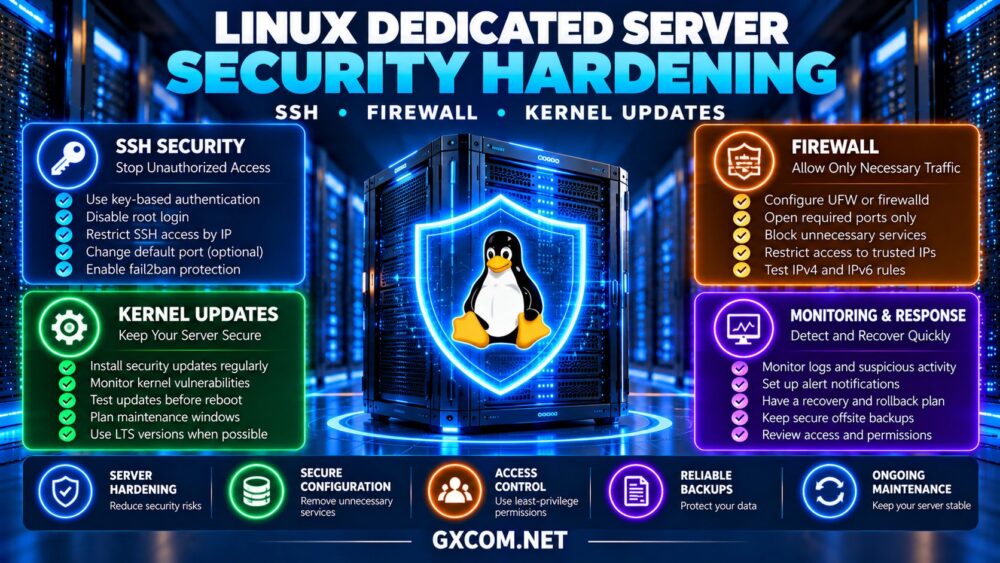
Why Linux Dedicated Server Hardening Matters
Internet-facing servers encounter automated login attempts, vulnerability scanning, and attacks against exposed services. Security hardening reduces unnecessary access and limits the consequences of configuration mistakes or compromised credentials.
Unlike fully managed hosting, an unmanaged dedicated server generally leaves operating system security and application administration to the customer.
从我们的 unmanaged dedicated server security checklist for initial deployment priorities.
1. Secure SSH Before Exposing Applications
SSH provides encrypted remote administration, making it one of the most important services to protect.
Create a named administrative account with appropriate sudo privileges. Configure public-key authentication and verify that the new account can connect successfully before changing root login or password authentication settings.
Once tested, consider disabling direct root SSH access and password-based SSH authentication where operationally appropriate.
Review the effective SSH configuration rather than assuming a single configuration file controls every setting. Distribution defaults and included configuration files can change the result.
Changing the SSH port may reduce automated log noise, but it is not a substitute for authentication controls, network restrictions, or timely patching.
重要提示: Keep an existing administrative session open and confirm out-of-band console access before restarting SSH or modifying firewall rules.
2. Configure UFW or firewalld Correctly
A host firewall should allow only required inbound traffic. Common examples include SSH administration, HTTP, HTTPS, and application-specific services.
Ubuntu deployments may use UFW, while distributions in the RHEL family commonly use firewalld. Confirm the firewall framework actually active on your server before applying rules.
Restrict SSH access to trusted management addresses when practical. If administrator IP addresses change frequently, consider a VPN or other controlled access method.
Apply firewall changes carefully: allowing application traffic while accidentally blocking administrative access can make a remote dedicated server difficult to recover.
Test IPv4 and IPv6 policies separately when both protocols are enabled.

3. Keep the Linux Kernel and Packages Updated
Kernel vulnerabilities can affect privilege boundaries, networking, and other critical operating system functions.
Install security updates from trusted distribution repositories and monitor vendor advisories for your supported operating system version.
Some kernel fixes require a reboot before the updated kernel becomes active. Live patching may reduce reboot requirements for certain supported vulnerabilities, but it does not replace normal maintenance.
Schedule updates around application requirements, preserve recovery access, and verify services after rebooting.
For high-availability workloads, plan maintenance across redundant nodes rather than updating every production server simultaneously.
4. Minimize Services and Administrative Privileges
Remove unused packages and disable unnecessary listening services. Every exposed component increases the number of configurations and vulnerabilities administrators must manage.
Use least-privilege permissions for application processes, service accounts, and administrative users.
Review sudo permissions regularly and remove access when personnel or operational responsibilities change.
Do not run applications as root unless technically necessary. Protect secrets, configuration files, and private keys with appropriate filesystem permissions.
5. Use SELinux or AppArmor Where Appropriate
Mandatory access control systems can limit what compromised processes are allowed to access.
SELinux is commonly associated with RHEL-family distributions, while AppArmor is widely used in Ubuntu environments.
These controls can reduce the impact of certain application compromises, but incorrect policies may interfere with legitimate services.
Prefer supported policy adjustments and careful testing instead of permanently disabling protections to resolve application errors.
6. Compare Linux Dedicated Server Providers
Security depends partly on infrastructure capabilities. Before ordering, confirm the provider’s rescue environment, remote console access, reinstall options, network controls, and hardware support boundaries.
Cherry Servers: Flexible Linux Infrastructure
Cherry 服务器 is worth evaluating for teams that need configurable physical infrastructure and direct operating system control.
Review available Linux deployment options, recovery access, storage configurations, and networking capabilities for the selected server.
最适合: Technical teams building customized Linux environments.
InterServer: Cost-Conscious Linux Dedicated Hosting
InterServer is relevant for administrators comparing dedicated hardware with predictable infrastructure budgets.
Verify supported Linux installations, remote management arrangements, available backups, and responsibility for operating system maintenance.
最适合: Experienced administrators managing their own Linux security.
Bacloud: Budget-Focused Bare Metal Options
Bacloud deserves consideration when hardware cost and self-managed operation are important purchasing factors.
Confirm Linux compatibility, rescue access, storage redundancy, and network protection options before deployment.
最适合: Buyers balancing dedicated hardware expenses and administrative control.
ServerMania:企业级专用基础设施
ServerMania is another provider to evaluate for organizations with defined infrastructure and operational requirements.
Ask about supported operating systems, hardware recovery procedures, remote access, and available management services.
最适合: Businesses seeking documented dedicated server support arrangements.
7. Compare Essential Linux Security Controls
| Security Area | Recommended Control | Operational Check |
|---|---|---|
| SSH | Key authentication and restricted access | Verify a second login session |
| 防火墙 | Allow only required services | Test IPv4 and IPv6 connectivity |
| 内核 | Supported security updates | Confirm active kernel after reboot |
| Privileges | Least-privilege accounts | Review sudo permissions |
| 监测 | Logs and actionable alerts | Test alert delivery |
| 恢复 | 独立备份 | Perform restore tests |
8. Monitor Logs and Suspicious Activity
Security hardening is not a one-time configuration exercise. Monitor authentication failures, unexpected privilege changes, exposed services, and unusual resource consumption.
Use centralized logging or protected remote log storage when appropriate. Tools such as Fail2ban may help limit repeated authentication attempts, but they do not replace secure credentials or patching.

Define who receives alerts and how incidents are investigated outside normal business hours.
9. Protect Backups and Recovery Access
Firewalls and updates cannot prevent every incident. Maintain independent backups of applications, databases, and essential configuration files.
Protect backup credentials, use suitable offsite storage, and test restoration before a production emergency.
我们的 dedicated server backup strategy guide explains offsite copies, recovery objectives, and restore testing.
10. Calculate the Cost of Secure Linux Hosting
A low server rental price may exclude monitoring, backup storage, management assistance, and incident recovery services.
Consider a hypothetical Linux dedicated server costing $95 monthly, with $20 for backups and $35 allocated to monitoring and administration tools.
The illustrative monthly total is $150, excluding taxes, software subscriptions, and additional labor.
Compare infrastructure offers through our 专用服务器优惠指南, but evaluate recovery capabilities alongside hardware pricing.
For broader hardware selection, review our 裸机服务器提供商对比.
最终裁决
生效 Linux dedicated server security hardening combines secure SSH access, restrictive firewall policies, supported kernel updates, least-privilege administration, monitoring, and tested backups.
Cherry Servers, InterServer, Bacloud, and ServerMania provide infrastructure options worth investigating. Confirm the exact recovery, management, and security-related capabilities of each selected server.
Choose dedicated hosting that supports both your workload requirements and the operational controls needed to maintain security over time.