A dedicated server gives you control over hardware resources, applications, and data. But what happens if its storage fails, a database becomes corrupted, or ransomware encrypts your files?
Without a reliable dedicated server backup strategy, even powerful hardware cannot protect your business from data loss.
This guide explains the 3-2-1 backup rule, snapshots versus backups, recovery planning, and how to protect a dedicated server without unnecessary complexity or cost.
What Is the Best Dedicated Server Backup Strategy?
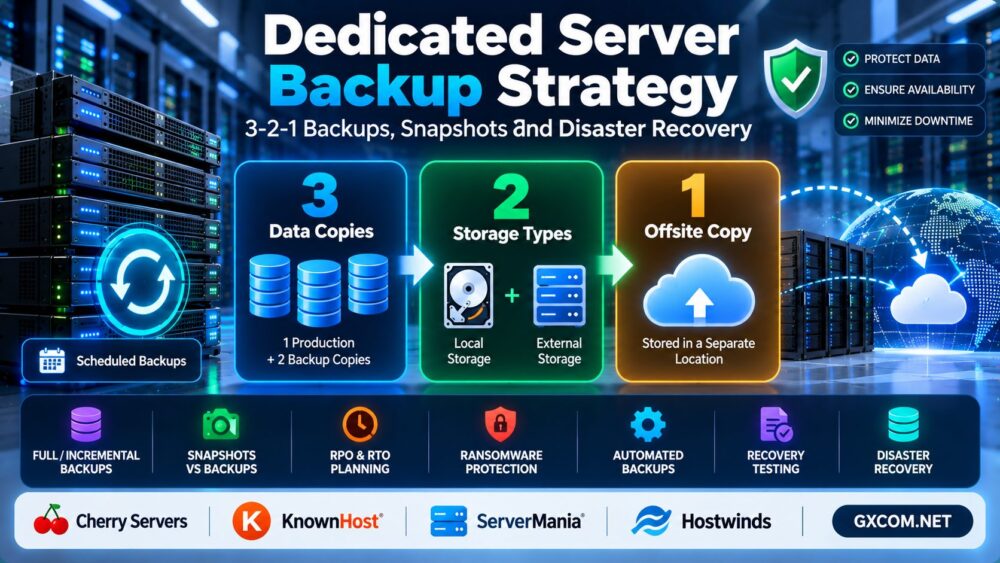
For most production environments, a strong starting point is the 3-2-1 backup strategy: maintain three copies of important data, use two different storage media or failure domains, and keep at least one copy offsite.
For stronger ransomware protection, extend this approach with an immutable or offline copy and regularly tested restores.
简答: Combine scheduled backups, independent offsite storage, suitable retention policies, and recovery testing. Do not rely solely on RAID or snapshots stored on the same server.
How the 3-2-1 Backup Rule Works
| Rule | 含义 | 示例 |
|---|---|---|
| 3 copies | Production data plus two backup copies | Live database, local backup, offsite backup |
| 2 storage types or failure domains | Avoid one shared point of failure | Local storage and independent object storage |
| 1 offsite copy | Protect against site-level incidents | Backup stored in another location |
The goal is independence. Three copies stored on the same physical server may all disappear during a hardware failure or security incident.
For critical workloads, consider the 3-2-1-1-0 approach: one additional immutable or offline copy, with zero unverified backup errors established through appropriate validation and restore testing.
Snapshots vs Backups: What's the Difference?
Snapshots and backups serve different purposes. Understanding the distinction is essential when designing disaster recovery.
| 功能 | Snapshot | Independent Backup |
|---|---|---|
| 主要目的 | Fast point-in-time rollback | Data recovery and retention |
| 存放位置 | Often tied to source infrastructure | Can be stored independently |
| Hardware failure protection | 取决于具体实现 | Strong when independently stored |
| 长期保留 | Often less suitable | Designed around retention policies |
| Recovery speed | Can be fast | Depends on backup size and destination |
A storage snapshot may help reverse an accidental change, but it is not automatically a disaster-proof backup.
Some platforms provide independently replicated snapshots. Always verify the actual storage architecture rather than assuming all snapshots behave identically.
What Should You Back Up on a Dedicated Server?
A complete recovery plan must cover more than website files.
- Application files: websites, uploads, scripts, and configuration files.
- 数据库: MySQL, MariaDB, PostgreSQL, and application-specific data.
- System configuration: web server settings, firewall rules, and scheduled jobs.
- Business data: orders, customer records, documents, and other critical information.
- Recovery information: software versions, deployment instructions, and securely managed credentials.
Database backups require special attention. Copying live database files without an application-consistent method may produce unusable results.

How Often Should You Back Up a Dedicated Server?
Backup frequency should depend on how much data your business can afford to lose.
This is measured by the 恢复点目标(RPO).
For example, an RPO of one hour means the business aims to limit data loss to approximately one hour of changes.
A mostly static website may tolerate daily backups. A busy eCommerce platform may require more frequent database backups or continuous transaction-log protection.
Backup frequency alone is insufficient: retention, storage independence, and successful restoration are equally important.
RPO vs RTO: Planning Disaster Recovery
Two metrics determine how a disaster recovery plan should be designed.
恢复点目标(RPO)
RPO describes the maximum acceptable amount of data loss measured in time.
恢复时间目标(RTO)
RTO describes the target time to restore an acceptable level of service after an interruption.
Consider a hypothetical business with a one-hour RPO and four-hour RTO. Its backup and recovery systems must be designed and tested to support those objectives.
These targets are planning goals, not guarantees. Actual recovery performance depends on infrastructure, backup integrity, and incident conditions.
How to Build a Dedicated Server Backup Plan
1. Identify Critical Workloads
List applications, databases, and files in order of business importance. Determine their acceptable RPO and RTO.
2. Choose Backup Methods
Use suitable full, incremental, or differential backups based on recovery requirements and supported tools.
3. Store Backups Independently
Keep at least one backup outside the production server's failure domain, ideally with separate access controls.
4. Protect Against Ransomware
Use encryption, restricted credentials, immutable storage or offline copies where appropriate. A compromised production account should not be able to erase every backup.
5. Automate and Monitor
Schedule backups and configure alerts for failed jobs, incomplete transfers, and storage capacity problems.
6. Test Restoration
Periodically restore files, databases, or entire applications to an isolated environment. Verify that recovered services actually work.
If server administration is a concern, our 托管型与非托管型主机指南 explains how operational responsibilities differ.
Example: Linux Dedicated Server Backup Workflow
On a Linux server, administrators may use tools such as rsync for file transfers and database-specific utilities for consistent exports.
An illustrative file backup command is:
rsync -a /var/www/ /backup/www/This copies files to the specified destination but does not, by itself, create versioned, immutable, offsite, or application-consistent backups.
For a MySQL-compatible database, a logical export may use:
mysqldump -u backup_user -p --single-transaction database_name > database.sqlReview database engine compatibility and transaction behavior. Large or complex databases may require specialized backup tools.
Finally, transfer verified backups to independent storage, enforce retention policies, and test recovery.
How to Protect Backups From Ransomware
Ransomware can target backup repositories as well as production systems.
Reduce exposure by separating backup credentials from production accounts, limiting deletion privileges, and maintaining immutable or offline copies.
Use multifactor authentication where supported, monitor unusual backup activity, and regularly verify that recovery copies remain accessible.
请记住: A backup that attackers can delete or encrypt may not provide effective ransomware protection.
Dedicated Server Providers and Backup Planning
When selecting dedicated hosting, evaluate backup capabilities alongside hardware, support, and recovery requirements.
Cherry 服务器 is worth considering for bare-metal infrastructure where buyers need to plan independent data protection and recovery workflows.
ServerMania may suit organizations comparing dedicated hardware and operational requirements for long-running applications.
KnownHost 以及 Hostwinds are relevant options when evaluating managed hosting support and the division of backup responsibilities.
For each provider, verify whether backups are included, which data is protected, where copies are stored, how restores work, and whether additional charges apply.
我们的 Cherry Servers vs ServerMania Comparison provides additional dedicated infrastructure context.
How Much Does Dedicated Server Backup Cost?
Backup costs depend on storage volume, retention duration, backup frequency, transfer charges, and recovery requirements.
For example, a hypothetical backup service costing $15 per month would total $540 over 36 months.
That expense may be modest compared with the financial impact of unrecoverable business data, but the appropriate budget depends on the workload.
Do not choose backup storage based only on its monthly price. Evaluate reliability, restore speed, access controls, and recovery testing.
For broader infrastructure purchasing decisions, see our 专用服务器与VPS对比.
Dedicated Server Disaster Recovery Checklist
- Critical data and applications identified
- RPO and RTO documented
- 3-2-1 backup architecture established
- Offsite storage configured
- Immutable or offline copy considered
- Backup jobs monitored
- Retention and deletion policies defined
- Recovery credentials secured
- Restore procedures documented
- Recovery tests completed regularly
Capacity planning also matters: recovery systems need sufficient CPU, RAM, storage, and network resources. See our 专用服务器内存需求指南 for memory sizing considerations.

常见问题解答
Is RAID a backup?
No. RAID may improve availability after certain disk failures, but it does not protect against accidental deletion, ransomware, or all forms of data corruption.
Are server snapshots enough for backup?
Not usually. Snapshots can support rapid rollback, but independent backups are needed for stronger disaster recovery.
What is the 3-2-1 backup rule?
Keep three copies of important data, across two storage types or failure domains, with at least one copy offsite.
How often should a dedicated server be backed up?
Set backup frequency according to your acceptable data loss, application activity, and recovery objectives.
Can backups protect against ransomware?
Yes, when protected copies remain inaccessible to attackers and are successfully restorable. Immutable or offline storage can strengthen protection.
Should I use managed backup services?
Managed services can reduce operational work, but verify exactly what is covered, who tests restores, and which responsibilities remain yours.
最终裁决
一个可靠的 dedicated server backup strategy combines the 3-2-1 rule, independent backup storage, appropriate retention, and tested disaster recovery procedures.
Snapshots are useful for rapid rollback, but they should not replace independently stored backups.
Whether you operate a small website or a business-critical dedicated server, the goal is not simply to create backup files. It is to restore essential services and data when something goes wrong.
Protect Data → Create Backups → Store Offsite → Secure Copies → Test Recovery.