VPS disk IOPS and throughput are two essential storage performance metrics, but they measure different things. A virtual private server may advertise NVMe SSD storage yet still struggle with slow database queries, delayed file operations, or inconsistent application response times.
The problem is that storage performance depends on more than drive technology. Random I/O, sequential transfer speed, latency, queue depth, and shared infrastructure limits all influence real-world results.
This guide explains how to benchmark VPS storage safely, interpret the numbers, identify bottlenecks, and decide when a hosting upgrade makes sense.
What Are VPS Disk IOPS?
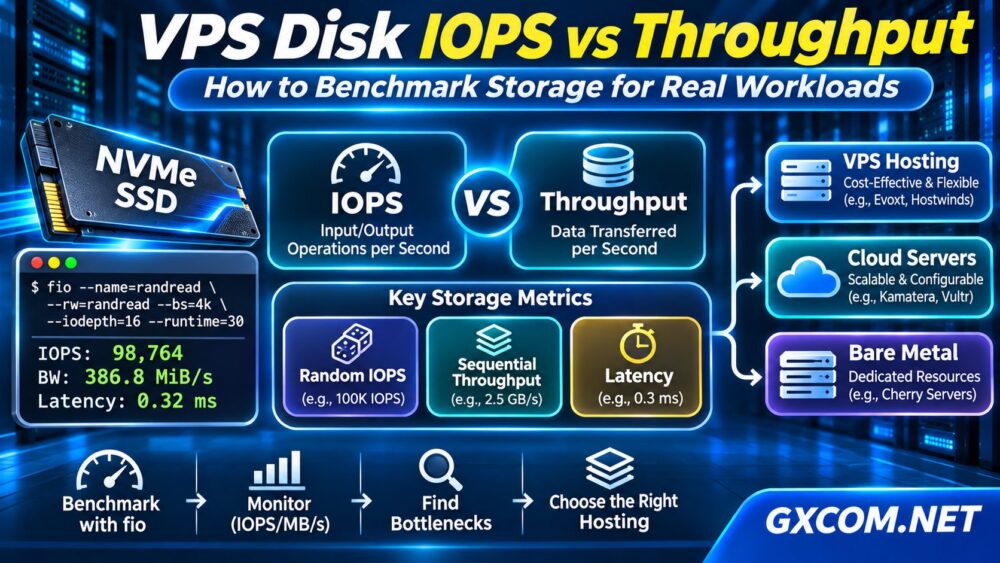
IOPS stands for input/output operations per second. It measures how many individual storage operations a system completes each second.
IOPS matters when applications perform numerous small reads and writes. Common examples include database queries, metadata operations, session storage, and transactional workloads.
Random IOPS describes operations accessing scattered storage locations. Sequential I/O involves reading or writing larger, continuous blocks.
A database server may depend heavily on random read latency, while a backup process may benefit more from sustained sequential transfer rates.
什么是磁盘吞吐量?
Disk throughput measures the volume of data transferred over time, usually expressed in MB/s or GB/s.
For example, transferring large backup files emphasizes throughput. Processing thousands of small database operations emphasizes IOPS and latency.
The approximate relationship is:
Throughput = IOPS × I/O block size
At 10,000 IOPS with 4 KiB blocks, throughput is approximately 39 MiB/s. At the same IOPS with larger blocks, the transferred data volume increases.
However, real systems are constrained by controller behavior, caching, networked storage, virtualization, and workload characteristics.
IOPS vs Throughput vs Latency
These three metrics should be evaluated together.
| 公制 | 措施 | 重要提示: |
|---|---|---|
| IOPS | 每秒运算次数 | Databases and small-file workloads |
| 吞吐量 | 每秒传输的数据量 | Backups and large files |
| 延迟 | Time required per operation | 交互式应用程序 |
High IOPS achieved with excessive queue depth may still produce poor application responsiveness. Low latency under realistic concurrency is often more valuable than an impressive maximum benchmark score.
For background on storage technologies, read our NVMe VPS vs SSD Performance guide.
How to Benchmark VPS Storage with fio
fio is a flexible Linux I/O testing tool that can measure random and sequential performance using configurable workloads.

重要提示: Run benchmarks only on storage you own or are authorized to test. Use a disposable test file, avoid busy production periods, and confirm available disk space. Never benchmark a raw production block device destructively.
Step 1: Install fio
On Debian or Ubuntu:
sudo apt update
sudo apt install fio
On compatible RHEL-based distributions, install the package through the appropriate system package manager.
Step 2: Test Random Read IOPS
Create a dedicated test directory on the filesystem being evaluated:
mkdir -p ~/storage-testThen run a bounded random-read benchmark using a temporary file:
fio --name=randread \
--directory=$HOME/storage-test \
--filename=fio-test.dat \
--size=1G \
--rw=randread \
--bs=4k \
--ioengine=libaio \
--direct=1 \
--iodepth=16 \
--runtime=30 \
--time_based \
--group_reporting
This command creates or uses a 1 GB test file and measures 4 KiB random reads. It is a starting point, not a complete storage certification.
Review reported IOPS, bandwidth, and completion latency. Results depend on filesystem, storage limits, queue depth, and cache behavior.
Step 3: Test Sequential Throughput
For a separate sequential-read test, change the workload:
fio --name=seqread \
--directory=$HOME/storage-test \
--filename=fio-test.dat \
--size=1G \
--rw=read \
--bs=1M \
--ioengine=libaio \
--direct=1 \
--iodepth=4 \
--runtime=30 \
--time_based \
--group_reporting
Use read-only workloads for initial investigation. Write tests can affect performance, consume storage endurance, and interfere with applications.
After testing, remove only the dedicated temporary test file when it is no longer needed.
Monitor Disk Activity with iostat
Benchmarks show performance under a generated workload. Monitoring reveals what happens during normal application activity.
Install the sysstat package if necessary, then run:
iostat -xz 1 10Examine read/write throughput, operations per second, queue behavior, and average request latency.
Metrics such as r_await 以及 w_await help identify delayed storage requests. Interpret device utilization carefully because modern SSDs can process concurrent operations.
Compare these readings with database slow queries, application latency, and CPU or memory pressure.
Why NVMe VPS Storage Can Still Be Slow
NVMe technology supports efficient storage access, but a VPS may encounter additional limits:
- Shared storage contention: Other workloads may compete for backend capacity.
- Provider limits: Plans may enforce IOPS or bandwidth ceilings.
- Network-attached storage: Network latency and backend architecture affect results.
- Insufficient memory: Reduced caching increases physical I/O.
- Application inefficiency: Poor queries or excessive writes create unnecessary demand.
CPU scheduling can also influence perceived performance. Our VPS CPU Steal Time troubleshooting guide explains how to investigate virtualization contention separately.
Which Storage Metrics Matter for Real Workloads?
Different applications require different testing profiles.
- WordPress: Database response time, caching effectiveness, and small random operations.
- WooCommerce: Transaction latency and consistent database writes.
- MySQL or PostgreSQL: Random I/O, write latency, and sustained performance.
- 备份服务器: Sequential throughput and available storage capacity.
- File hosting: Transfer rates, concurrency, and network bandwidth.
Benchmark block sizes, read/write ratios, and queue depths should resemble the intended application rather than maximize a headline score.
When Should You Upgrade VPS Storage?
First optimize queries, caching, filesystem configuration, and unnecessary background I/O. Upgrade when monitoring confirms persistent storage limitations that affect users or business transactions.
我们的 Best VPS Providers comparison provides a broader framework for evaluating virtual server plans.
Cloud VPS and Configurable Servers
卡马特拉 以及 Vultr are relevant choices for buyers comparing cloud server configurations and storage options. Check whether the selected plan offers suitable storage performance, capacity, and predictable billing.

Evoxt provides another VPS option for smaller websites and application deployments. Review its current storage specifications and resource policies before purchasing.
Explore Evoxt VPS plans to compare available configurations.
Managed and Self-Managed VPS
Hostwinds is worth considering when comparing VPS management requirements and Linux hosting options. Management services and storage performance should be evaluated separately.
Dedicated and Bare Metal Storage
Cherry 服务器 offers bare-metal infrastructure for workloads requiring greater hardware control. Dedicated hardware can reduce some shared-host constraints, but actual results depend on drive selection, RAID configuration, and application design.
请参阅我们的 专用服务器与云服务器的对比 before choosing a deployment model.
常见问题解答
Is Higher IOPS Always Better?
No. Higher IOPS helps certain workloads, but latency, throughput, consistency, and application behavior also matter.
Does NVMe Guarantee High VPS IOPS?
No. Provider limits, virtualization, backend storage architecture, and contention can restrict observed performance.
Can fio Damage a VPS?
Heavy or poorly configured tests can disrupt applications, consume space, or overwrite data. Use controlled file-based tests and avoid destructive targets.
最终裁决
VPS disk IOPS, throughput, and latency describe different aspects of storage performance. Benchmark realistic workloads, monitor production behavior, and identify the actual bottleneck before upgrading.
When storage limitations are confirmed, compare VPS, cloud, and bare-metal options using documented resource policies and repeatable measurements—not NVMe marketing claims alone.