Unmanaged VPS disaster recovery becomes critical when a virtual server stops booting, its storage becomes corrupted, or an application loses essential data. Unlike managed hosting, an unmanaged VPS generally leaves operating system administration, application backups, and recovery planning to the customer.
A reliable recovery strategy combines independent backups, documented server configurations, rebuild procedures, and realistic recovery objectives. This guide explains how to restore Linux VPS workloads while controlling downtime and infrastructure costs.
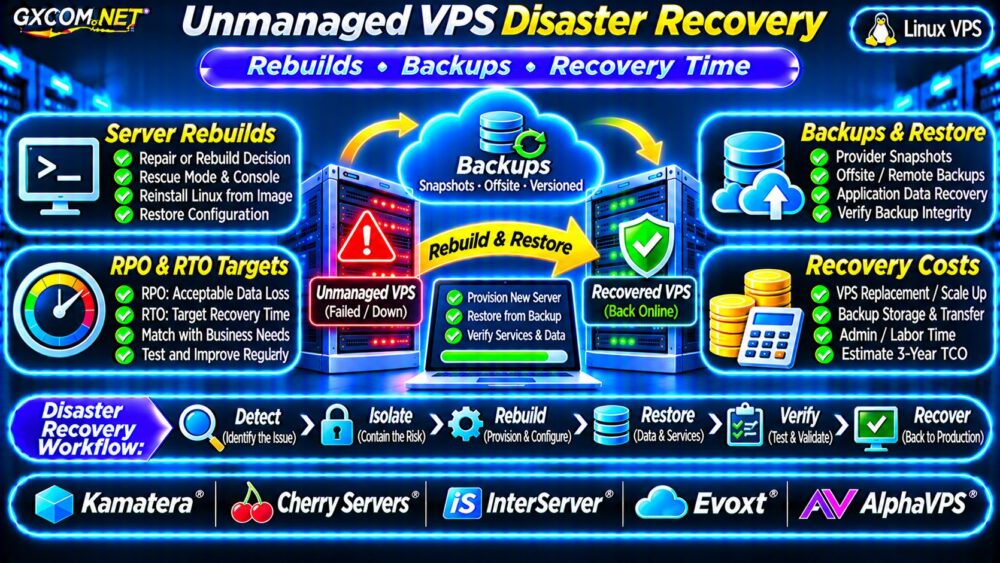
What Causes an Unmanaged VPS Disaster?
Common incidents include failed operating system upgrades, accidental file deletion, compromised credentials, damaged databases, storage failures, and provider infrastructure outages.
Not every failure requires a complete rebuild. A broken application configuration may be repaired safely, while a compromised operating system may require replacement from a trusted image.
Start by identifying the affected services, preserving useful logs, and determining whether the existing server can be trusted.
Repair or Rebuild: Make the Right Decision
Repair may be appropriate when the failure is isolated, understood, and reversible. Rebuilding is often preferable after serious compromise, extensive corruption, or configuration drift.
| Failure Scenario | Potential Response |
|---|---|
| Incorrect application configuration | Repair and validate |
| Failed kernel update | Boot a known-good kernel or recover |
| Suspected root compromise | Isolate and rebuild from trusted sources |
| Unrecoverable filesystem corruption | Restore onto healthy storage |
| Provider-wide outage | Consider independent recovery infrastructure |
For compromised systems, preserve evidence when required and rotate exposed credentials before reconnecting restored services.
Define RPO and RTO Before Disaster Strikes
Recovery point objective (RPO) represents the maximum acceptable amount of data loss measured in time. Recovery time objective (RTO) represents the targeted duration for restoring service.
For example, an RPO of one hour means the business aims to lose no more than one hour of data. An RTO of four hours means service restoration should be completed within four hours.
These are planning targets, not automatic guarantees. Backup frequency, replication, staffing, and recovery infrastructure determine whether they are achievable.
Match Recovery Objectives to Workloads
A development server may tolerate daily backups and extended downtime. An ecommerce database may require frequent recoverable copies and a much shorter restoration window.
Calculate the business impact of lost transactions before paying for more complex recovery infrastructure.

Build a Three-Layer VPS Backup Strategy
Use multiple recovery methods rather than relying on one snapshot.
- Provider snapshots: Useful for rapid rollback when available.
- Independent offsite backups: Protect against failures affecting the primary hosting account.
- Application-aware backups: Preserve consistent databases, configurations, and critical application data.
Encrypt sensitive backup data, protect encryption keys separately, and restrict deletion permissions. Where practical, use immutable or versioned storage.
Snapshots are not automatically independent backups. See our VPS 快照备份与恢复指南 for related recovery techniques.
Rebuild a Failed Linux VPS Step by Step
Step 1: Isolate and Assess
Stop unsafe traffic, document the incident, and check whether the provider offers console or rescue access. Avoid repeatedly rebooting a failing filesystem without understanding the risk.
Step 2: Provision a Clean Replacement
Create a replacement VPS using a trusted operating system image. Select sufficient RAM, CPU, storage, and network capacity for the original workload.
Apply security updates and establish restricted administrative access before exposing applications publicly.
Step 3: Restore Configuration and Data
Recreate users, packages, firewall policies, application services, and scheduled jobs using documented configurations or infrastructure automation.
Restore database backups with database-supported tools. Do not assume copying live database files produces a consistent recovery point.
Step 4: Validate Before Cutover
Test application responses, database consistency, SSL certificates, background jobs, and external integrations. Confirm that restored data matches the intended recovery point.
Then update DNS or traffic routing and monitor the application carefully.
Use Automation to Reduce Rebuild Time
Configuration management tools such as Ansible can recreate software packages, service definitions, and security settings consistently.
Cloud-init can assist with initial provisioning where the provider supports it. Store deployment definitions in version control without embedding secrets.
Automation reduces manual configuration errors, but it does not replace backups of application data.
For operating system hardening, review our 非托管服务器安全检查清单.
Test Your Disaster Recovery Plan
A successful backup job does not prove that an application can be restored.
Perform recovery drills on isolated infrastructure. Record the time required to provision a server, retrieve backups, restore databases, validate applications, and redirect traffic.
Measure actual recovery time against the RTO. Check the newest successfully recoverable data against the RPO.
Repeat tests after major application, operating system, or infrastructure changes.
Five Unmanaged VPS Providers to Compare
The following GXCOM.NET-approved affiliate providers are relevant infrastructure candidates. Verify recovery features for the exact product before purchasing.
Kamatera: Flexible Recovery Infrastructure
卡马特拉 is worth comparing for configurable virtual infrastructure. Review available backup products, provisioning controls, geographic options, and restoration charges.
Cherry Servers: Infrastructure Recovery Planning
Cherry 服务器 may suit workloads requiring detailed infrastructure control. Check available server images, rescue access, storage options, and deployment procedures.
InterServer: Linux VPS Recovery Costs
InterServer provides another option for comparing unmanaged VPS resources. Confirm backup availability, administrative responsibilities, and recovery support boundaries.
Evoxt: Smaller VPS Rebuilds
Evoxt can be evaluated for compact Linux deployments. Review snapshot availability, operating system reinstall options, and storage requirements.
AlphaVPS: Self-Managed Recovery Workflows
AlphaVPS is relevant for administrators managing their own Linux environments. Compare console access, backup options, and replacement-server requirements.
For broader purchasing research, consult our 最佳VPS服务商指南.
Calculate VPS Disaster Recovery Costs
Consider a hypothetical recovery budget: $20 monthly for the primary VPS, $6 for offsite backups, and $4 for monitoring.

The baseline is $30 monthly, or $1,080 over thirty-six months if prices remain unchanged.
Suppose a disaster also requires $60 in temporary infrastructure and four hours of administrator work at an illustrative $50 hourly rate. That incident adds $260, excluding lost revenue.
Recovery planning should compare prevention costs against potential downtime, labor, and data-loss exposure.
For more information about retention and restoration expenses, read our 廉价VPS服务商对比 when evaluating baseline hosting costs.
Unmanaged VPS Disaster Recovery Checklist
- Document recovery objectives and responsible personnel.
- Maintain independent, encrypted backups.
- Keep reproducible server configurations.
- Record rescue-console and account access procedures.
- Test complete application restoration regularly.
- Monitor backup failures and recovery readiness.
常见问题解答
Can a VPS Snapshot Replace Disaster Recovery?
No. Snapshots can help restore individual systems, but independent backups and tested procedures protect against broader failures.
How Long Does a VPS Rebuild Take?
Recovery time varies with deployment automation, data volume, application complexity, and available infrastructure.
Does Unmanaged VPS Hosting Include Recovery Support?
Support boundaries vary. Customers should confirm which infrastructure issues the provider handles and which operating system or application tasks remain their responsibility.
最终裁决
Effective unmanaged VPS disaster recovery depends on preparation, independent backups, repeatable rebuilds, and verified recovery objectives.
Compare Kamatera, Cherry Servers, InterServer, Evoxt, and AlphaVPS using documented recovery capabilities and total operating costs. The best VPS is not merely inexpensive to run; it is practical to restore when something fails.