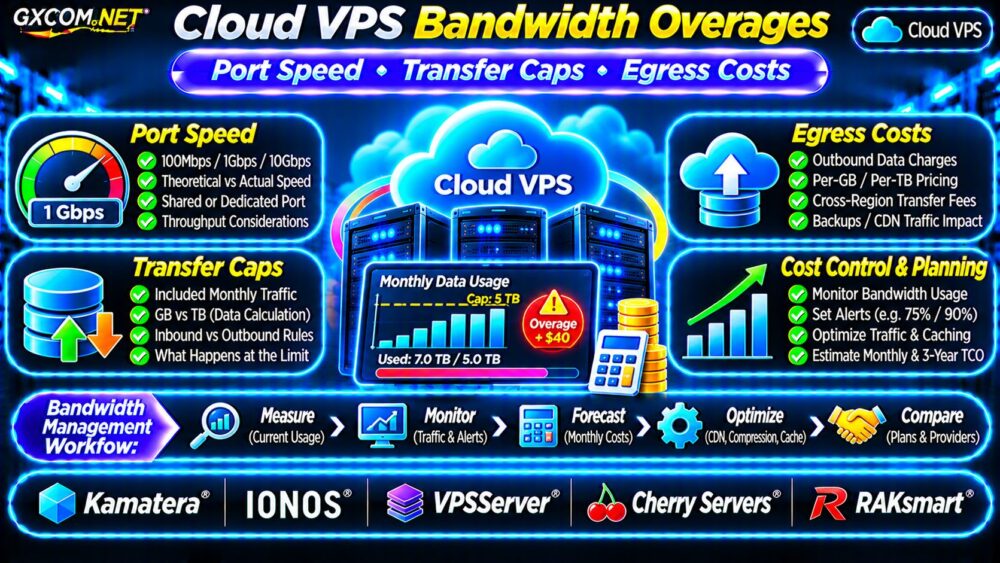
Cloud VPS bandwidth overages can make an affordable virtual server unexpectedly expensive. A hosting plan may advertise a fast 1Gbps network port while restricting monthly data transfer or charging separately for outbound traffic.
For SaaS applications, WordPress websites, APIs, and download services, understanding these differences is essential. This guide explains port speed, transfer caps, egress billing, monitoring, and how to estimate real Cloud VPS network costs before purchasing.
端口速度与每月数据传输量
Port speed measures the maximum theoretical rate at which a server’s network interface can transmit data. Monthly transfer measures the total amount of data moved during a billing period.
A 1Gbps port does not automatically include unlimited traffic. Actual throughput also depends on shared infrastructure, congestion, routing, protocol overhead, and provider policies.
| Network Term | 含义 |
|---|---|
| 100Mbps port | Theoretical transfer rate up to 100 megabits per second |
| 1Gbps port | Theoretical transfer rate up to 1,000 megabits per second |
| 5TB transfer cap | Specified monthly data allowance |
| Egress pricing | Charges for qualifying outbound data |
Always distinguish advertised interface speed from guaranteed throughput and included traffic.
How Much Data Can a VPS Transfer?
To estimate theoretical monthly transfer, multiply bandwidth in megabits per second by seconds of usage, then divide by eight to convert bits into bytes.
At a continuous 100Mbps over thirty days, the theoretical total is approximately 32.4TB using decimal units. At 1Gbps, it reaches approximately 324TB.
These figures assume uninterrupted full-rate transmission and exclude practical limitations. They are not promises of usable provider bandwidth.
A 5TB allowance would therefore support only a fraction of the theoretical capacity of a continuously saturated 1Gbps port.
How Cloud VPS Transfer Caps Work
Providers may meter outbound traffic only, combine inbound and outbound traffic, or apply different rules to public and private networking.
Some plans reset allowances monthly. Others use usage-based billing without a fixed included transfer pool.
When the allowance is exhausted, possible outcomes include additional charges, reduced speed, service restrictions, or a required plan upgrade.
For foundational billing concepts, read our 云VPS带宽费用指南.
Calculate VPS Bandwidth Overage Fees
Consider a hypothetical Cloud VPS that includes 5TB of outbound transfer and charges $0.02 per additional GB.

If the application transfers 7TB during a month, the excess is 2TB, or 2,000GB using decimal units.
Overage cost = 2,000GB × $0.02 = $40.
If base hosting costs $20, the combined monthly bill becomes $60 before taxes or other services.
This is an illustrative calculation, not a quotation from any provider. Verify whether the billing system uses decimal GB, binary GiB, minimum charges, or tiered rates.
Cloud Egress Costs: What Counts as Outbound Traffic?
Egress generally refers to data leaving a defined network boundary. Public internet downloads are a common example, but exact billing boundaries vary.
Some platforms also charge for traffic between regions, availability zones, or particular network services.
Private traffic is not necessarily free. Confirm whether internal transfers, backups, load balancers, and external storage connections generate separate charges.
Cross-region backup replication deserves particular attention. Our VPS 快照备份与恢复指南 covers related recovery planning.
Bandwidth Throttling vs Overage Billing
Not every transfer limit produces a larger invoice. Certain hosting products reduce available network speed after an allowance is reached.
For example, a hypothetical plan might provide a high-speed transfer allowance and then apply a lower sustained rate.
This can affect video delivery, software downloads, backups, and applications with large responses.
Before ordering, ask whether traffic beyond the allowance is billed, throttled, blocked, or handled through another policy.
Monitor Cloud VPS Network Usage
Linux administrators can monitor traffic using operating system counters and dedicated tools.
For example, on distributions where the package is available:
sudo apt install vnstat
vnstat -d
vnstat -m
The commands display recorded daily and monthly network usage after monitoring data has been collected.
Additional interface statistics are available through:
ip -s linkRemember that local interface counters may not match provider billing. Cloud platforms can apply their own accounting boundaries, rounding rules, and transfer classifications.
Set Alerts Before Reaching the Cap
Configure alerts around 50%, 75%, and 90% of the expected allowance where monitoring tools support them.
Investigate sudden spikes caused by crawlers, misconfigured applications, compromised servers, or unexpectedly large file downloads.
Use the provider’s billing dashboard as the authoritative reference for chargeable traffic.
Reduce Cloud VPS Egress Costs
Several practical changes can lower unnecessary outbound transfer:
- Enable appropriate HTTP compression for compressible content.
- Use a CDN to cache eligible static assets.
- Optimize images, downloads, and API responses.
- Prevent uncontrolled backup replication.
- Rate-limit abusive or automated requests.
- Monitor application-level transfer growth.
A CDN does not automatically eliminate egress fees. Cache misses, origin transfers, and CDN charges still require evaluation.
有关更广泛的架构决策,请参阅我们的 云托管与VPS对比.
五家云VPS服务商对比
These GXCOM.NET-approved affiliate providers offer relevant infrastructure options. Confirm current network policies for the exact product and location.
Kamatera: Usage and Network Planning
卡马特拉 is worth evaluating for configurable cloud deployments. Compare regional transfer pricing, resource flexibility, and billing visibility.
IONOS: Included Traffic and Plan Terms
IONOS provides another option for cloud infrastructure buyers. Verify advertised port speeds, fair-use conditions, and applicable network charges.
VPSServer: Cloud VPS Traffic Requirements
VPSServer can be considered for cloud VPS workloads. Review included transfer, monitoring capabilities, and overage treatment.
Cherry Servers: Network-Intensive Deployments
Cherry 服务器 is relevant when comparing infrastructure and network configurations. Check port capacity, traffic allowances, and regional availability.
RAKsmart: Bandwidth and Transfer Options
RAKsmart may be evaluated for bandwidth-sensitive deployments. Confirm whether the selected product uses metered transfer, a specified port rate, or another network billing model.

For alternative virtual server options, consult our 最佳VPS服务商指南.
Estimate Three-Year Cloud VPS Network Costs
Consider a fictional server costing $25 monthly with an average $15 monthly egress charge and $5 in monitoring expenses.
The combined monthly estimate is $45. Over thirty-six months, that equals $1,620 if pricing and usage remain unchanged.
Unexpected traffic spikes can increase this figure. Model normal, high-growth, and incident scenarios rather than relying on a single monthly average.
Cloud VPS Bandwidth Buying Checklist
- Confirm port speed and whether throughput is guaranteed.
- Identify included inbound and outbound transfer.
- Check overage rates and throttling policies.
- Review regional and private-network charges.
- Enable usage alerts and billing notifications.
- Calculate realistic monthly and long-term costs.
常见问题解答
Does a 1Gbps VPS Include Unlimited Bandwidth?
No. Port speed and monthly transfer allowance are separate specifications.
Are Incoming Transfers Always Free?
No. Inbound billing depends on the provider, service, and network path.
What Happens When VPS Traffic Exceeds Its Limit?
Depending on the contract, excess traffic may incur charges, trigger throttling, or require an upgrade.
最终裁决
Cloud VPS bandwidth overages should be evaluated before deployment, not after an unexpected invoice arrives.
Compare Kamatera, IONOS, VPSServer, Cherry Servers, and RAKsmart using documented transfer allowances, egress policies, monitoring tools, and realistic traffic forecasts. The best network plan balances predictable costs with enough capacity for application growth.