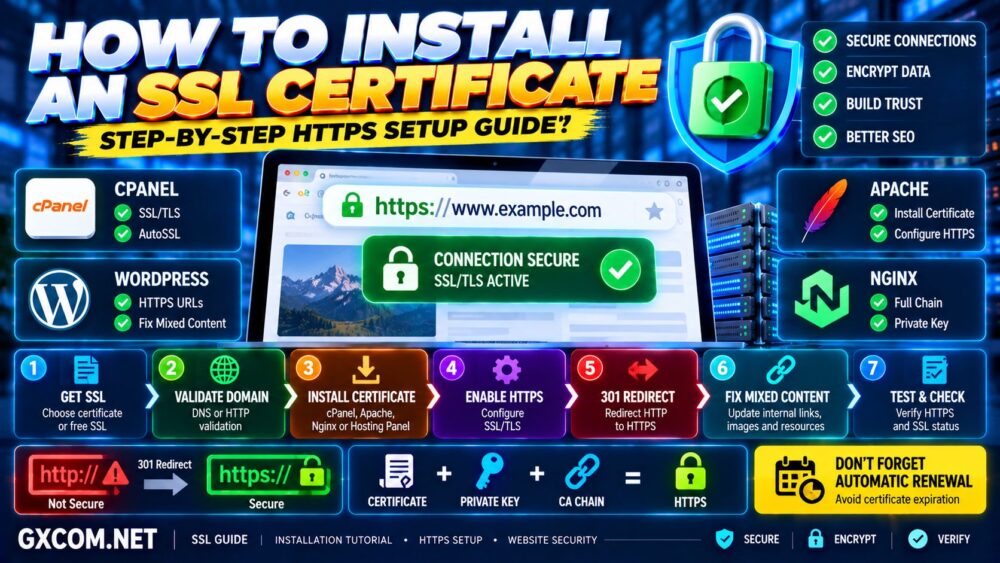
Installing an SSL certificate is one of the most important steps when launching or securing a website.
An SSL/TLS certificate enables HTTPS, encrypting data transmitted between a visitor's browser and your web server. It also allows browsers to verify that they are communicating with the domain covered by the certificate.
But installing the certificate itself is only part of the process.
A complete HTTPS migration also requires correct certificate deployment, HTTP-to-HTTPS redirects, internal URL updates, mixed-content checks, and final testing.
本指南介绍了 how to install an SSL certificate step by step, including cPanel, WordPress, Apache and Nginx installation methods.
HTTPS Setup: Get Certificate → Install Certificate → Configure HTTPS → Redirect HTTP → Fix Mixed Content → Test.
什么是 SSL 证书?
An SSL certificate—technically a TLS certificate—is a digital certificate used to establish an encrypted HTTPS connection between a client and a server.
When HTTPS is configured correctly, visitors normally see:
https://www.example.com/
instead of:
http://www.example.com/
HTTPS helps protect information transmitted between the website and its visitors from interception or modification in transit.
这对以下情况尤为重要:
- 登录凭据
- 联系表单
- Account information
- Payment-related data
- Administration panels
- API requests
HTTPS should now be considered a standard requirement for modern public websites rather than an optional feature reserved for ecommerce sites.
SSL vs TLS: What Is the Difference?
The term “SSL certificate” remains widely used, but modern secure web connections actually use TLS.
SSL is the older protocol family that preceded TLS.
In everyday hosting terminology, however, phrases such as:
- SSL certificate
- SSL installation
- SSL hosting
- 免费 SSL
usually refer to modern TLS certificates and HTTPS configuration.
Therefore, this guide uses “SSL certificate” because it remains the terminology most website owners recognize.
What Do You Need Before Installing an SSL Certificate?
Before starting, make sure you have:
- A registered domain name
- Control of the domain or required validation method
- Access to your hosting control panel or server
- A web server such as Apache or Nginx
- An SSL/TLS certificate
- The matching private key
- Any required intermediate certificate chain
Depending on how the certificate was issued, you may receive files such as:
example.com.crt
example.com.key
ca-bundle.crt
The exact filenames vary between certificate authorities and server environments.
Step 1: Choose an SSL Certificate
The first step is choosing the appropriate certificate.
For many ordinary websites, a free Domain Validation certificate is sufficient for enabling HTTPS.
Common certificate categories include:
| Certificate Type | 典型用途 |
|---|---|
| DV | Blogs, websites, small business sites |
| OV | Organizations wanting validated organization information |
| EV | Organizations requiring extended validation |
| Wildcard | Multiple subdomains under one domain level |
| Multi-Domain / SAN | Multiple domain names in one certificate |
Do not assume that a more expensive certificate automatically provides stronger HTTPS encryption for ordinary browser connections.
The appropriate certificate depends primarily on your validation and domain coverage requirements.
Step 2: Check Whether Your Hosting Already Includes SSL
Before purchasing a certificate, check your hosting environment.
Many modern hosting platforms provide automated SSL certificate issuance and renewal.
Look for features such as:
- 免费 SSL
- Let's Encrypt
- AutoSSL
- SSL/TLS
- HTTPS
- Certificate Management
If automated SSL is already available, enabling it is usually easier than manually generating and installing certificate files.
For managed websites, automatic renewal is particularly valuable because an expired certificate can cause browser security warnings and disrupt HTTPS access.
Step 3: Generate a CSR When Required
If you are purchasing or manually requesting a certificate, the certificate authority may ask for a Certificate Signing Request (CSR).
A CSR contains information used during certificate issuance and is associated with a private key.
Typical CSR information can include:
- Domain name
- Organization information
- Country
- Public key
Most hosting control panels can generate the CSR for you.
You can also generate one using OpenSSL.
openssl req -new -newkey rsa:2048 -nodes -keyout example.com.key -out example.com.csr
This creates a private key and CSR.
重要提示: Keep the private key secure. Do not email it publicly, upload it to public repositories, or share it with unauthorized parties.
Step 4: Complete Domain Validation
Before issuing a Domain Validation certificate, the certificate authority must verify control over the domain.
Depending on the provider, validation methods may include:
- DNS record
- HTTP file validation
- Other CA-supported domain control validation methods
DNS validation is particularly useful for wildcard certificates.
After validation succeeds, the certificate authority can issue the certificate.
Step 5: Download Your SSL Certificate Files
After issuance, obtain the files required by your server.
You may receive:
- Server certificate
- Intermediate certificate or CA bundle
- 证书链
Your private key normally remains wherever it was originally generated.
Make sure the certificate matches the private key you intend to use.
A certificate paired with the wrong private key will not work correctly.
How to Install an SSL Certificate in cPanel
cPanel is widely used by shared hosting, reseller hosting and VPS providers.
The exact interface may vary slightly depending on the hosting provider and cPanel version, but the general process is:
- Log in to cPanel.
- Open SSL/TLS.
- Locate the certificate installation or management section.
- Select the domain.
- Enter or upload the certificate.
- Enter the matching private key.
- Add the certificate authority bundle when required.
- Install the certificate.
After installation, visit:
https://www.example.com/
and confirm the page loads without a certificate warning.
If your cPanel hosting supports AutoSSL, the certificate may be installed and renewed automatically without this manual process.
How to Install an SSL Certificate on Apache
On a self-managed Apache server, you need to configure the HTTPS virtual host with the correct certificate and private key paths.
A simplified configuration may look like:
<VirtualHost *:443>
    ServerName example.com
    ServerAlias www.example.com

    DocumentRoot /var/www/html

    SSLEngine on
    SSLCertificateFile /etc/ssl/certs/example.com.crt
    SSLCertificateKeyFile /etc/ssl/private/example.com.key
</VirtualHost>
Your actual certificate-chain configuration depends on the Apache version, operating system and certificate format.
After editing the configuration, test it before reloading Apache.
apachectl configtest
If the test reports that the syntax is valid, reload the server using the appropriate command for your operating system.
systemctl reload apache2
On some distributions, the service may instead be named:
httpd
Never blindly restart a production web server after editing configuration files without validating the configuration first.
How to Install an SSL Certificate on Nginx
For Nginx, configure the server block listening on HTTPS.
A simplified example is:
server {
    listen 443 ssl;
    server_name example.com www.example.com;

    ssl_certificate /etc/ssl/certs/example.com-fullchain.pem;
    ssl_certificate_key /etc/ssl/private/example.com.key;

    root /var/www/html;
}
Test the configuration:
nginx -t
If the configuration test succeeds, reload Nginx:
systemctl reload nginx
The certificate file may need to contain the appropriate certificate chain depending on how your certificate authority provides its files.
How to Install a Free Let's Encrypt SSL Certificate
Let's Encrypt provides free publicly trusted certificates and is widely supported by hosting platforms and automation tools.
If your hosting panel includes Let's Encrypt or AutoSSL, use the integrated option when available.
On a self-managed Linux server, Certbot is one common automation method.
Depending on your operating system and web server, Certbot can obtain and configure certificates and help automate renewal.
Because package installation and Certbot commands differ between Linux distributions and server configurations, follow the current Certbot instructions for your exact environment rather than copying an outdated command from an old tutorial.
The most important requirement is not merely obtaining the certificate—it is ensuring renewal works automatically.
Automatic Certificate + Failed Renewal = Future HTTPS Failure.
How to Enable SSL on WordPress
Installing the certificate on the server does not automatically mean every WordPress URL will immediately use HTTPS correctly.
After confirming that HTTPS works at the server level, check the WordPress URLs.
In WordPress:
“设置” → “通用”
Verify that the intended URLs use HTTPS:
WordPress Address (URL)
https://www.example.com

Site Address (URL)
https://www.example.com
Before changing these values, confirm HTTPS already works correctly. Incorrect URL changes can make the WordPress administration area difficult to access.
If you are troubleshooting WordPress performance after the HTTPS migration, our WordPress 速度优化指南 covers caching, images, plugins, database performance and hosting resources.
Step 6: Redirect HTTP to HTTPS
Once HTTPS works correctly, redirect visitors and search engines from HTTP URLs to their HTTPS equivalents.
The desired behavior is:
http://example.com/page/ → https://example.com/page/
For a permanent HTTPS migration, permanent redirects are normally appropriate.
Apache HTTPS Redirect Example
RewriteEngine On
RewriteCond %{HTTPS} !=on
RewriteRule ^ https://%{HTTP_HOST}%{REQUEST_URI} [L,R=301]
Configuration varies by environment. If a reverse proxy, CDN or load balancer terminates TLS before traffic reaches Apache, HTTPS detection may require a different configuration.
Nginx HTTPS Redirect Example
server {
    listen 80;
    server_name example.com www.example.com;

    return 301 https://$host$request_uri;
}
After enabling redirects, test several URLs rather than only the homepage.
Step 7: Update Internal Links to HTTPS
A redirect can send HTTP traffic to HTTPS, but your own website should ideally link directly to HTTPS URLs.
Update:
- Navigation links
- Article links
- Image URLs
- 规范 URL
- Structured data URLs
- Sitemap URLs
- CSS and JavaScript references where applicable
Avoid deliberately routing every internal request through an unnecessary HTTP-to-HTTPS redirect.
Internal Link → Final HTTPS URL.
Step 8: Fix Mixed Content
Mixed content occurs when an HTTPS page attempts to load resources through insecure HTTP URLs.
例如:
http://example.com/image.jpg
http://example.com/style.css
http://example.com/script.js
Mixed content can trigger browser warnings or cause certain resources to be blocked.
常见的来源包括:
- 旧图片的URL
- Theme files
- Plugin assets
- Hard-coded URLs
- 外部脚本
- CSS background images
Use browser developer tools to identify insecure requests and update them to HTTPS when the destination supports it.
Step 9: Update Canonical URLs
After moving to HTTPS, canonical tags should point to your intended HTTPS URLs.
示例:
<link rel="canonical" href="https://www.example.com/page/">
Avoid configurations where:
Page URL = HTTPS
Canonical = HTTP
That creates conflicting signals.
Your redirects, internal links, sitemap and canonical tags should reinforce the same preferred URL structure.
Step 10: Update the XML Sitemap
Your XML sitemap should contain the canonical HTTPS versions of URLs you want search engines to discover.
After migration:
- Regenerate the sitemap if necessary
- Confirm URLs use HTTPS
- Remove obsolete HTTP URLs
- Verify sitemap accessibility
- Submit the appropriate sitemap in Google Search Console
For a broader review of crawling, canonicals, sitemaps and HTTPS signals, see our 技术SEO检查清单.
Step 11: Test Your SSL Certificate
Do not consider the migration complete until you test it.
请检查:
- 证书有效期
- Correct domain coverage
- 证书链
- Expiration date
- HTTP 到 HTTPS 的重定向
- 混合内容
- www/non-www behavior
- Important subdomains
- Desktop browsers
- Mobile browsers
Also test important URLs directly rather than testing only the homepage.
Step 12: Verify Automatic SSL Renewal
Certificate renewal is easy to overlook.
An SSL certificate that works today can still create an outage later if renewal fails.
For automatically managed certificates, verify that:
- Renewal is enabled
- Domain validation remains possible
- DNS changes have not broken validation
- The renewed certificate will be deployed correctly
For self-managed servers, monitor certificate expiration rather than assuming automation will always work.
SSL Setup Is Not Finished Until Renewal Is Reliable.
Common SSL Certificate Installation Errors
| 问题 | 可能的原因 |
|---|---|
| Certificate warning | Wrong certificate or hostname |
| 证书链不完整 | 缺少中间证书 |
| 私钥不匹配 | Certificate paired with wrong key |
| 混合内容 | HTTP resources on HTTPS page |
| 重定向循环 | Conflicting HTTPS redirect rules |
| WordPress login loop | Proxy/HTTPS detection or URL configuration |
| 证书已过期 | Renewal failure |
| Domain mismatch | Certificate does not cover requested hostname |
How to Fix “Your Connection Is Not Private”
A browser privacy warning does not automatically mean the website has been hacked.
Possible SSL/TLS causes include:
- 证书已过期
- Wrong domain name
- 不受信任的证书
- 证书链不完整
- Incorrect server configuration
Check the certificate details and server configuration before replacing random files or reinstalling WordPress.
How to Fix an SSL Certificate Name Mismatch
The certificate must cover the hostname visitors actually request.
例如,证书可能涵盖:
example.com
but not necessarily:
www.example.com
unless the certificate includes both hostnames or uses appropriate wildcard coverage.
Before issuing the certificate, decide which domains and subdomains need HTTPS.
如何修复不完整的证书链
Browsers need to build a trusted chain from your server certificate to a trusted root certificate.
If the server does not provide the required intermediate certificates, some clients may report certificate problems.
Use the full certificate chain recommended by your certificate authority and web-server documentation.
Do not simply combine certificate files in random order.
How to Fix Too Many Redirects After Enabling SSL
Redirect loops commonly appear when several layers attempt to force HTTPS simultaneously.
例如:
CDN → HTTPS Redirect
Hosting Panel → HTTPS Redirect
WordPress Plugin → HTTPS Redirect
.htaccess → HTTPS Redirect
Multiple redirect mechanisms are not automatically wrong, but conflicting logic can create loops.
Identify where TLS terminates and which layer should be responsible for redirects.
One Clear HTTPS Strategy Is Better Than Multiple Conflicting Rules.
Do You Need an SSL Plugin for WordPress?
不一定。.
If the certificate, WordPress URLs, redirects and resources are configured correctly at the server and application level, HTTPS can work without a dedicated SSL plugin.
An SSL plugin may simplify configuration in some environments, but it should not replace understanding the underlying problem.
A plugin also cannot issue a valid certificate by itself unless it integrates with a certificate or hosting service capable of doing so.
Free SSL vs Paid SSL Certificates
| 功能 | Free DV SSL | 付费 SSL |
|---|---|---|
| HTTPS 加密 | 是的 | 是的 |
| 域名验证 | 是的 | 是的 |
| 组织验证 | 通常不 | 有货 |
| 扩展验证 | 不 | 有货 |
| Automated Renewal | 常有货 | Depends on Provider |
| Suitable for Ordinary Blogs | 是的 | Usually Not Necessary |
For many websites, a properly configured free DV certificate provides the HTTPS functionality they need.
Paid certificates can make sense when an organization requires specific validation levels, support arrangements, certificate management features or other commercial requirements.
Does SSL Improve Google Rankings?
HTTPS is important for security and is part of building a modern, trustworthy website.
However, installing an SSL certificate should not be treated as a shortcut to high Google rankings.
HTTPS does not replace:
- Useful content
- Search intent
- 站内链接
- 技术性搜索引擎优化
- 网站性能
- Authority signals
The more important objective is ensuring that the entire website consistently uses one secure, canonical HTTPS version.
SSL Certificate Installation Checklist
- ✓ Choose the appropriate SSL certificate
- ✓ Check whether hosting provides automatic SSL
- ✓ Generate CSR when required
- ✓ Keep the private key secure
- ✓ Complete domain validation
- ✓ Install the certificate and chain
- ✓ Confirm HTTPS loads correctly
- ✓ 将 HTTP 重定向到 HTTPS
- ✓ Update internal links
- ✓ Fix mixed content
- ✓ Update canonical URLs
- ✓ Update XML sitemap
- ✓ Test www/non-www versions
- ✓ 测试重要的子域名
- ✓ 检查证书过期时间
- ✓ Verify automatic renewal
SSL Certificate FAQ
How do I install an SSL certificate?
Obtain a certificate, install the certificate and matching private key on your hosting account or web server, configure HTTPS, redirect HTTP traffic to HTTPS, fix mixed content and test the final configuration.
Can I get an SSL certificate for free?
Yes. Free publicly trusted certificates are available through services such as Let's Encrypt, and many hosting providers include automated SSL certificates with hosting plans.
Do I need to buy an SSL certificate for WordPress?
Not necessarily. If your hosting provider includes a suitable free SSL certificate, it can normally be used for WordPress.
How long does SSL installation take?
Automated SSL can often be deployed quickly, while manual certificates may require additional time for validation and server configuration. DNS-based validation can also depend on DNS propagation and provider behavior.
Why does HTTPS still show “Not Secure” after installing SSL?
Possible causes include an invalid or mismatched certificate, incomplete certificate chain, expired certificate, mixed content, or incorrect HTTPS configuration.
Should I redirect HTTP to HTTPS?
Yes, after confirming HTTPS works correctly. A permanent redirect helps users and search engines consistently reach the secure version of each URL.
Will changing HTTP to HTTPS hurt SEO?
A correctly implemented HTTPS migration should preserve your URL relationships through redirects and consistent canonical signals. Problems are more likely when redirects, canonicals, internal links or sitemaps are configured incorrectly.
Do SSL certificates expire?
Yes. Certificates have validity periods and must be renewed. Automated renewal reduces maintenance, but it should still be monitored for failures.
What happens if my SSL certificate expires?
Visitors may receive browser security warnings, which can significantly reduce trust and prevent normal access to the website.
Is HTTPS enough to make a website secure?
No. HTTPS protects data in transit, but website security also depends on software updates, authentication, permissions, backups, application security and server configuration.
最终建议
学习 how to install an SSL certificate is not simply about uploading a certificate file.
A successful HTTPS setup requires the entire chain to work correctly:
Certificate → Private Key → HTTPS → Redirects → Internal URLs → Canonicals → Sitemap → Renewal.
If your hosting provider offers reliable automated SSL, that is often the simplest solution for ordinary websites.
If you manage your own VPS or dedicated server, verify the certificate chain, web-server configuration, redirects and automated renewal carefully.
After installation, test the website from beginning to end.
Get Certificate → Install → Enable HTTPS → Redirect → Fix Mixed Content → Test → Monitor Renewal.
A properly configured SSL certificate does more than remove a browser warning. It creates a secure HTTPS foundation for your website, your users and the rest of your technical SEO configuration.