Cloud server scaling becomes essential when an application starts receiving more traffic, processing larger workloads, or serving more customers. But when your current infrastructure reaches its limits, should you upgrade one server or deploy several servers?
This is the fundamental difference between vertical scaling and horizontal scaling.
Vertical scaling increases the resources available to an existing server. Horizontal scaling distributes workloads across multiple servers or application instances.
Both approaches can improve capacity, but neither guarantees better performance without understanding the application's bottlenecks.
SCALING ≠ OPTIMIZATION.
MORE CPU ≠ AUTOMATICALLY FASTER APPLICATIONS.
MORE SERVERS ≠ AUTOMATIC HIGH AVAILABILITY.
In this guide, we explain how cloud server scaling works, compare vertical and horizontal scaling, examine their costs and limitations, and show how to choose the right approach for WordPress, WooCommerce, SaaS applications, databases, and growing websites.
Vertical vs Horizontal Scaling: Quick Comparison
| 功能 | 垂直扩展 | 水平扩展 |
|---|---|---|
| Also Known As | Scale Up / Scale Down | Scale Out / Scale In |
| Basic Method | Increase resources on one server | Add more servers or instances |
| CPU 和 RAM | Upgrade existing allocation | Distribute workloads across instances |
| Implementation | 通常更简单 | Usually more complex |
| Application Changes | Often minimal | May require architectural changes |
| Scaling Limits | Maximum available instance size | Application and infrastructure limits |
| 停机时间 | Some upgrades require restart | Can reduce disruption if designed correctly |
| Typical Use Cases | Small websites, databases, single servers | Web applications, APIs, distributed services |
| Cost Structure | Larger instance costs | Multiple instances plus supporting services |
Quick verdict: Vertical scaling is often the simplest first step for a growing application. Horizontal scaling becomes more attractive when workloads need additional capacity, redundancy, or the ability to distribute traffic across multiple instances.
What Is Vertical Scaling in Cloud Computing?
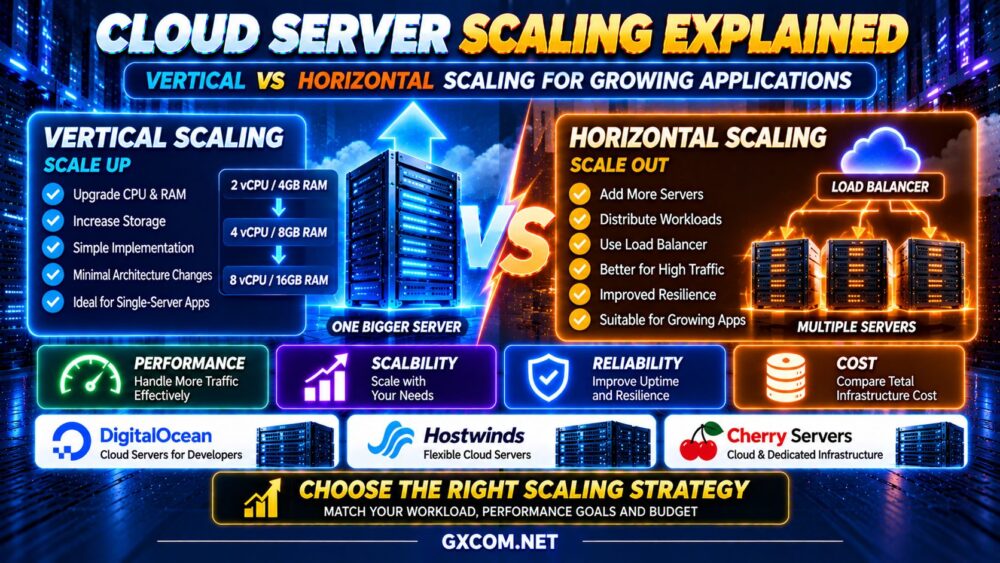
Vertical scaling means increasing or decreasing the computing resources assigned to an existing server.
For example, a cloud application might move through the following configurations:
2 vCPU / 4GB RAM → 4 vCPU / 8GB RAM → 8 vCPU / 16GB RAM
The application continues operating on a single virtual machine, but that machine receives additional resources.
How Vertical Scaling Works
A cloud provider may allow customers to select a larger instance size through a management dashboard or API.
Depending on the platform, the process may involve resizing the virtual machine, adjusting allocated resources, and restarting the operating system.
Some changes may require a migration or a planned maintenance window.
Advantages of Vertical Scaling
- Relatively straightforward implementation
- Often requires fewer application changes
- Useful for applications designed around one server
- Can increase available CPU and RAM quickly
- Usually avoids adding load balancers and multiple application nodes
Limitations of Vertical Scaling
- Maximum server sizes impose limits
- Larger instances may increase monthly costs substantially
- Resizing may require downtime
- A single server can remain a single point of failure
- Additional resources may not resolve software bottlenecks
Vertical scaling is often the right choice when an application needs more resources but does not yet require a distributed architecture.
What Is Horizontal Scaling in Cloud Computing?
Horizontal scaling means adding more servers or application instances to distribute a workload.
Instead of upgrading one virtual machine, an application can run across multiple instances.
A simplified architecture looks like this:
USERS → LOAD BALANCER → APP SERVER A / APP SERVER B / APP SERVER C
The load balancer distributes incoming requests among available application servers.
When demand increases, additional instances can be deployed. When demand decreases, unnecessary instances may be removed.
Advantages of Horizontal Scaling
- Supports distributing traffic across multiple instances
- Can accommodate workloads that exceed one server's capacity
- May improve resilience when properly designed
- Works well with automated deployment systems
- Can support gradual capacity increases
Limitations of Horizontal Scaling
- Requires more complex infrastructure management
- Applications may need changes to handle multiple instances
- Shared sessions and persistent data require careful planning
- Load balancers and networking add costs
- Databases can become centralized bottlenecks
- Distributed systems require additional monitoring and troubleshooting
Adding servers is only effective when the workload can actually be distributed.
Vertical vs Horizontal Scaling: Which Delivers Better Performance?
Neither scaling method is universally faster.
The better approach depends on the application's resource consumption, concurrency requirements, and architecture.
CPU-Bound Applications
An application limited by CPU processing may benefit from additional CPU resources.
Vertical scaling can help when the application can use the extra cores effectively.
Horizontal scaling can help when requests or processing jobs can be distributed across multiple instances.
Memory-Intensive Applications
Applications with large in-memory datasets may benefit from vertical scaling because increasing RAM can reduce swapping or improve caching.
Horizontal scaling may be possible, but distributing application state and data can introduce complexity.
High-Concurrency Web Applications
Applications handling many independent requests may benefit from horizontal scaling.
Multiple application servers can process requests concurrently, provided that shared resources and downstream services can support the additional load.
Database-Limited Applications
Adding web servers does not necessarily improve performance when a database is the bottleneck.
Database query optimization, indexing, caching, storage performance, and connection management should be evaluated first.
MORE APPLICATION SERVERS ≠ FASTER DATABASE QUERIES.
Vertical Scaling vs Horizontal Scaling Architecture
Vertical Scaling Architecture
A vertically scaled application may use one larger server:
USERS → WEB APPLICATION → DATABASE
Resources are increased within the existing server or database environment.

This approach can simplify administration, but it may leave important components dependent on individual machines.
Horizontal Scaling Architecture
A horizontally scaled web application may use:
USERS → LOAD BALANCER → MULTIPLE APP SERVERS → SHARED DATABASE
Supporting components may include:
- Centralized session storage
- Shared object storage
- Distributed caching
- Database connection pooling
- 健康检查
- Automated deployments
- Centralized monitoring and logging
These components help application instances operate consistently, but they also introduce additional operating costs and maintenance responsibilities.
Cloud Auto Scaling: How Does It Work?
Auto scaling adjusts infrastructure capacity according to defined rules, schedules, or workload metrics.
Horizontal auto scaling commonly adds or removes application instances.
For example, an application may use CPU utilization, request rates, or queue depth to determine when additional capacity is required.
Example Auto Scaling Workflow
- Monitor application load and performance.
- Detect sustained demand above a defined threshold.
- Launch additional application instances.
- Verify instance health and readiness.
- Route traffic to healthy instances.
- Remove excess capacity when demand decreases.
Auto scaling is not necessarily instantaneous. New instances may require time to boot, initialize applications, load dependencies, and become ready for traffic.
Scaling policies should also include safeguards against rapid repeated increases and decreases in capacity.
Importantly, not every cloud VPS or cloud server plan includes an automatic scaling service. Verify the capabilities of the selected provider and product.
Cloud Server Scaling Costs: Scale Up or Scale Out?
Scaling affects more than CPU and RAM expenses.
Vertical scaling generally increases the cost of the existing server configuration.
Horizontal scaling adds more instances and may introduce additional services.
| Cost Component | 垂直扩展 | 水平扩展 |
|---|---|---|
| 计算 | Larger server configuration | Additional server instances |
| 记忆 | More RAM on existing server | RAM distributed across instances |
| 存储 | May require larger volumes | Shared or replicated storage may be needed |
| 人际网络 | 通常更简单 | Load balancing and inter-instance traffic |
| 监测 | Fewer systems to monitor | More infrastructure components |
| 管理 | 通常更简单 | Greater operational complexity |
Illustrative Scaling Cost Example
Consider a hypothetical application with two possible upgrade paths:
- Vertical scaling: One larger cloud server with an illustrative monthly compute cost of $80.
- Horizontal scaling: Two smaller cloud servers costing $35 each, plus a load balancer costing $15 per month.
In this simplified example, vertical compute costs $80 per month, while the horizontal configuration totals $85 before any additional storage, networking, monitoring, or management charges.
These figures are hypothetical examples, not current provider prices.
Horizontal scaling may justify additional cost through capacity flexibility or resilience, but it does not automatically reduce spending.
SCALING COST = COMPUTE + STORAGE + NETWORK + MANAGEMENT + SUPPORTING SERVICES.
For a broader understanding of virtual server infrastructure and purchasing considerations, explore our 最佳云服务器提供商 比较。.
Vertical vs Horizontal Scaling for WordPress
WordPress can benefit from either scaling approach, but the correct strategy depends on traffic behavior and application design.
When Vertical Scaling Makes Sense
A WordPress website may benefit from a larger server when it experiences:
- High PHP worker utilization
- 内存压力
- Database resource limitations
- Heavy background processing
- Insufficient CPU capacity during dynamic requests
However, increasing resources should follow an investigation of caching, database queries, and plugin efficiency.
When Horizontal Scaling Makes Sense
Multiple WordPress application servers may help websites with substantial concurrent traffic.
However, multi-server WordPress deployments require careful handling of uploaded media, sessions, cache invalidation, scheduled tasks, and database connections.
For smaller WordPress websites, this complexity may outweigh the benefits.
Scaling WooCommerce and Dynamic Websites
WooCommerce introduces dynamic workloads that are not always handled by ordinary full-page caching.
Checkout pages, shopping carts, customer accounts, inventory updates, and order processing can increase database and PHP resource demands.
Vertical scaling may be appropriate when the existing application architecture remains effective but requires additional capacity.
Horizontal scaling may become useful when request concurrency exceeds what a single application server can efficiently handle.
Before scaling, review:
- Checkout response times
- Database query performance
- PHP 工作进程饱和
- 对象缓存
- Background job queues
- Payment processing dependencies
Increasing server capacity without addressing slow queries or application contention may simply increase hosting costs.
Vertical vs Horizontal Scaling for SaaS Applications
SaaS applications often experience changing user demand and may eventually need more sophisticated infrastructure.
Vertical scaling can be effective during early development because it keeps architecture relatively simple.
As an application grows, horizontal scaling may support additional application instances, background workers, and geographically distributed deployments.
However, SaaS platforms should consider:
- Stateless application design
- Database scalability
- Authentication and session management
- Shared storage
- Queue processing
- Deployment automation
- Monitoring and incident recovery
A hybrid approach is often practical: increase resources where necessary while distributing components that benefit from horizontal scaling.
Scaling Cloud VPS vs Traditional VPS
Both cloud VPS and traditional VPS hosting can support resource upgrades.
Cloud-oriented platforms may offer additional provisioning, automation, and API capabilities that make horizontal scaling easier to manage.
Traditional VPS providers may focus on predefined plan upgrades and simpler server administration.
However, the product label alone does not establish scaling capabilities.
请阅读我们的 云VPS与传统VPS的对比 guide for a detailed comparison of performance, flexibility, reliability, and cost.
When Should You Consider Dedicated or Bare Metal Infrastructure?
Cloud virtual machines are not the only option for scaling demanding applications.
Some workloads require sustained CPU performance, large memory allocations, or predictable access to physical hardware.
Dedicated servers and bare metal infrastructure may be worth evaluating when workloads remain resource-intensive over long periods.
However, moving to dedicated hardware does not automatically provide horizontal scaling or high availability.
Compare hardware allocation, operating costs, deployment flexibility, and application requirements.
For additional context, see our 专用服务器与云服务器 比较。.
Cloud Scaling Provider Examples: DigitalOcean, Hostwinds and Cherry Servers
Different cloud infrastructure providers can support different stages of application growth.
DigitalOcean — Cloud Infrastructure and Application Scaling
DigitalOcean provides Droplets and additional cloud infrastructure services relevant to application deployment.
Its virtual machines, load balancing options, and API-based infrastructure management can be useful when designing applications that need more than one server.
However, implementing a horizontally scalable application still requires appropriate software architecture and operational planning.
最适合: Developers and teams building cloud applications that may require multiple instances and automated infrastructure management.
Hostwinds — Flexible Cloud Server Resources
Hostwinds offers cloud server and VPS products that may suit businesses seeking additional virtual server capacity.
When evaluating an upgrade, compare the selected product's resource configurations, billing terms, storage options, and management responsibilities.
Do not assume that every cloud server product includes automated horizontal scaling.
最适合: Businesses that want to expand virtual server capacity while evaluating different infrastructure and management options.
Cherry Servers — Cloud and Bare Metal Infrastructure
Cherry 服务器 offers cloud virtual servers and dedicated bare metal infrastructure.
This makes it relevant when applications need to compare virtualized resources with dedicated physical computing capacity.
For sustained workloads, dedicated infrastructure may be worth evaluating alongside larger cloud instances.
However, the best choice depends on workload utilization, deployment requirements, and total operating cost.
最适合: Teams evaluating sustained high-performance workloads and different compute allocation models.
Common Cloud Server Scaling Mistakes
1. Scaling Before Measuring Performance
Upgrading infrastructure without identifying the bottleneck can waste money.
2. Assuming More CPU Solves Every Problem
Storage latency, database queries, and application locks may remain limiting factors.
3. Adding Servers Without Application Readiness
Horizontal scaling requires careful management of state, sessions, and persistent data.
4. Ignoring Database Bottlenecks
Multiple application servers can increase pressure on an already overloaded database.
5. Forgetting Supporting Infrastructure Costs
Load balancers, monitoring, storage, and network transfer can increase the total bill.
6. Assuming Auto Scaling Prevents Every Outage
Scaling policies cannot eliminate software bugs, infrastructure incidents, or failures in shared dependencies.
7. Overcomplicating Small Applications
A simple application may perform better operationally on one properly sized server than on a complex distributed platform.
Cloud Server Scaling Decision Checklist
- ✓ Measure CPU, RAM, disk I/O, and network usage
- ✓ Identify the actual performance bottleneck
- ✓ Review application response times
- ✓ Check database efficiency
- ✓ Optimize caching and application code
- ✓ Determine whether the workload can be distributed
- ✓ Evaluate vertical instance limits
- ✓ Review load balancing requirements
- ✓ Plan shared storage and session handling
- ✓ Compare infrastructure costs
- ✓ Verify backup and recovery procedures
- ✓ Review monitoring and scaling automation
- ✓ Test performance under realistic load
- ✓ Establish rollback procedures
Cloud Server Scaling FAQ
What is the difference between vertical and horizontal scaling?
Vertical scaling increases the resources of an existing server. Horizontal scaling adds more servers or application instances to distribute workloads.
Is horizontal scaling better than vertical scaling?
Not always. Horizontal scaling can support distributed workloads, but it introduces architectural complexity. Vertical scaling may be simpler and more effective for applications that do not need multiple servers.
Does vertical scaling require downtime?
Some resource upgrades require a restart or migration. Downtime requirements depend on the provider, operating system, and type of resource change.
Can cloud servers scale automatically?
Some cloud platforms support automatic scaling, but availability and implementation vary. Applications must also be designed to handle changing instance counts.
Is horizontal scaling cheaper?
Not necessarily. Multiple servers, load balancing, networking, monitoring, and shared services can increase costs. Compare the complete architecture.
Can WordPress use horizontal scaling?
Yes. WordPress can run across multiple application servers, but shared files, database connections, caching, and scheduled tasks require careful planning.
When should I upgrade my cloud server?
Consider upgrading when monitoring shows sustained resource constraints and application optimization cannot adequately resolve the bottleneck.
Does adding more servers improve uptime?
It can improve resilience when the application has appropriate load balancing, redundancy, health checks, and failover procedures. Simply adding servers does not guarantee higher availability.
Can databases scale horizontally?
Some databases support techniques such as read replicas, sharding, or distributed architectures. The appropriate method depends on consistency requirements, query patterns, and application design.
What is the best scaling strategy for a growing application?
Start by measuring workload behavior and optimizing existing resources. Use vertical scaling when a larger server meets the need efficiently, and horizontal scaling when distributed capacity or resilience justifies the additional complexity.
Final Verdict: Scale for Your Workload, Not the Marketing
Cloud server scaling is not simply about purchasing more CPU cores or adding additional virtual machines.
Vertical scaling is often the easiest way to increase capacity for an existing application. Horizontal scaling can support larger distributed workloads and more flexible architectures, but it requires additional engineering and operational planning.
DigitalOcean is relevant for developers building cloud applications with multiple infrastructure components. Hostwinds is worth evaluating for flexible virtual server resources, while Cherry Servers offers options for comparing cloud virtual machines with dedicated computing infrastructure.
For a broader comparison of available infrastructure options, visit our Best Cloud VPS Hosting 指南。.
Before scaling, follow this framework:
WORKLOAD → MONITORING → BOTTLENECK → OPTIMIZATION → SCALING METHOD → PERFORMANCE → TOTAL COST
请记住:
SCALING ≠ OPTIMIZATION.
MORE CPU ≠ AUTOMATICALLY FASTER APPLICATIONS.
MORE SERVERS ≠ AUTOMATIC HIGH AVAILABILITY.
The best scaling strategy is the one that delivers the capacity, reliability, and performance your application needs without unnecessary infrastructure complexity or spending.