查找 最适合视频流媒体的专用服务器 requires more than comparing CPU cores and monthly rental prices. Video-on-demand (VOD) libraries and live broadcasts generate sustained network traffic, and a server with generous storage can still buffer viewers when its port or transfer allowance becomes the bottleneck.
Before purchasing, estimate simultaneous viewers, average video bitrate, monthly transfer, and storage growth. Then compare network policies and hardware configurations against those requirements.
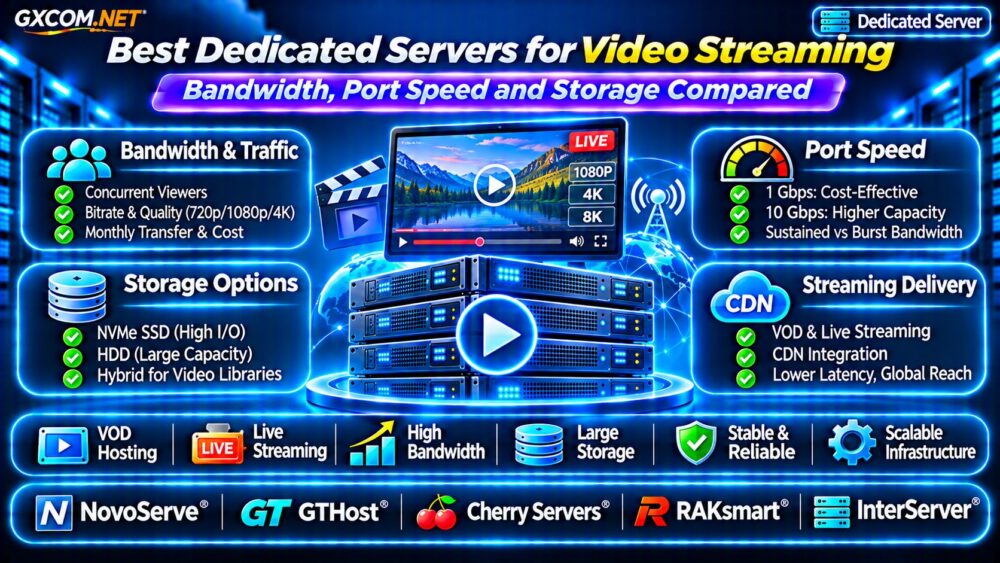
How Much Bandwidth Does Video Streaming Need?
Start with the bitrate delivered to each viewer, not the resolution label. A 1080p stream might average 5 Mbps, but codec, frame rate, scene complexity, and adaptive bitrate settings change actual consumption.
Required outbound Mbps = concurrent viewers × average delivered Mbps. For 100 simultaneous viewers at 5 Mbps, the theoretical payload is 500 Mbps. Allow additional capacity for protocol overhead, traffic bursts, and operational headroom.
Adaptive bitrate streaming distributes different renditions, so average delivered bitrate may be lower than the highest available quality. Measure real viewer sessions whenever possible.
Monthly Transfer Example
Transfer depends on viewing hours as well as peak concurrency. One hundred viewers watching a 5 Mbps stream for one hour consume approximately 225 GB of video payload in total. At that same continuous aggregate rate for 30 days, transfer approaches 162 TB before overhead.
Real audiences rarely remain at peak concurrency continuously. Use viewing-hour forecasts to estimate monthly transfer, and examine our 云VPS带宽费用指南 for related transfer-cost considerations.
1Gbps vs 10Gbps Dedicated Server Ports
A 1Gbps port has a theoretical maximum of 1,000 Mbps. It cannot reliably deliver that full figure as application payload, and a shared or rate-limited network may perform below the advertised port speed.
At 5 Mbps per viewer, 150 concurrent viewers represent 750 Mbps of video payload. That could fit within a well-performing 1Gbps connection, but traffic fluctuations and other server activity reduce available margin.
A 10Gbps port offers more peak headroom for large audiences, multiple streaming renditions, and origin traffic. However, a 10Gbps interface does not guarantee 10Gbps of sustained internet throughput.
Ask providers whether port speed is dedicated, shared, capped, or subject to fair-use restrictions. Also verify upstream capacity, routing quality, and traffic billing.
Metered, Unmetered and Burstable Bandwidth
These terms can dramatically change streaming economics. Metered plans include a transfer allowance, with possible overage charges. Unmetered plans generally remove a conventional monthly byte allowance but may impose speed caps or acceptable-use conditions.

Burstable connections may permit temporary peaks while limiting sustained throughput or billing according to usage measurements. Read the complete network policy rather than relying on an advertising label.
For predictable workloads, calculate annual traffic costs under realistic and high-growth scenarios. A slightly higher rental fee can be worthwhile if it avoids expensive overages.
NVMe vs HDD Storage for Video Libraries
Streaming workloads need both capacity and consistent delivery. Large VOD libraries often favor high-capacity HDD storage, while NVMe SSDs suit metadata, databases, frequently accessed content, and transcoding scratch space.
For example, 10,000 videos averaging 2 GB each require approximately 20 TB of raw media storage before redundancy, thumbnails, alternative renditions, and backups.
Keeping every file on premium NVMe can increase costs without improving playback when the network is the limiting factor. A hybrid layout may offer better value: NVMe for active workloads and HDD arrays or object storage for bulk media.
RAID helps tolerate selected drive failures but does not replace independent backups. Evaluate usable capacity after redundancy, rebuild behavior, and recovery procedures.
Do You Need a Powerful CPU or GPU?
Directly serving pre-encoded HLS or DASH segments is often more network- and storage-intensive than CPU-intensive. Live transcoding, however, can require substantial processing capacity, especially when producing multiple resolutions simultaneously.
Choose CPU cores, hardware encoders, or GPUs according to the number of simultaneous transcodes, codecs, resolutions, and latency targets. Benchmark the actual media pipeline rather than buying the highest core count available.
For larger architectures, review our Cloud Hosting for Media Websites Guide to compare application and delivery patterns.
Five Dedicated Server Providers to Compare
The following approved infrastructure providers are candidates for streaming deployments. Their inclusion is not a verified ranking, and available ports, bandwidth allowances, and storage configurations differ by product and location.
NovoServe: Network-Focused Evaluation
NovoServe is worth evaluating when sustained transfer and network geography drive purchasing decisions. Request written confirmation of committed bandwidth, traffic policies, available ports, and media-delivery restrictions.
GTHost: Port Speed and Deployment Location
GTHost is another comparison candidate for physical servers. Examine available network configurations, processor generations, storage choices, and latency to your target audience.
Cherry Servers: Compute and Storage Planning
Cherry 服务器 deserves consideration when streaming also involves encoding, application processing, or demanding storage workloads. Verify the exact CPU, disk, and network specifications for the selected machine.
RAKsmart: Regional Distribution Requirements
RAKsmart can be assessed for deployments serving particular regions. Compare location-specific routing, transfer conditions, setup costs, and options for future capacity increases.
InterServer: Total Hosting Budget
InterServer offers another infrastructure comparison point for cost-sensitive projects. Review the complete quotation, including storage, network usage, operating system, and management responsibilities.
Compare providers against a consistent workload specification. Our 裸机服务器提供商对比 offers a broader infrastructure selection framework.
Why a CDN Changes the Server Calculation
A content delivery network caches video segments near viewers and can reduce repeated requests to the origin server. This can improve geographic delivery and reduce origin bandwidth, although cache misses, live streams, and CDN charges still matter.
Estimate origin traffic separately from viewer-facing traffic. A well-cached VOD library may need a modest origin port even when audience delivery is substantial.

For application routing and distribution planning, consult our 云服务器负载均衡器费用指南.
Streaming Dedicated Server Buying Checklist
- Calculate peak viewers, delivered bitrate, and monthly viewing hours.
- Confirm sustained port capacity and all transfer restrictions.
- Size usable media storage, redundancy, and independent backups.
- Benchmark transcoding workloads before selecting CPU or GPU hardware.
- Check audience latency, CDN compatibility, monitoring, and support terms.
- Verify acceptable-use rules and your rights to distribute the content.
常见问题解答
Is 1Gbps Enough for Video Streaming?
It can be sufficient for smaller audiences, depending on delivered bitrate, concurrency, and real network throughput. Plan headroom instead of operating continuously near the port limit.
Is Unmetered Bandwidth Truly Unlimited?
Not necessarily. Providers may apply port caps, fair-use rules, or other restrictions. Check the contract and product-specific network policy.
Should Video Storage Use NVMe?
NVMe is valuable for active processing and metadata, but HDD or object storage may be more economical for large media libraries.
最终裁决
The best dedicated server for streaming matches actual viewing demand, sustainable network capacity, and storage economics. Compare NovoServe, GTHost, Cherry Servers, RAKsmart, and InterServer using written quotations and realistic traffic forecasts. Buy for measurable delivery requirements, not headline port speeds alone.