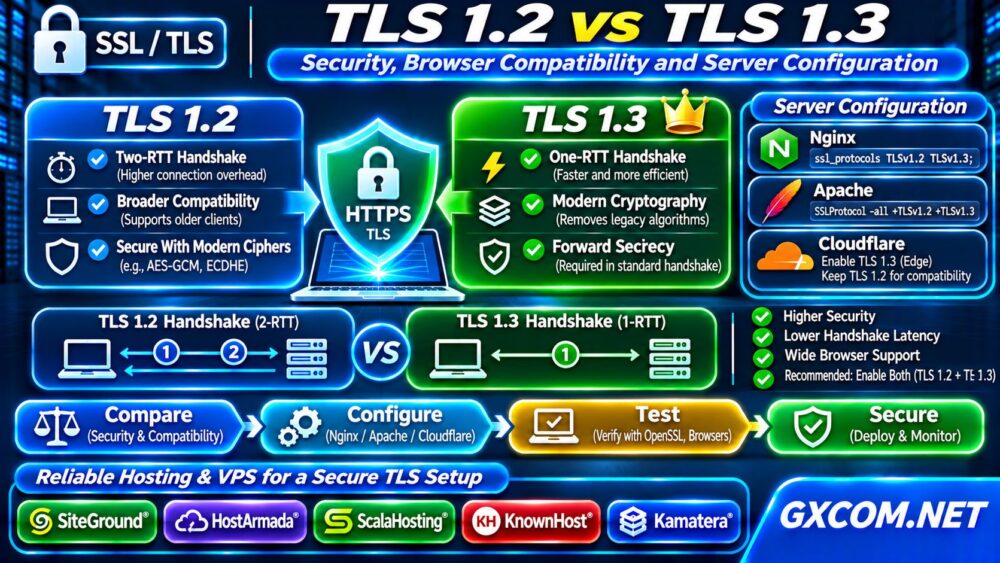
TLS 1.2 vs TLS 1.3 is an important comparison for website owners deciding how to secure HTTPS connections without excluding legitimate visitors. Both protocols can protect data in transit, but TLS 1.3 simplifies cryptographic negotiation and reduces connection setup overhead. Choosing the right configuration requires understanding clients, applications, and server capabilities rather than chasing a version number.
This guide explains the differences, shows practical configuration examples, and identifies when hosting limitations justify an infrastructure review.
What Are TLS 1.2 and TLS 1.3?
Transport Layer Security (TLS) encrypts connections between clients and servers. TLS 1.2 remains widely deployed and can be secure when configured with modern cipher suites and certificates. TLS 1.3 removes several obsolete options, streamlines negotiation, and requires forward-secret key exchange in its standard handshake.
Neither protocol automatically fixes vulnerable applications, stolen credentials, or incorrectly deployed certificates. HTTPS security depends on the entire system.
TLS 1.2 vs TLS 1.3: Key Differences
| 功能 | TLS 1.2 | TLS 1.3 |
|---|---|---|
| Full handshake | Typically two round trips | Typically one round trip |
| Legacy cipher options | Available, depending on configuration | Removed from negotiation |
| Forward secrecy | Depends on selected key exchange | Required in standard handshakes |
| 0-RTT early data | 不支持 | Optional, with replay considerations |
| Older clients | Broader compatibility | Requires compatible software |
The main advantage of TLS 1.3 is a smaller set of safer choices, not a guarantee that every connection becomes faster.
Is TLS 1.3 More Secure?
TLS 1.3 eliminates obsolete key exchange and encryption mechanisms, including static RSA key exchange and CBC cipher suites. It also encrypts more handshake information after the initial negotiation.
Properly configured TLS 1.2 can still provide strong protection using authenticated encryption and ephemeral key exchange. However, maintaining safe TLS 1.2 configurations requires greater care because older options may remain available.
Disable TLS 1.0 and TLS 1.1 unless a narrowly justified legacy requirement exists. Avoid weakening production security to accommodate obsolete software without assessing alternatives.
Does TLS 1.3 Improve Website Speed?
A typical TLS 1.3 full handshake needs one network round trip, compared with two for a conventional TLS 1.2 full handshake. That reduction can matter when users connect over high-latency networks or repeatedly establish new connections.

Real-world gains depend on connection reuse, network latency, HTTP configuration, caching, and application performance. A slow database query will not become fast merely because TLS 1.3 is enabled.
If initial server responses remain slow, follow our High TTFB Troubleshooting guide to separate backend delays from connection setup costs.
What About TLS 1.3 Zero-RTT?
TLS 1.3 supports optional zero-round-trip early data when reconnecting with previously established session information. Early data can reduce latency, but it may be replayed by an attacker under certain conditions.
Do not enable 0-RTT indiscriminately for state-changing requests such as payments, account updates, or administrative actions. Evaluate application replay defenses and edge-provider behavior before adopting it.
Browser and Application Compatibility
Current mainstream browsers and operating systems generally support TLS 1.3. Older browsers, embedded devices, outdated Java runtimes, and legacy API clients may support only TLS 1.2.
For public websites, supporting both TLS 1.2 and TLS 1.3 is often a practical balance. Prefer TLS 1.3 when available while allowing secure TLS 1.2 negotiation for compatible legacy clients.
Before disabling TLS 1.2, inspect actual traffic, customer requirements, monitoring agents, and integration dependencies. Compatibility testing should include mobile apps and automated clients, not just desktop browsers.
How to Check Which TLS Version a Server Supports
Use OpenSSL from a trusted client to test each protocol explicitly:
openssl s_client -connect example.com:443 -servername example.com -tls1_3
openssl s_client -connect example.com:443 -servername example.com -tls1_2
Replace the hostname with your own domain. Inspect the negotiated protocol, cipher, certificate verification, and connection errors. A successful handshake is not proof that certificate trust is configured correctly.
我们的 SSL Certificate Chain Errors guide covers missing intermediates and client trust failures.
Enable TLS 1.2 and TLS 1.3 in Nginx
On a compatible Nginx build linked against an appropriate TLS library, configure the HTTPS server block:
ssl_protocols TLSv1.2 TLSv1.3;Check the installed Nginx and OpenSSL versions first. Run sudo nginx -t before reloading, then verify both protocols externally. Other configuration scopes or upstream proxies may affect the observed result.
Configure TLS Protocols in Apache
On a compatible Apache installation, use an appropriate SSL virtual host or server configuration:
SSLProtocol -all +TLSv1.2 +TLSv1.3Validate with sudo apachectl configtest, reload safely, and test from a separate client. TLS 1.3 availability depends on Apache, the linked cryptographic library, and the operating system.
请查看我们的 非托管服务器安全检查清单 for related patching and access-control practices.
Cloudflare and TLS Termination
When Cloudflare proxies a website, visitors negotiate TLS with Cloudflare’s edge, while Cloudflare establishes a separate connection to the origin. Edge minimum TLS settings do not necessarily describe the origin connection’s negotiated protocol.
Test both connections when diagnosing compatibility or security requirements. Maintain appropriate origin certificate validation rather than downgrading SSL mode to bypass errors.
When Should You Upgrade Hosting or VPS Infrastructure?
If your hosting platform cannot update its TLS library, exposes no protocol controls, or lacks a supported upgrade path, consider whether managed hosting or a configurable VPS would reduce operational risk.
SiteGround 以及 HostArmada are relevant web-hosting options for site owners prioritizing managed operations. ScalaHosting 以及 KnownHost offer managed VPS choices, while 卡马特拉 serves teams needing configurable cloud resources. Check each plan’s actual TLS support and administrative permissions before purchasing.

Compare responsibilities using our 托管型与非托管型VPS对比, then explore broader options in our 最佳云托管解决方案指南.
常见问题解答
Should I Disable TLS 1.2?
Not automatically. Secure TLS 1.2 remains useful for legitimate clients that cannot negotiate TLS 1.3. Base retirement decisions on risk and measured compatibility needs.
Does TLS 1.3 Replace SSL Certificates?
No. TLS 1.3 still uses certificates for server authentication in typical HTTPS deployments. Certificate validity and trust-chain configuration remain essential.
Can TLS 1.3 Fix a Slow Website?
It may reduce handshake latency, but application bottlenecks, caching, storage, and network conditions often matter more.
Deployment Checklist
Before changing production settings, capture the current configuration, confirm certificate renewal behavior, and arrange a maintenance window if required. Test a staging endpoint with representative browsers and API clients. After deployment, monitor handshake failures, TLS version distribution, and certificate alerts. Keep a rollback plan that restores known-good settings without re-enabling obsolete protocols. Recheck the configuration after operating-system upgrades or CDN changes.
最终裁决
Enable TLS 1.3 where supported, retain securely configured TLS 1.2 when compatibility requires it, and disable obsolete protocols. Test real clients, verify certificates, and upgrade infrastructure only when current platform limitations prevent reliable security maintenance.