SSL certificate chain errors can make a website appear untrusted even when its leaf certificate is valid and unexpired. Browsers, API clients, and monitoring tools may report different failures because they build certificate trust paths differently. A missing intermediate certificate is a frequent cause, but it is not the only one.
This guide explains how certificate chains work, how to inspect a live server with OpenSSL, and how to correct Apache, Nginx, and Cloudflare configurations without weakening TLS verification.
What Is an SSL Certificate Chain?
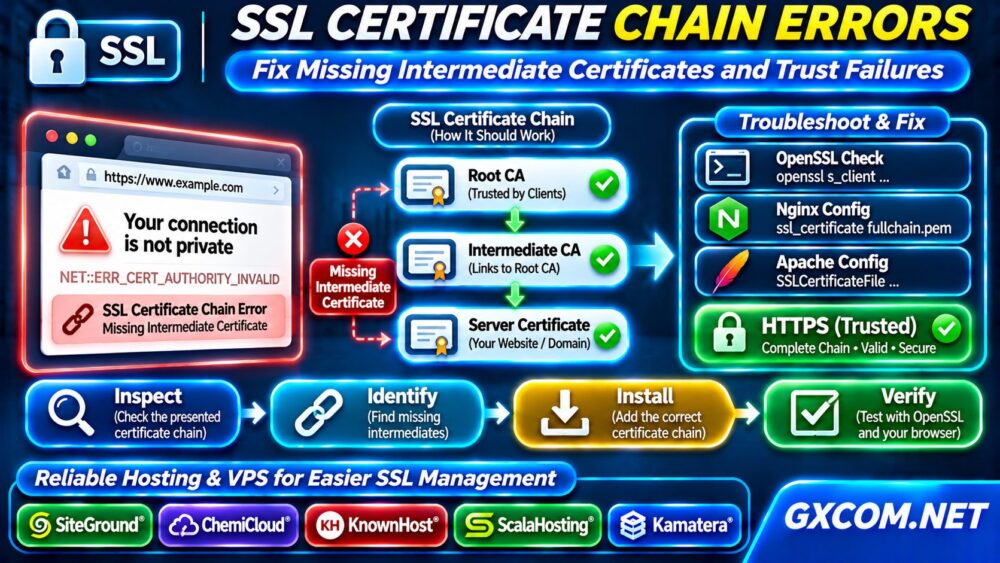
A certificate chain links your website’s leaf certificate to a trusted root certificate authority through one or more intermediate certificates. The server normally presents its leaf certificate and required intermediates during the TLS handshake. The client then validates signatures, hostname coverage, validity dates, and trust.
Root certificates are generally supplied by the client’s trust store rather than sent by the website. Installing only the leaf certificate can leave clients unable to build a trusted path.
Common Certificate Chain Error Messages
Typical messages include “unable to get local issuer certificate,” “unable to verify the first certificate,” and “certificate verify failed.” Some browsers display a generic connection warning instead.
These messages can indicate missing intermediates, an outdated client trust store, an untrusted private certificate authority, or an incorrect server configuration. An expired certificate or hostname mismatch is a separate validation problem and needs its own fix.
Step 1: Inspect the Certificate Presented by Your Server
From a trusted terminal, run:
openssl s_client -connect example.com:443 -servername example.com -showcerts </dev/nullReplace the hostname with your domain. The -服务器名称 option supplies Server Name Indication, helping the server choose the correct virtual host certificate.
Inspect the displayed certificate chain, subject, issuer, validity dates, and verification result. Remember that OpenSSL verification depends on the local machine’s trust store. A successful handshake alone does not prove that the chain is trusted.
Step 2: Identify Missing Intermediate Certificates
Compare the leaf certificate’s issuer with the subject of the next certificate in the chain. Continue until the chain reaches an issuer trusted by your intended clients.
If an intermediate is absent, download the correct certificate from your certificate authority’s official repository or control panel. Avoid downloading random certificate bundles from third-party websites.

Some clients retrieve missing intermediates automatically, while others do not. That difference explains why a site may work in one browser but fail in an API client or command-line tool.
Step 3: Build a Correct Full Chain File
For PEM-based server configurations, create a chain file containing the leaf certificate first, followed by its intermediate certificates in the appropriate order.
cat server.crt intermediate.crt > fullchain.pemUse the actual certificate filenames supplied by your authority. Do not include the private key in this public certificate bundle. A root certificate usually does not need to be included.
Protect the private key separately with restrictive permissions. Confirm the leaf certificate matches that key before changing production configuration.
Step 4: Fix the Certificate Chain in Nginx
In the relevant HTTPS server block, point ssl_certificate to the full chain file and ssl_certificate_key to the matching private key:
ssl_certificate /etc/ssl/example/fullchain.pem;
ssl_certificate_key /etc/ssl/example/privkey.pem;
Validate the configuration with sudo nginx -t and reload only after it passes. Then repeat the external OpenSSL test. Check every hostname and load-balanced endpoint, not just the primary domain.
Step 5: Fix Apache SSL Certificate Configuration
On current Apache installations, configure SSLCertificateFile with the leaf and intermediate certificates in the supported chain format, alongside the matching key:
SSLCertificateFile /etc/ssl/example/fullchain.pem
SSLCertificateKeyFile /etc/ssl/example/privkey.pem
Legacy Apache versions may use separate chain directives. Follow the documentation for your installed version rather than copying outdated configuration examples.
运行 sudo apachectl configtest, reload the service after a successful test, and verify the public endpoint again.
Step 6: Distinguish Server Errors From Client Trust Failures
If the server presents a complete chain but one client still fails, check that client’s operating system, CA bundle, application runtime, and clock. Old Java environments or container images may lack newer trusted roots.
Never disable certificate verification in production code as a shortcut. Update the client trust store or configure the correct trusted authority instead.
For self-signed or internal certificates, distribute the authorized organizational root through managed trust policies. A publicly accessible website usually needs a certificate trusted by mainstream clients.
Step 7: Check Cloudflare and Origin Certificates
Cloudflare introduces separate visitor-to-edge and edge-to-origin TLS connections. A Cloudflare Origin CA certificate is designed for Cloudflare’s origin validation and is not generally trusted by browsers connecting directly to the origin.
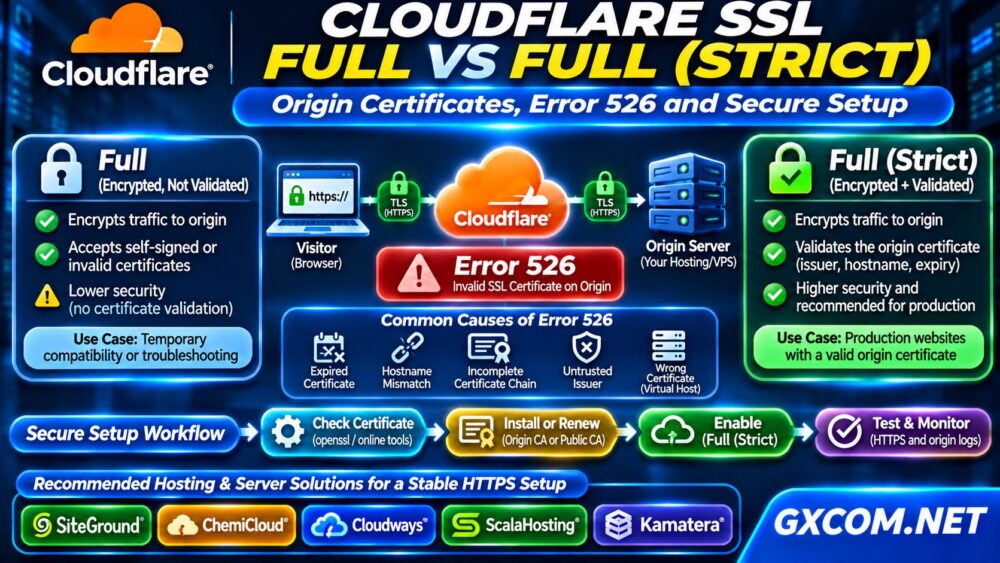
In Full (Strict) mode, Cloudflare validates the origin certificate. An invalid origin certificate can produce Error 526. Test the correct connection before replacing certificates or changing SSL modes.
For broader server hardening, review our 非托管服务器安全检查清单.
Step 8: Prevent Chain Errors During Renewal
Automate certificate renewal where supported, but also verify that deployment updates the served full chain and reloads the correct service. Monitor expiration dates, certificate changes, and HTTPS checks from multiple clients.
Test staging and production independently. Our WordPress 测试站指南 explains safer ways to validate website changes before release.
When Should You Compare Hosting or VPS Providers?
Most certificate chain failures require correcting files or trust settings, not purchasing new infrastructure. However, limited certificate controls, unreliable renewal processes, or missing administrative access can justify evaluating another hosting model.

SiteGround 以及 ChemiCloud are relevant to WordPress owners comparing managed website operations. KnownHost 以及 ScalaHosting offer managed VPS options for administrators seeking more control with support. 卡马特拉 provides configurable cloud servers for teams managing their own TLS stack.
Compare certificate automation, support boundaries, root access, backups, and deployment flexibility. Our 托管型与非托管型VPS指南 clarifies operational responsibility, while the 托管云主机对比 supports cloud purchasing decisions.
If persistent backend latency accompanies HTTPS issues, use our High TTFB Troubleshooting guide to investigate performance separately from certificate trust.
常见问题解答
Should I Install the Root Certificate on My Server?
Usually not. Servers normally send the leaf and intermediate certificates; clients maintain trusted root stores.
Why Does SSL Work in Chrome but Fail in Curl?
Clients may use different trust stores or intermediate discovery behavior. Compare their certificate paths and software versions.
Does Renewing a Certificate Fix a Missing Intermediate?
Not necessarily. The server must deploy the correct chain file after renewal.
最终裁决
Fix SSL certificate chain errors by identifying the presented certificates, installing missing intermediates, validating the complete chain, and checking client trust. Secure HTTPS depends on correct deployment and ongoing verification, not simply on buying a more expensive server.