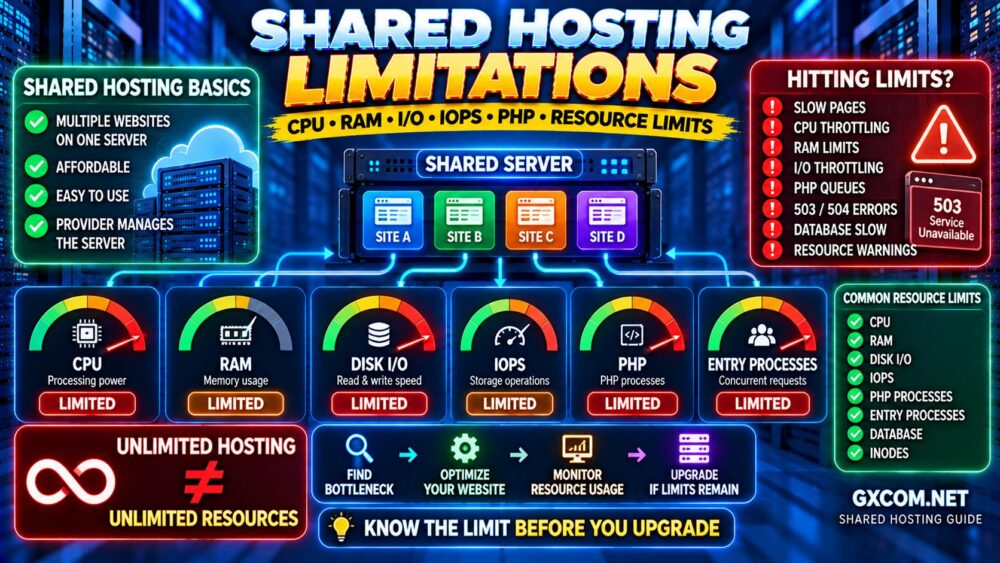
Shared hosting is an affordable way to launch a website, but every shared server has finite resources. Even when a plan advertises generous storage or bandwidth, your account may still face restrictions on CPU usage, memory, disk operations, and concurrent requests.
理解 shared hosting resource limits helps explain why a WordPress website can become slow, display errors, or temporarily stop responding during traffic spikes.
This guide explains the most important hosting limits, how to identify resource bottlenecks, and when upgrading to VPS hosting makes sense.
什么是共享主机的资源限制?
Shared hosting places multiple customer accounts on the same physical or virtual server. The provider allocates resources and applies restrictions to help prevent one account from consuming capacity needed by others.
Depending on the hosting platform, these restrictions may include CPU usage, physical memory, disk input/output, IOPS, entry processes, and the number of running processes.
Some providers use CloudLinux and its Lightweight Virtual Environment (LVE) technology to enforce account-level limits. Other platforms implement different resource-management systems.
Limits vary by provider and plan. Never assume that two packages with similar storage allowances offer identical processing capacity.
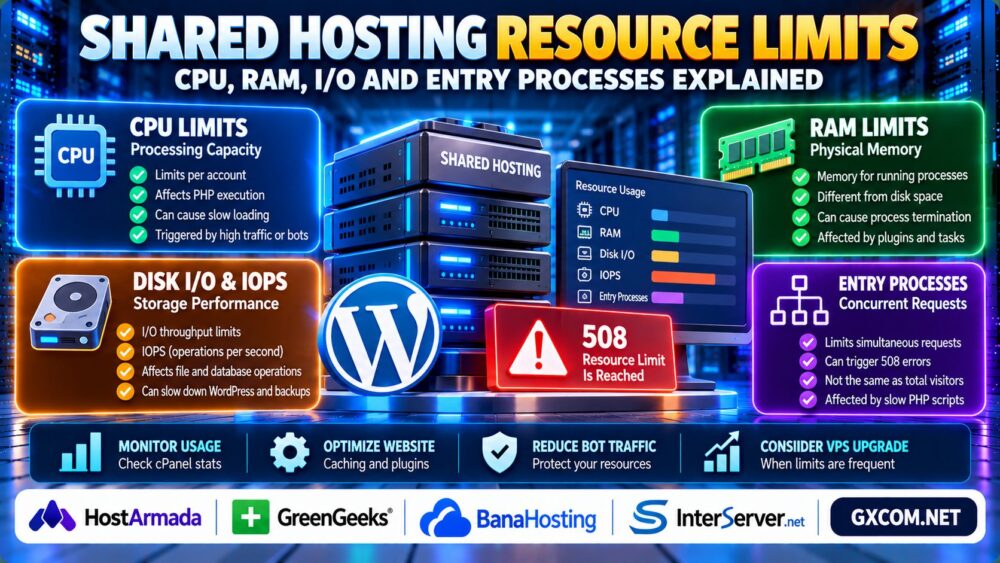
Shared Hosting CPU, RAM, I/O and Entry Processes Compared
| 资源 | What It Controls | Possible Symptoms |
|---|---|---|
| CPU | Processing capacity available to the account | Slow PHP execution and delayed responses |
| RAM | Memory consumed by account processes | Failed or terminated processes |
| 磁盘I/O | Rate of data transferred to or from storage | Slow file and database-related operations |
| IOPS | Number of storage operations per second | Delays during many small file operations |
| 入境流程 | Concurrent requests entering the account's execution environment | Rejected requests or resource-limit errors |
These symptoms are indicators rather than definitive diagnoses. Application errors, network problems, and database failures can produce similar behavior.
1. CPU Limits: Why WordPress Becomes Slow
CPU capacity determines how much processing work your hosting account can perform within the provider's allocation rules.
WordPress uses CPU resources when executing PHP, running plugins, generating pages, and processing background tasks.
Common sources of excessive CPU activity include:
- Expensive WordPress plugin operations.
- Uncached pages receiving repeated requests.
- Search engine crawlers and automated bots.
- Scheduled tasks and backup generation.
- Database queries requiring substantial processing.
When an account reaches its CPU allocation, the hosting platform may throttle execution rather than immediately terminate the website.
Visitors may experience slower responses even though the website remains accessible.
Before upgrading, examine PHP execution time, caching effectiveness, and resource consumption during traffic peaks.
2. RAM Limits: Physical Memory vs Storage Space
RAM is working memory used by running processes. It is different from the disk space used to store website files, databases, and backups.
Shared hosting providers may enforce a physical memory limit on each account.
Memory usage can increase when WordPress executes multiple PHP requests, runs demanding plugins, or performs resource-intensive operations.
If the account reaches its memory limit, some processes may fail or be terminated, depending on the hosting environment.

Adding disk storage does not solve a memory shortage. Likewise, increasing PHP's configured memory limit cannot override a lower account-level memory allocation.
3. Disk I/O and IOPS: Two Different Storage Limits
Disk I/O throughput describes how quickly data can be transferred between storage and the application, often expressed in bytes per second.
IOPS measures the number of storage input/output operations completed per second.
A website handling many small file operations can encounter IOPS pressure even without transferring large amounts of data.
Examples include plugin updates, cache file creation, backups, and operations involving many individual files.
NVMe storage may provide strong underlying performance, but account-level I/O restrictions can still limit the resources available to a shared hosting customer.
Therefore, an NVMe label alone does not guarantee unrestricted disk performance.
4. Entry Processes: What Does the Limit Mean?
Entry Processes, commonly abbreviated as EP in CloudLinux-based environments, represent concurrent requests entering the account's controlled execution environment.
They are not simply the total number of people visiting your website.
A visitor reading a cached page may require little or no PHP processing, while a dynamic request can occupy execution capacity until its work finishes.
Slow PHP scripts can increase the time requests remain active, making it easier to reach the entry-process limit.
What Happens When Entry Processes Are Exhausted?
On certain CloudLinux configurations, reaching the EP limit can cause additional requests to fail with a 508 Resource Limit Is Reached response.
However, error codes and failure behavior depend on the hosting platform. Not every HTTP 508 response has the same cause.
Check your account's resource-fault statistics before concluding that EP saturation is responsible.
5. Entry Processes vs PHP Workers
Entry Processes and PHP workers are related to request concurrency, but they are not interchangeable metrics.
Entry Processes describe concurrency entering a controlled hosting environment, while PHP workers are processes or execution slots handling PHP workloads.
The relationship depends on whether the server uses PHP-FPM, LiteSpeed, CloudLinux, or another configuration.
For dynamic ecommerce workloads, our WordPress Hosting for WooCommerce Guide explains how PHP processing capacity affects checkout performance.
6. How to Check Resource Usage in cPanel
If your provider uses cPanel with CloudLinux resource reporting, you may find a tool named Resource Usage or a similar label.
Follow these steps:
- Sign in to your hosting control panel.
- Locate the Resource Usage or resource-monitoring section.
- Review CPU, memory, I/O, IOPS, and EP metrics where available.
- Check the time periods when limits were reached.
- Compare fault events with traffic spikes, backups, or scheduled tasks.
- Contact your hosting provider if the available statistics are insufficient.
Not all shared hosting plans expose the same monitoring tools or historical data.
For broader troubleshooting methods, read our 服务器性能监控指南.
7. How to Reduce Shared Hosting Resource Usage
Before paying for a larger hosting plan, identify the underlying bottleneck.
Enable Appropriate Page Caching
Page caching can reduce repeated WordPress PHP execution for eligible public pages.
However, carts, checkout pages, and personalized account content require appropriate exclusions or variation rules.
Review Plugins and Background Jobs
Disable unnecessary plugins, investigate expensive scheduled tasks, and avoid running multiple resource-intensive operations simultaneously.
Optimize Images and Static Assets
Proper image sizing, compression, and CDN delivery can reduce bandwidth and processing pressure in some workloads.
Investigate Slow Database Queries
Database inefficiency can extend dynamic request duration and increase concurrent resource demand.
Review our MySQL Performance Tuning for WordPress Guide for database-specific optimization.
Control Unwanted Automated Traffic
Identify abusive bots and repeated login attempts. Use appropriate rate limiting and security controls without blocking legitimate search engine crawlers.
8. When Should You Upgrade from Shared Hosting?
An upgrade becomes reasonable when resource-limit events remain frequent after application optimization, or when your website requires more predictable processing capacity.
Shared hosting may remain suitable for blogs, small business websites, and lightweight WordPress installations with moderate dynamic workloads.
VPS hosting may be more appropriate for sustained concurrency, custom server configurations, or applications needing greater resource control.
我们的 VPS 与共享主机对比 explains the broader differences.
9. Comparing Shared Hosting Providers and Upgrade Paths
When evaluating hosting plans, look beyond advertised disk space and bandwidth.
HostArmada 以及 GreenGeeks are relevant options to investigate for shared and WordPress hosting requirements.
BanaHosting is another candidate for budget-conscious website owners, while InterServer can be considered when comparing hosting options and potential VPS upgrade paths.

Check each provider's current plan documentation for resource allocations, monitoring availability, upgrade policies, and renewal conditions.
For further VPS research, explore our Cheap VPS Providers Comparison.
共享主机资源检查清单
- Check CPU and physical memory allocations.
- Review I/O throughput and IOPS restrictions.
- Identify Entry Processes and process-count limits.
- Verify whether resource monitoring is available.
- Investigate repeated resource faults before upgrading.
- Confirm backup, caching, and security requirements.
- Compare renewal pricing and future upgrade options.
常见问题解答
What are shared hosting resource limits?
They are account-level restrictions on resources such as CPU, memory, disk operations, and concurrent requests, used to manage capacity on shared servers.
What causes the 508 Resource Limit Is Reached error?
On some CloudLinux hosting systems, exhausting the Entry Processes limit can produce this error. Confirm the cause through resource-fault statistics.
Are Entry Processes the same as website visitors?
No. Entry Processes relate to concurrent requests entering the hosting execution environment, not the total number of visitors.
Does unlimited bandwidth mean unlimited CPU?
No. Bandwidth allowances and processing allocations are separate hosting resources.
Can caching reduce shared hosting CPU usage?
Yes. Appropriate page caching can reduce PHP execution for eligible requests, although dynamic and uncached operations still consume resources.
When is VPS better than shared hosting?
VPS hosting becomes worth considering when sustained resource limits, configuration requirements, or growing dynamic workloads justify greater resource control.
最终裁决
理解 shared hosting resource limits is essential when diagnosing slow WordPress websites, recurring resource errors, and unexpected performance restrictions.
CPU, RAM, disk I/O, IOPS, and Entry Processes measure different aspects of server capacity. No single metric explains every performance problem.
Monitor actual usage, optimize inefficient workloads, and upgrade only when your measurements show that the current hosting environment can no longer meet your requirements.