Cheap cloud VPS hosting can be an excellent choice for websites, developers, small businesses, and growing applications. But the cheapest virtual server is not always the most affordable option in the long run.
A low-cost cloud VPS may advertise generous RAM, multiple virtual CPU cores, and fast SSD storage. Yet those specifications alone do not reveal how the server will perform under real workloads.
CPU allocation, storage latency, network quality, backup costs, management responsibilities, and renewal terms can all affect the actual value of a hosting plan.
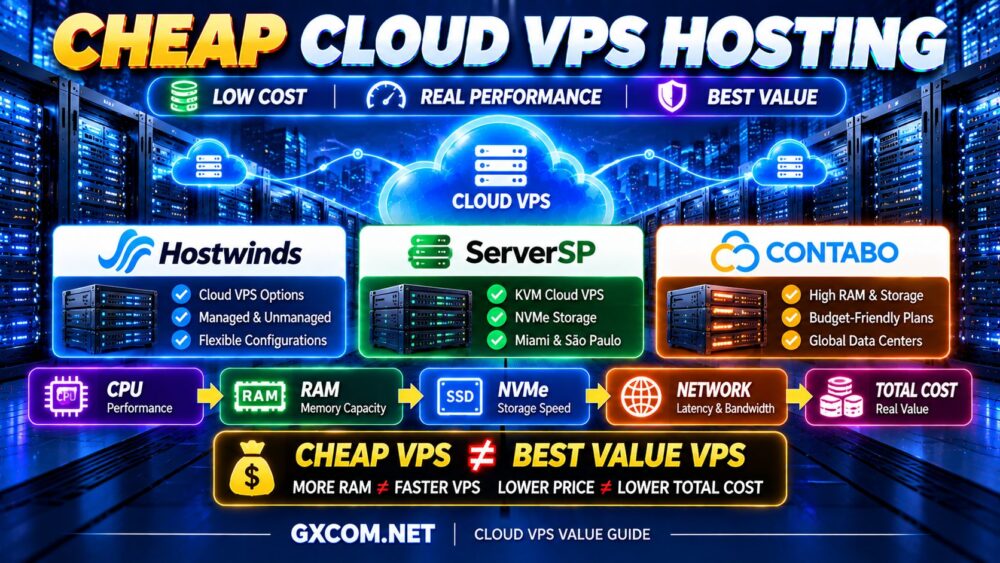
CHEAP VPS ≠ BEST VALUE VPS.
The goal is not simply to spend less. It is to get enough useful performance, flexibility, and reliability without paying for resources your application does not need.
In this guide, we explain how to evaluate affordable cloud VPS hosting, compare Hostwinds, ServerSP, and Contabo, and identify the hidden costs and performance tradeoffs that matter before you buy.
Best Cheap Cloud VPS Hosting Providers at a Glance
| 服务提供商 | 最适合 | 主要优势 | 需要检查的内容 |
|---|---|---|---|
| Hostwinds | Users seeking budget-conscious VPS flexibility | Cloud and VPS options with management choices | Management scope, storage, and total cost |
| ServerSP | Regional Cloud VPS deployments | KVM virtualization and NVMe-based Cloud VPS | Server location, resource limits, and support |
| Contabo | Resource-heavy workloads on a limited budget | Generous resource configurations in value-focused plans | CPU consistency, storage limits, and fees |
Quick recommendations:
- Best for flexible VPS management options: Hostwinds
- Best for Miami and Brazil Cloud VPS deployments: ServerSP
- Best for buyers prioritizing RAM and storage capacity: Contabo
These are workload-based recommendations, not rankings derived from independent benchmarks. Product specifications and billing terms can change, so verify the current plan before purchasing.
什么是廉价的云VPS主机?
Cheap cloud VPS hosting provides a virtual server at a relatively low operating cost, typically with allocated CPU, memory, storage, and network resources.
Unlike shared web hosting, a VPS gives users greater control over the operating system and software environment.
Cloud VPS products may also provide convenient provisioning, snapshots, configurable resources, or cloud management tools.
However, the term “cloud VPS” is not standardized across the industry.
One provider may offer conventional virtual machines on shared infrastructure, while another provides additional cloud networking, automation, or resource scaling features.
For a broader comparison of provider capabilities, read our Best Cloud VPS Hosting 指南。.
Cheap Cloud VPS vs Cheap Traditional VPS
Both products provide virtualized server resources, but their surrounding infrastructure and management tools may differ.
| 因子 | 便宜的云VPS | Cheap Traditional VPS |
|---|---|---|
| 虚拟化 | Typically virtualized compute | Typically virtualized compute |
| 配置 | Often cloud control panel based | 取决于提供商 |
| 缩放 | May offer convenient resource changes | Plan upgrades vary |
| 账单 | Hourly or fixed billing may be available | Often subscription based |
| 自动化 | May include API or cloud tooling | 因服务商而异 |
| 高可用性 | Not automatically included | Not automatically included |
A cloud label does not guarantee better performance, automatic failover, or stronger hardware.
Compare the actual product architecture and included features.
1. Hostwinds — Best for Affordable VPS Flexibility
Hostwinds is worth considering when buyers want a balance between virtual server resources, management options, and practical hosting features.
Its hosting portfolio includes cloud servers and managed or unmanaged VPS products, making it relevant to customers with different technical abilities.
Key Strengths
- Cloud server and VPS options
- Linux and Windows hosting choices
- Different CPU and memory configurations
- Managed and unmanaged service options
- 云管理工具
- Resource upgrade possibilities
For a small business, the ability to select an appropriate management level can be as important as the base hosting price.
An unmanaged plan may reduce direct service fees, but it also requires the customer to maintain the operating system, firewall, updates, and application environment.
Who Should Choose Hostwinds?
Hostwinds is worth evaluating for:
- 小型企业网站
- Linux 应用程序
- Windows server workloads
- Users comparing managed and unmanaged VPS
- Projects that may need resource upgrades
Potential Limitations
Do not assume that features from one Hostwinds product apply to every VPS or cloud server plan.
Verify whether management, backups, storage features, and other services are included in the selected configuration.
最适合: Budget-conscious buyers who value VPS flexibility and clear management choices.
2. ServerSP — Best for Regional Cloud VPS Value
ServerSP offers Cloud VPS infrastructure with KVM virtualization and NVMe storage, making it a relevant option for buyers looking for virtual server resources in supported locations.
Its Miami and São Paulo infrastructure options may be particularly useful for applications serving audiences in Brazil, Latin America, and nearby markets.
Key Strengths
- KVM-based Cloud VPS
- NVMe 存储
- root 或管理员权限
- Cloud server management panel
- IPv4 and IPv6 connectivity
- Miami and São Paulo location options
- Virtual Data Center services
For location-sensitive applications, selecting a nearby server can sometimes improve user experience more than upgrading to a larger CPU configuration.
Who Should Choose ServerSP?
ServerSP may be worth considering for:
- Websites serving Brazil or Latin America
- 中小企业应用程序
- 开发环境
- KVM-based Linux workloads
- Users seeking regional cloud infrastructure
Potential Limitations
Regional infrastructure coverage is more limited than that of a large global cloud platform.
Check the location of the specific service, network latency, resource limits, backup policy, and support scope before ordering.
最适合: Buyers seeking Cloud VPS infrastructure in supported American regions.
3. Contabo — Best for Resource-Focused Budget Cloud VPS Hosting
Contabo is widely associated with value-oriented VPS and cloud server configurations that emphasize resource capacity.
Its offerings can appeal to buyers who want substantial memory and storage without immediately moving to more expensive infrastructure.
Key Strengths
- Cloud VPS product range
- Multiple CPU and RAM configurations
- SSD and NVMe-based storage offerings
- Linux and Windows options depending on product
- Different deployment locations
- Resource-focused configurations
Contabo can be interesting for applications that genuinely need more memory or disk capacity.

However, a plan offering more RAM is not automatically faster than a smaller plan from another provider.
Who Should Choose Contabo?
Consider Contabo for:
- Memory-heavy applications
- 开发环境
- 多种轻量级服务
- Self-managed websites
- Storage-conscious workloads
Potential Limitations
Resource quantity and resource performance are different things.
Before purchasing, investigate CPU allocation, sustained performance requirements, storage I/O characteristics, network allowances, setup charges, and renewal terms.
最适合: Buyers prioritizing resource capacity while carefully evaluating actual workload performance.
Hostwinds vs ServerSP vs Contabo: Which Offers Better Value?
There is no universal winner because the three providers emphasize different aspects of VPS hosting.
| 优先级 | Provider to Evaluate First | Why |
|---|---|---|
| 管理灵活性 | Hostwinds | Managed and unmanaged VPS choices |
| Miami or Brazil deployment | ServerSP | Regional Cloud VPS locations |
| Higher RAM and storage capacity | Contabo | Resource-oriented VPS configurations |
| 企业网站托管 | Hostwinds or ServerSP | Depends on location and administration needs |
| Self-managed development workloads | Contabo or ServerSP | Depends on resources and location |
For an accurate comparison, choose similar configurations and evaluate their total costs, support policies, and actual application performance.
How to Find the Best Value Cloud VPS
The most important step is to define what “value” means for your workload.
A cheap VPS is valuable when it meets your application's requirements at a sustainable total cost.
请使用以下框架:
WORKLOAD → RESOURCES → PERFORMANCE → RELIABILITY → TOTAL COST
1. Compare CPU Performance, Not Just vCPU Count
Virtual CPU specifications can be misleading when considered in isolation.
Performance depends on processor generation, architecture, resource allocation, and contention on the underlying host.
Four virtual CPU cores from one provider may behave differently from four virtual CPU cores on another platform.
4 个 vCPU ≠ 4 个 vCPU。.
For applications that consistently use substantial CPU resources, examine whether dedicated CPU configurations are available.
2. Choose RAM Based on Real Memory Usage
RAM supports the operating system, application processes, databases, caching, and background services.
More memory can be useful for database caching and concurrent workloads, but it does not automatically improve CPU-bound applications.
更多内存 ≠ 更快的VPS。.
Before paying for additional memory, check whether the existing server is actually experiencing memory pressure or swapping.
3. Evaluate Storage Performance
Storage capacity and storage speed are separate considerations.
NVMe can benefit I/O-sensitive applications, but real performance also depends on latency, IOPS limits, and the provider's storage architecture.
A large disk is not necessarily a fast disk.
如需更详细的说明,请参阅我们的 NVMe VPS 性能 指南。.
4. Check Network Quality and Location
A cheap cloud VPS can feel slow if its network route to your users is poor.
评估:
- 数据中心位置
- Latency to your target audience
- 网络路由
- Bandwidth allowances
- 端口速度
- 交通限制
1 GBPS PORT ≠ 1 GBPS REAL-WORLD THROUGHPUT.
5. Understand Management Responsibilities
Many inexpensive VPS plans are unmanaged.
This means the customer may be responsible for:
- 操作系统更新
- 防火墙配置
- 安全加固
- 应用程序安装
- 监测
- 备份
- 软件故障排除
Unmanaged hosting can provide excellent value for experienced administrators.
However, businesses without technical expertise should account for the cost of administration.
How Much CPU and RAM Does a Cheap Cloud VPS Need?
The right starting configuration depends on your application.
| 工作量 | Suggested CPU | Suggested RAM | Main Priority |
|---|---|---|---|
| Lightweight Linux Server | 1 个 vCPU | 1–2GB | Low overhead |
| 小型 WordPress 网站 | 1–2 个 vCPU | 2–4GB | Caching and optimization |
| 商业网站 | 2–4 个虚拟CPU | 4–8GB | Consistent resources |
| Small Web Application | 2–4 个虚拟CPU | 4–8GB | CPU and database performance |
| 开发环境 | 1–4 vCPU | 2–8GB | 灵活性 |
These are illustrative planning ranges, not guaranteed requirements.
Start with the smallest configuration that can reliably handle your workload, then use monitoring to determine when an upgrade is necessary.
Cheap Cloud VPS for WordPress
Cloud VPS hosting can provide an affordable upgrade path for WordPress websites that need more control than shared hosting offers.
However, server specifications are only part of WordPress performance.
重要因素包括:
- PHP 配置
- 页面缓存
- 对象缓存
- 数据库效率
- Theme quality
- Plugin overhead
- CDN的使用情况
A well-optimized WordPress website on a modest VPS may outperform a poorly optimized website on a much larger server.
For WordPress-specific buying guidance, explore our 最适合 WordPress 的 VPS 比较。.
面向开发者的经济型云VPS
Developers often use low-cost cloud VPS hosting for staging environments, API testing, small applications, and containerized services.
实用功能包括:
- root权限
- Linux distribution choices
- 快照
- API 访问
- SSH key support
- 资源升级
- Predictable billing
For development workloads, hourly billing can be attractive when servers are temporary, while fixed monthly pricing may be simpler for continuously running environments.
Check how the provider bills stopped instances, storage, and reserved resources.
Cheap Cloud VPS for Small Businesses
Small businesses should consider the operational cost of hosting alongside the subscription price.
A cheap unmanaged VPS may be suitable when someone on the team can administer the server.
If the business depends on its website for leads, orders, or customer communication, backups, monitoring, and support become more important.
Downtime or data loss can cost more than the difference between hosting plans.
Hidden Costs of Cheap Cloud VPS Hosting
The advertised monthly charge is not always the total cost of ownership.
Backup Charges
Some providers charge separately for automated backups, snapshots, or additional retention.
Additional Storage
Extra block storage or expanded disks may increase the bill.
Bandwidth and Traffic
Data transfer allowances and overage charges vary between providers.
Operating System Licenses
Windows Server and certain control panels may require additional licensing fees.
Management Services
Managed support can increase costs but may reduce the time required for administration.
Setup and Renewal Terms
Some hosting products have setup fees, introductory offers, or different renewal conditions.
REAL VPS COST = SERVER + STORAGE + BACKUPS + NETWORK + LICENSES + MANAGEMENT
Before ordering, compare the total expected cost over the period you intend to use the server.
Cheap Cloud VPS vs Premium Cloud VPS
Premium VPS hosting is not automatically faster, but more expensive services may offer different resource allocations, support levels, or infrastructure features.
Important differences can include:
- 共享 CPU 与专用 CPU
- 存储性能
- 管理范围
- 备份功能
- 网络质量
- Support arrangements
- 缩放选项
For a broader comparison of low-cost and higher-priced virtual servers, see our 廉价VPS与高端VPS 指南。.
Is a Cheap Cloud VPS Good for High-Traffic Websites?
It depends on the type of traffic.
A website serving mostly cached pages can handle more requests with fewer resources than a dynamic application performing expensive database operations on every request.
评估:
- Peak concurrency
- 缓存命中率
- Dynamic request volume
- CPU利用率
- 数据库查询
- 网络流量
HIGH TRAFFIC ≠ HIGH SERVER LOAD.
A cheap VPS can be a sensible starting point for a well-optimized website, but resource-intensive applications may require stronger infrastructure.
When Should You Upgrade a Budget Cloud VPS?
Upgrade when monitoring shows a consistent resource bottleneck.
常见的预警信号包括:
- CPU 持续满负荷运行
- Excessive memory swapping
- 数据库查询速度慢
- 存储 I/O 瓶颈
- Application timeouts
- 网络限制
Before upgrading, determine whether application optimization can solve the problem.
Database indexing, caching, and efficient background processing can sometimes provide greater benefits than buying more CPU cores.
OPTIMIZE FIRST. UPGRADE WHEN NECESSARY.
Cheap Cloud VPS vs Shared Hosting
Shared hosting is often easier to operate because the provider manages much of the underlying hosting environment.
A cloud VPS gives users greater control over the operating system and installed applications.
However, that additional control comes with more administration responsibilities.
A VPS is not automatically faster than a well-managed shared hosting environment.
The better choice depends on the workload, required software, available technical expertise, and budget.
How to Avoid Overspending on Cloud VPS Hosting
Do Not Buy CPU Cores You Cannot Use
More cores do not help applications that are limited by single-thread performance or database latency.
Do Not Buy RAM Without Measuring Usage
Memory upgrades are most useful when actual memory pressure exists.
Do Not Ignore Application Optimization
Caching, database indexing, and efficient code can reduce infrastructure requirements.
Do Not Choose a Distant Server Location
Network latency can harm performance even when the server itself is powerful.
Do Not Assume Backups Are Included
Confirm backup features, retention, and restoration procedures.
Do Not Compare Only Promotional Prices
Evaluate the total cost of ownership, including renewal and additional service charges.
Cheap Cloud VPS Buying Checklist
- ✓ Define the workload
- ✓ Compare CPU allocation
- ✓ Choose realistic RAM capacity
- ✓ Check SSD or NVMe storage
- ✓ Evaluate network location
- ✓ Confirm bandwidth allowances
- ✓ Review backup costs
- ✓ Check management responsibilities
- ✓ Verify operating system support
- ✓ Understand renewal terms
- ✓ Review resource upgrade options
- ✓ Calculate total operating cost
- ✓ Test actual application performance
Cheap Cloud VPS Hosting FAQ
What is the best cheap cloud VPS hosting provider?
The best provider depends on the workload. Hostwinds is worth considering for management flexibility, ServerSP for supported regional Cloud VPS deployments, and Contabo for buyers prioritizing memory and storage capacity.
Is cheap cloud VPS hosting reliable?
Low cost does not automatically mean unreliable hosting. Reliability depends on infrastructure quality, maintenance, application configuration, and backup planning. Review service terms and test the selected configuration.
How much RAM do I need for a cheap cloud VPS?
Lightweight Linux applications may need 1–2GB, while small WordPress sites may benefit from 2–4GB. Growing applications may require 4–8GB or more. Actual workload measurements should determine sizing.
Is NVMe important for cheap VPS hosting?
NVMe can help storage-intensive applications, but CPU performance, caching, and database efficiency may matter more for other workloads.
Can I host WordPress on a cheap cloud VPS?
Yes. WordPress can run well on an affordable cloud VPS when the server has sufficient resources and the website is properly optimized.
Is cheap cloud VPS better than shared hosting?
Not always. VPS hosting offers greater control, but shared hosting may be simpler and more suitable for users who do not want to manage a server.
Can cheap cloud VPS handle high traffic?
It can handle substantial traffic when the application is efficient and caching is effective. Dynamic workloads and high concurrency may require additional resources.
Are backups included with cheap cloud VPS hosting?
Backup policies vary by provider and plan. Some offer paid backup services, while others require customers to configure their own backups.
Should I choose managed or unmanaged cheap cloud VPS?
Choose unmanaged hosting when you can administer the operating system and applications. Choose managed hosting when you need support with server maintenance and the service scope justifies the cost.
How can I reduce cloud VPS hosting costs?
Right-size CPU and RAM, optimize applications, use caching, monitor resource usage, remove unnecessary services, and compare the full cost of hosting rather than the base subscription alone.
Final Verdict: How to Find the Best Value Cloud VPS
The best cheap cloud VPS hosting provider is not necessarily the one with the lowest advertised monthly price.
Hostwinds is worth evaluating when management flexibility and practical VPS options matter.
ServerSP is relevant when its Cloud VPS infrastructure and regional locations match your audience.
Contabo can be attractive when your workload benefits from higher memory or storage capacity, provided the actual performance and total cost meet your requirements.
Before buying, follow this framework:
WORKLOAD → CPU → RAM → STORAGE → NETWORK → SUPPORT → TOTAL COST
请记住:
CHEAP VPS ≠ BEST VALUE VPS.
更多内存 ≠ 更快的VPS。.
4 个 vCPU ≠ 4 个 vCPU。.
LOWER PRICE ≠ LOWER TOTAL COST.
Choose the smallest cloud VPS configuration that can reliably handle your application, verify the provider's real capabilities, and scale only when monitoring shows that additional resources are necessary.