在……之间做出选择 Azure Virtual Machines vs App Service is an important decision for businesses deploying websites, APIs, and cloud applications. Both services run workloads on Microsoft Azure, but they differ significantly in operating system control, deployment workflows, scaling responsibilities, and billing.
Azure Virtual Machines provide infrastructure-level flexibility, while Azure App Service offers a managed application platform. The right choice depends on your software stack, operational resources, traffic patterns, and long-term budget.
Azure Virtual Machines vs App Service: Core Differences
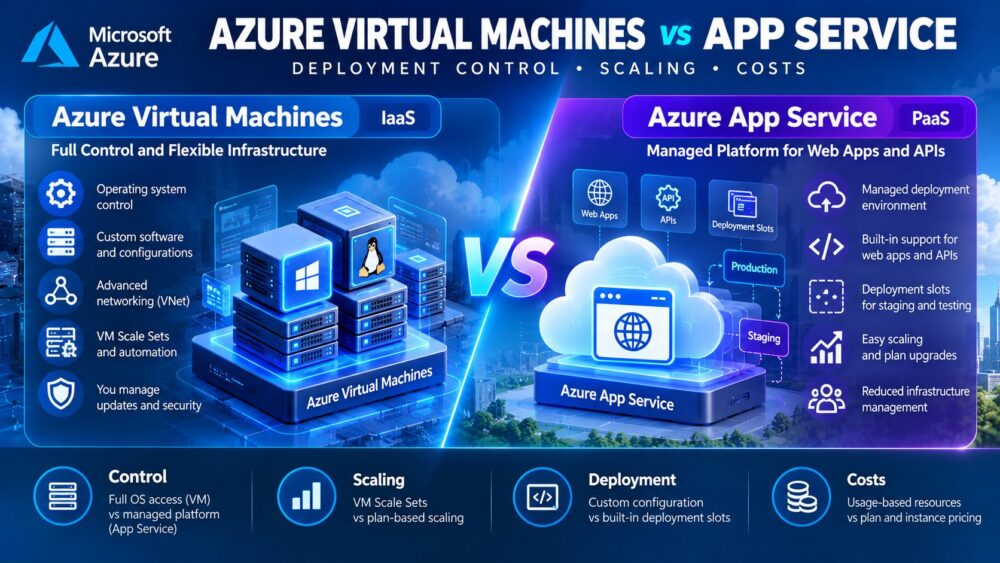
Azure Virtual Machines are an infrastructure-as-a-service (IaaS) solution. Customers select virtual machine sizes, operating systems, storage, and networking configurations while remaining responsible for operating system maintenance and application administration.
Azure App Service is a platform-as-a-service (PaaS) offering designed to host supported web applications and APIs. Microsoft manages much of the underlying infrastructure, allowing development teams to focus on application code and deployment.
Neither approach is automatically cheaper. Teams requiring custom operating system software may prefer VMs, while developers prioritizing managed deployment workflows may find App Service more efficient.
For applications without complex Azure dependencies, conventional cloud servers from 卡马特拉 或 Vultr may also deserve consideration. Our 云托管与VPS对比 explains when simpler infrastructure can meet business requirements.
Deployment Control and Operating System Access
Azure Virtual Machines: Full Server Administration
Azure VMs allow administrators to configure supported Windows or Linux operating systems, install custom packages, modify system services, and manage network access. This flexibility supports legacy applications, specialized software, and workloads requiring privileged access.
The tradeoff is operational responsibility. Teams must manage patching, security hardening, monitoring, application deployment, and backup procedures. Azure maintains the physical infrastructure, but customers remain responsible for the guest environment.
Azure App Service: Managed Application Deployment
App Service supports application deployment through supported development tools, source control integrations, and deployment pipelines. Developers can use deployment slots on eligible plans to test releases before switching production traffic.
However, App Service does not provide unrestricted administration of its underlying host operating system. Applications requiring unsupported system-level modifications may need VMs or another hosting architecture.
Scaling: VM Scale Sets vs App Service
Azure Virtual Machine Scale Sets help manage multiple VM instances and can adjust capacity using supported autoscale rules. This approach provides control over instance configurations but requires careful planning for load balancing, application state, and database dependencies.
App Service supports vertical scaling through plan upgrades and horizontal scaling through additional instances. Depending on the plan, scaling can use rules, schedules, or supported automatic scaling capabilities.

App Service scaling is not identical to serverless billing. Dedicated plans allocate compute instances, and additional or prewarmed capacity can increase costs.
我们的 云服务器自动扩展指南 explains how CPU thresholds, load balancing, and capacity decisions affect cloud infrastructure spending.
Azure VM vs App Service Feature Comparison
| 功能 | Azure 虚拟机 | Azure 应用服务 |
|---|---|---|
| 服务模式 | IaaS | PaaS |
| 操作系统控制 | 管理员权限 | Platform-managed host |
| 部署 | Custom scripts and automation | Managed application workflows |
| 缩放 | VM Scale Sets and automation | Plan scaling and supported autoscale |
| 分阶段 | Separately configured environments | Deployment slots on eligible plans |
| 维护 | Customer-managed guest OS | 由平台管理的基础设施 |
| 账单 | Compute plus supporting resources | Plan instances plus additional services |
Azure Hosting Costs and Hidden Charges
Azure VM costs depend on machine size, operating system, runtime, disks, and supporting infrastructure. Public IP addresses, outbound data transfer, backup storage, and load balancing can add charges beyond the advertised compute rate.
App Service is generally billed through its App Service plan, with pricing affected by tier and instance count. Multiple compatible applications can share one plan, potentially improving utilization. However, scaling the plan or adding separate environments increases resource consumption.
Illustrative Monthly Cost Comparison
Consider a hypothetical Azure VM deployment costing $45 for compute, $12 for storage, and $13 for networking and backup services. Its estimated monthly infrastructure expense is $70.
Now consider an App Service deployment with a hypothetical $85 monthly plan and $10 in additional services. Its estimated total is $95 monthly.
Under these assumptions, the VM costs $300 less annually. However, if the VM requires additional administration, patching, and monitoring labor, App Service may offer better overall value. These figures are illustrative assumptions, not current Azure quotations.
Network expenses deserve particular attention. Read our 云VPS带宽费用指南 before estimating internet egress, backups, and application traffic.
Four Cloud Hosting Alternatives Worth Comparing
Not every application requires Azure-specific services. Businesses with conventional websites, APIs, and development environments should compare alternative cloud hosting models before committing to a complex architecture.
Kamatera:可配置的云服务器
卡马特拉 offers customizable cloud servers for teams needing adjustable CPU, memory, and storage resources. It may suit applications requiring operating system control without depending on Azure-specific integrations. Compare network billing, backup options, and management responsibilities.
Vultr:面向开发者的云计算服务
Vultr provides cloud compute options for developers comfortable managing virtual infrastructure. Teams can configure their own application stacks and deployment automation. Evaluate compute families, regional availability, bandwidth allowances, and additional service charges.
Cloudways:托管式应用程序托管服务
Cloudways may appeal to teams deploying supported PHP applications and WordPress websites. Its managed environment offers deployment and administration tools that can reduce routine server management. Confirm application compatibility, available permissions, and staging requirements before purchasing.
ScalaHosting: Managed and Self-Managed VPS
ScalaHosting offers managed and self-managed VPS options for businesses seeking different levels of infrastructure control. Compare administrative access, backup services, support coverage, and recurring costs against both Azure VMs and App Service.
如需了解更多购买选项,请浏览我们的 经济实惠的云VPS优惠指南 and evaluate complete infrastructure expenses rather than introductory server prices.
When Azure Virtual Machines Make More Sense
Choose Azure VMs when applications require operating system administration, specialized software, custom networking, or legacy dependencies that managed application platforms cannot support.

VMs can also suit organizations with established infrastructure automation and dedicated operations teams. Their flexibility is valuable when application requirements justify the additional maintenance workload.
When Azure App Service Is the Better Choice
App Service is attractive for supported web applications and APIs when teams prioritize deployment speed, managed infrastructure, and integrated application scaling.
Deployment slots and supported automation can simplify release management, but plan limitations and instance charges still matter. Compare total cost against the engineering time saved by avoiding routine server administration.
How to Choose the Right Azure Deployment Model
- Check application compatibility: Identify operating system, runtime, and package requirements.
- Define access needs: Determine whether privileged server administration is necessary.
- Model scaling: Estimate normal traffic, peak demand, and required instance capacity.
- 计算总成本: Include storage, networking, backups, monitoring, and engineering labor.
- 测试恢复: Validate deployment rollback, backups, and failure handling.
For broader commercial comparisons, review our 云托管优惠指南 before making a long-term infrastructure commitment.
最终裁决
Azure Virtual Machines vs App Service is ultimately a choice between infrastructure control and managed application operations. VMs offer greater configuration flexibility, while App Service reduces many routine hosting responsibilities for supported workloads.
Compare Kamatera, Vultr, Cloudways, and ScalaHosting when their products match your application requirements. The best deployment model balances performance, scaling, operational effort, and predictable long-term costs.