选择一个 Linux dedicated server for Proxmox requires more than finding an inexpensive machine with plenty of CPU cores. Proxmox Virtual Environment (VE) combines KVM virtual machines, Linux containers, software-defined networking, and storage management on physical hardware. The wrong configuration can create memory pressure, slow storage, or difficult network administration.
For businesses consolidating applications, hosting development environments, or running private virtualization infrastructure, a dedicated server provides direct control over physical resources. This guide explains practical CPU, RAM, storage, and networking requirements while comparing infrastructure options from Cherry 服务器, ServerMania, NovoServe, ,以及 Bacloud.
Why Use a Dedicated Server for Proxmox VE?
Proxmox VE is a Debian-based virtualization platform that supports KVM virtual machines and LXC containers. Its web interface simplifies managing guests, virtual networks, storage, snapshots, and backups.
Installing Proxmox directly on dedicated hardware avoids the additional complexity of nested virtualization. It also gives administrators control over CPU allocation, memory consumption, physical disks, and network interfaces.
However, a single Proxmox host remains a single failure domain. It can consolidate workloads efficiently, but it cannot provide automatic physical-host failover without additional infrastructure.
For general hardware selection, see our 专用服务器硬件指南.
Proxmox CPU Requirements: Cores, Threads and Virtualization
Check Hardware Virtualization Support
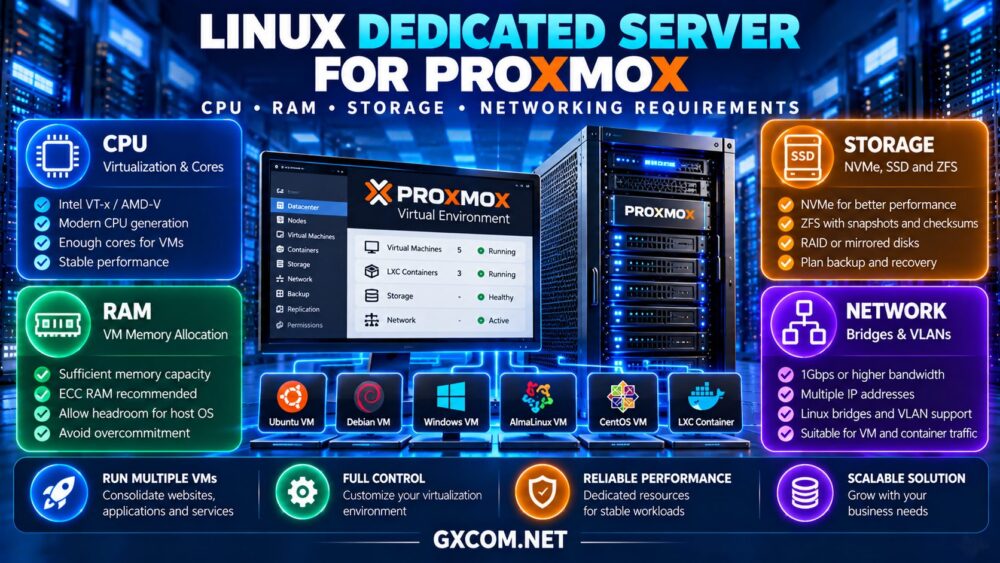
Choose a processor supporting Intel VT-x or AMD-V for KVM virtualization. Hardware-assisted virtualization is essential for practical VM performance. Verify that virtualization extensions are enabled in firmware and available to the installed hypervisor.
Modern CPU architecture often matters more than headline core counts. A newer processor with fewer cores may outperform an older high-core-count model for latency-sensitive applications.
Plan vCPU Allocation Realistically
Proxmox allows multiple guests to share physical CPU capacity. This makes consolidation efficient when workloads have different utilization patterns.
However, assigning 32 virtual CPUs across several VMs does not turn an eight-core physical processor into a 32-core machine. Excessive simultaneous demand creates CPU contention and increased scheduling latency.
For a small production environment, compare modern processors with approximately 8–16 physical cores as an initial purchasing range, then adjust according to measured workload requirements. This is a planning example, not a universal Proxmox minimum.
How Much RAM Does a Proxmox Dedicated Server Need?
Memory planning should begin with the combined requirements of the host operating system, virtualization services, storage stack, and guest workloads.
For example, four VMs configured with 8GB each represent 32GB of assigned guest memory. The host also needs memory for its own services, caching, and operational headroom.
A 64GB dedicated server can be a practical starting point for moderate consolidation, while 128GB or more may suit larger databases, numerous guests, or memory-intensive applications.
Actual utilization depends on guest behavior and memory management settings. Do not assume that memory ballooning can safely compensate for consistently overcommitted workloads.

ECC memory is worth considering for production virtualization because it can detect and correct certain memory errors when supported by the complete hardware platform.
Proxmox Storage: NVMe, SSD, ZFS and RAID
Choose Storage for the Workload
NVMe drives are attractive for virtual machines performing frequent random reads and writes. Database servers, development environments, and application workloads can benefit from low storage latency.
SATA SSDs may still be suitable for lighter workloads, while HDDs are generally better suited to capacity-oriented storage than latency-sensitive production VMs.
Understand ZFS Memory and Disk Requirements
Proxmox supports ZFS, which provides checksumming, snapshots, and storage management features. ZFS can benefit from additional RAM for caching, but memory requirements depend on the configuration and workload.
Mirrored disks can protect against certain drive failures. They do not protect against accidental deletion, ransomware, or complete server loss.
For a small host, two enterprise-grade SSDs or NVMe drives in a suitable mirrored configuration may provide a reasonable balance of performance and redundancy. Confirm disk compatibility, endurance, and the provider’s replacement procedures.
Hardware RAID and ZFS should not be combined casually. Review controller presentation and storage architecture before installation.
Networking Requirements for Proxmox Hosting
Proxmox commonly uses Linux bridges to connect virtual machines and containers to physical networking. A bridge allows guests to communicate through an attached interface, subject to the configured addressing and network policies.
Before ordering a server, verify the available public IP addresses, additional IP policies, VLAN support, private networking options, and remote console access.
Some hosting providers restrict additional MAC addresses or require specific routing arrangements. These policies can affect whether guests receive public addresses directly or operate behind NAT.
A 1Gbps port may be sufficient for many small virtualization environments, but storage replication, backups, and network-intensive applications can require greater throughput.
请查看我们的 裸机服务器对比 出于更广泛的基础设施方面的考虑。.
Best Dedicated Server Providers for Proxmox
These four providers offer dedicated infrastructure worth evaluating for self-managed virtualization. Proxmox installation support, remote management features, and hardware availability must be verified for each configuration.
1. Cherry Servers: Bare Metal for Technical Teams
Cherry 服务器 is worth considering for administrators seeking bare metal control and configurable infrastructure. Its server options may suit KVM virtualization, development workloads, and customized Linux environments.
Confirm the CPU model, available RAM, disk configuration, installation method, and out-of-band recovery options.
最适合: DevOps teams managing their own virtualization infrastructure.
2. ServerMania: Dedicated Infrastructure for Business Workloads
ServerMania is relevant for businesses evaluating dedicated hardware with defined performance and operational requirements.
Compare processor generations, memory expansion, storage redundancy, and network connectivity. Ask whether custom operating system installation or remote installation assistance is available.
最适合: Businesses consolidating production applications onto dedicated hardware.
3. NovoServe:兼顾网络因素的专用服务器
NovoServe deserves consideration when virtualization workloads require substantial network capacity or particular deployment locations.
Check bandwidth terms, IP addressing arrangements, remote access, and available storage configurations before selecting a host.
最适合: Network-sensitive virtualization and self-managed server environments.
4. Bacloud: Budget-Conscious Dedicated Hosting
Bacloud can be evaluated by buyers seeking economical dedicated infrastructure for Linux virtualization.
Compare actual CPU generations, RAM capacity, disk health and endurance, and rescue access. Lower rental costs should be weighed against hardware limitations and administration requirements.
最适合: Experienced administrators building cost-conscious Proxmox environments.
Proxmox Dedicated Server Provider Comparison
| 服务提供商 | 主要采购重点 | 下单前请确认 |
|---|---|---|
| Cherry 服务器 | 裸机灵活性 | Installation and remote access |
| ServerMania | 商业基础设施 | CPU, RAM and storage options |
| NovoServe | 网络要求 | IP policies and bandwidth |
| Bacloud | 经济型基础设施 | Hardware generation and recovery |
These are workload-based purchasing considerations, not independently benchmarked rankings.

Backup, Security and Recovery Planning
Proxmox supports guest backup workflows, and Proxmox Backup Server can provide dedicated backup capabilities. Store recoverable copies outside the physical host whenever possible.
Restrict management interface access, enable multifactor authentication where supported, maintain updates, and separate management traffic from public application traffic when practical.
Test VM restoration regularly. A successful backup job does not prove that a guest can be recovered within the required timeframe.
For broader hosting choices, consult our 裸机服务器提供商指南.
How Much Does a Proxmox Dedicated Server Cost?
The complete budget includes hardware rental, additional IP addresses, backup storage, software subscriptions if selected, monitoring, and administration.
As a hypothetical example, a server costing $110 monthly, with $20 for external backups and $15 for additional services, totals $145 monthly before engineering labor.
Compare current offers through our 专用服务器优惠指南. Confirm renewal pricing and service terms rather than comparing introductory prices alone.
When Is a VPS the Better Choice?
A VPS may be more economical when only one or two lightweight applications are needed. Dedicated Proxmox hosting becomes more attractive when multiple guests require consistent resources, custom networking, or administrative control over the hypervisor.
Compare these deployment models in our 专用服务器与VPS的对比.
最终裁决
右侧 Linux dedicated server for Proxmox combines suitable virtualization-capable CPUs, adequate RAM, reliable storage, and networking compatible with the intended guest architecture.
Cherry Servers, ServerMania, NovoServe, and Bacloud offer different infrastructure options to investigate. Select a configuration based on actual workload demand, recovery requirements, administrative access, and total operating costs rather than advertised core counts alone.