选择一个 Windows dedicated server for IIS hosting involves more than installing Windows Server and publishing a website. Production IIS environments need properly configured application pools, secure HTTPS connections, predictable hardware performance, and reliable recovery procedures.
For businesses running ASP.NET applications, customer portals, or internal web services, dedicated infrastructure provides exclusive physical resources and administrative control. However, server ownership alone cannot prevent application crashes, inefficient database queries, or incorrect IIS settings.
This guide explains how to configure IIS for dependable operation and compares Windows hosting options from Hostwinds, InterServer, ServerMania, ,以及 AccuWeb 主机服务.
Why Choose Dedicated Hardware for IIS?
Internet Information Services (IIS) is Microsoft’s web server platform for hosting websites and applications on Windows Server. It supports Windows authentication, application isolation, HTTPS, and integration with Windows-based administration tools.
A dedicated server can be attractive when applications consistently consume significant CPU, memory, or storage resources. It also allows administrators to control operating system updates, security policies, and application dependencies without sharing the underlying physical machine with unrelated customers.
Nevertheless, smaller websites may perform equally well on a properly configured VPS. Compare the two infrastructure models in our 专用服务器与VPS对比指南.
Understanding IIS Application Pools
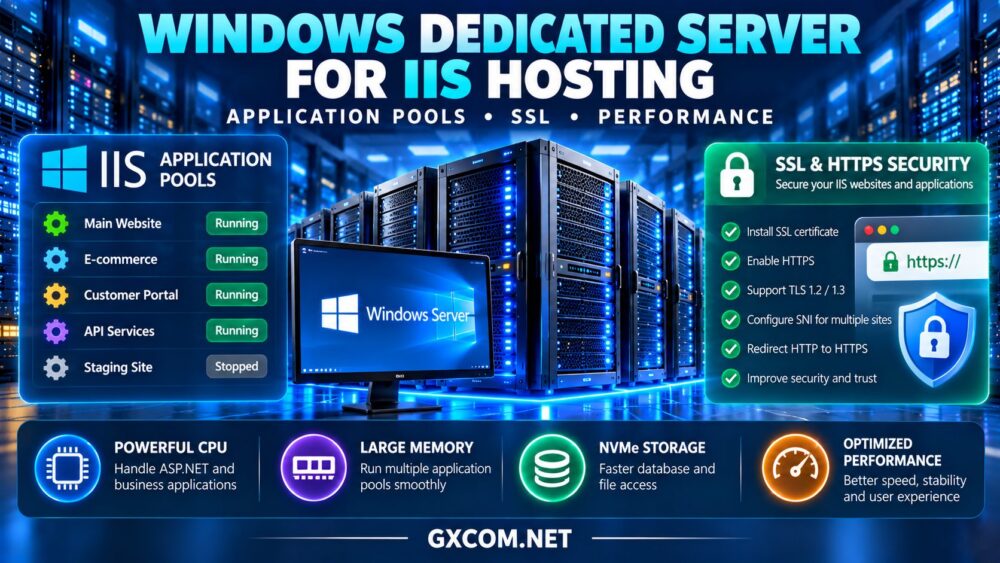
An IIS application pool groups one or more applications under a worker process configuration. Separate pools can provide process-level isolation, independent identities, and different recycling settings.
Use Separate Pools for Important Applications
Hosting unrelated business applications in separate pools reduces the likelihood that a worker-process failure in one application directly terminates another. It also allows administrators to assign distinct security identities and resource settings.
However, application pools do not create complete security boundaries equivalent to separate virtual machines. Operating system permissions and application security still matter.
Configure Pool Recycling Carefully
IIS supports recycling worker processes based on configured conditions, including scheduled intervals and resource thresholds. Recycling can help recover certain problematic processes, but excessive recycling may interrupt sessions or increase application startup latency.
For ASP.NET Core applications, administrators should also verify the correct hosting bundle, application pool configuration, and process hosting model.
Monitor recycling events before changing defaults. Repeated crashes or memory growth usually require application-level investigation rather than increasingly aggressive recycling schedules.
SSL Certificates and HTTPS Security
Every production IIS website handling logins, customer information, or business transactions should use properly configured HTTPS.
Install a trusted TLS certificate, bind it to the correct IIS website, and verify the hostname, expiration date, and certificate chain. Server Name Indication (SNI) can support multiple HTTPS websites sharing an IP address when compatible clients and configurations are used.

Disable obsolete protocols and weak cipher configurations according to current Windows Server security guidance. Enable HTTPS redirection where appropriate, and consider HTTP Strict Transport Security after confirming that the entire application supports HTTPS.
Certificate renewal deserves special attention. Automating renewal without testing certificate installation and IIS bindings can leave websites using expired certificates.
Best Windows Dedicated Hosting Providers for IIS
These four providers are worth evaluating for Windows-based infrastructure. Windows Server availability, licensing, administrative access, and management services must be confirmed for each specific configuration.
1. Hostwinds: Windows Dedicated Hosting Options
Hostwinds is a candidate for businesses seeking dedicated server resources alongside hosting support options.
For IIS workloads, compare available processors, memory configurations, Windows Server editions, and storage options. Clarify whether IIS setup, application troubleshooting, security updates, and backups fall within the selected support package.
最适合: Businesses comparing dedicated Windows infrastructure with different operational assistance requirements.
2. InterServer: Dedicated Infrastructure for Web Applications
InterServer provides dedicated hosting options suitable for evaluating self-managed Windows web environments.
Check the selected server’s Windows licensing availability, remote administration access, storage configuration, and bandwidth terms. Developers running several IIS websites should also consider memory requirements and application pool isolation.
最适合: Teams seeking direct administrative control over Windows web applications.
3. ServerMania: Customizable Business Infrastructure
ServerMania is relevant for businesses with established application workloads and specific hardware requirements.
Evaluate CPU performance, memory expansion, storage redundancy, and network connectivity. Confirm the availability and cost of supported Windows Server configurations before designing a migration.
最适合: Business-critical IIS environments requiring dedicated hardware planning.
4. AccuWeb Hosting: Windows-Oriented Hosting Choices
AccuWeb 主机服务 offers Windows hosting products worth comparing for ASP.NET and IIS-related applications.
Confirm that the exact dedicated server product supports the required Windows version, application framework, administrative permissions, and SQL Server connectivity. Avoid assuming that database licenses or application management are automatically included.
最适合: Windows-focused development teams comparing compatible hosting configurations.
Windows IIS Dedicated Server Comparison
| 服务提供商 | 首要考虑因素 | Verify Before Ordering |
|---|---|---|
| Hostwinds | Dedicated hosting and support | Windows options and management scope |
| InterServer | Administrative control | OS licensing and server specifications |
| ServerMania | Business infrastructure customization | Hardware, Windows support and redundancy |
| AccuWeb 主机服务 | Windows application compatibility | Dedicated product and framework support |
This comparison reflects purchasing considerations, not independently measured performance rankings.
How to Improve IIS Server Performance
Choose Hardware Based on Workload
CPU-intensive applications benefit from strong processor performance, while memory-heavy applications need sufficient RAM to avoid excessive paging. Database-driven websites also depend on storage latency and query efficiency.
NVMe storage may improve demanding workloads, but upgrading disks will not fix inefficient application code or slow external database connections.
请参阅我们的 专用服务器硬件指南 for further hardware selection considerations.
Monitor Application and System Metrics
Use Windows performance counters, IIS logs, and application monitoring to investigate CPU utilization, memory pressure, request latency, failed requests, and worker-process behavior.
Enable suitable compression and caching for eligible content. HTTP/2 support can improve request handling under compatible configurations, but it does not replace application optimization.
For ASP.NET Core applications, review runtime configuration, logging overhead, and database connection pooling before purchasing additional hardware.
Windows Server Licensing and Operating Costs
Windows dedicated hosting can include operating system licensing charges beyond the physical server rental. SQL Server, Remote Desktop Services, backup software, and management tools may introduce separate expenses.

Compare the full licensing picture using our Windows 专用服务器许可指南.
As a hypothetical example, a server costing $130 monthly, plus $35 in licensing and $25 for backups, totals $190 monthly before administration and optional services. These are illustrative figures rather than current provider prices.
Security, Backups and Reliability
Restrict RDP exposure, apply security updates, use least-privilege application pool identities, and protect administrative credentials with appropriate access controls.
Back up website files, configuration, certificates, and databases. Test restoration on a separate environment because RAID and snapshots alone do not guarantee recoverability.
For business-critical applications, consider redundant application nodes and database recovery procedures. One dedicated server remains a single potential failure point, regardless of its hardware specifications.
When Should You Upgrade from Windows VPS?
Consider dedicated infrastructure when sustained CPU usage, memory pressure, storage contention, or administrative requirements exceed the practical limits of your current VPS.
Before migrating, measure actual bottlenecks and estimate downtime, software compatibility, licensing changes, and recovery requirements.
Compare purchasing options through our affordable Windows dedicated servers comparison 以及 专用服务器优惠指南.
最终裁决
右侧 Windows dedicated server for IIS hosting combines suitable hardware with secure IIS configuration, application pool management, dependable backups, and realistic operating costs.
Hostwinds, InterServer, ServerMania, and AccuWeb Hosting provide different options to investigate. Choose according to verified Windows compatibility, support responsibilities, application performance requirements, and total ownership costs—not server specifications alone.