Two NVMe drives in RAID 1 or four drives in RAID 10? For a dedicated server buyer, the choice affects database responsiveness, usable storage, fault tolerance, and the final monthly bill. More drives can improve parallelism, but a larger array is not automatically the better investment.
这个 RAID 1 与 RAID 10 对比 comparison explains how mirroring and striping behave on modern NVMe SSDs, where performance gains appear, which disk failures remain dangerous, and how to evaluate dedicated hosting offers without paying for unnecessary hardware.
RAID 1 vs RAID 10: Quick Verdict
Choose RAID 1 when you need straightforward redundancy for a system volume, website, or moderately loaded database and want to minimize the number of physical drives.
Choose RAID 10 when sustained concurrent I/O, multiple virtual machines, or demanding transactional databases can benefit from additional drive-level parallelism. Budget for at least four drives and validate the expected improvement with realistic benchmarks.
Both protect against certain drive failures. Neither protects against accidental deletion, ransomware, compromised credentials, or every hardware incident. Independent backups remain essential.
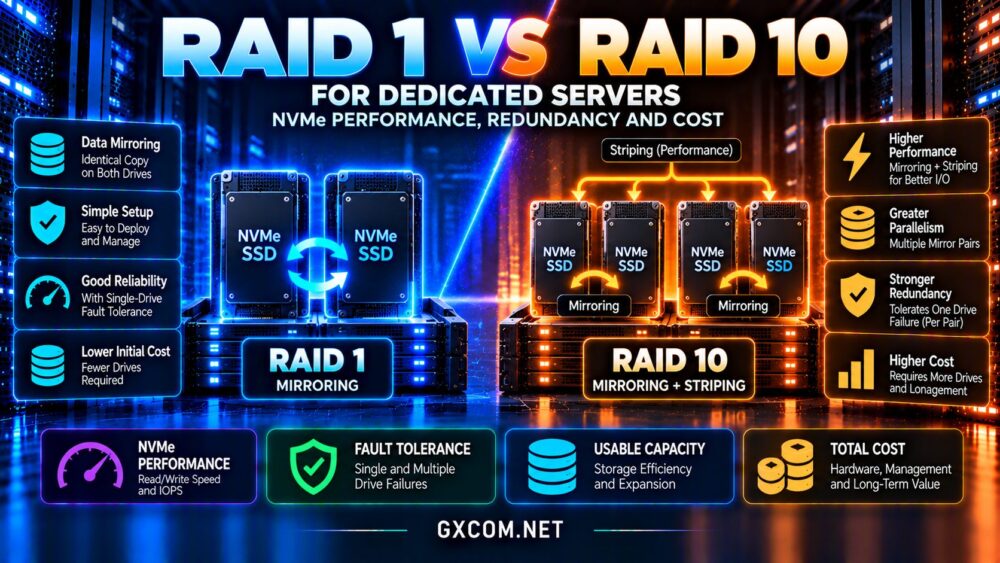
How RAID 1 Works
RAID 1 mirrors data across two or more drives. In the common two-drive configuration, each member holds a copy of the same logical data. If one drive fails, the other can normally continue serving the volume while the failed device is replaced.
With two equal-capacity 2 TB NVMe drives, the resulting logical capacity is approximately 2 TB before formatting and filesystem overhead. You pay for 4 TB of raw storage to obtain a mirrored 2 TB volume.
Reads may be distributed across members, depending on the RAID implementation and workload. Writes must reach the required mirror members, so two drives do not simply double write throughput.
For background on server hardware choices, see our 专用服务器托管指南.
How RAID 10 Works
RAID 10 combines mirrored pairs with striping across those pairs. A typical four-drive array contains two mirrored pairs, with data distributed between them.
Four equal 2 TB drives provide approximately 4 TB of usable capacity before formatting. The capacity efficiency is still about 50%, but the array has twice the raw capacity and twice the usable capacity of the two-drive RAID 1 example.
Because different blocks can be handled by different mirror pairs, RAID 10 can offer greater aggregate I/O capability, particularly when many operations are in flight. Results depend on workload, queue depth, controller or software RAID behavior, and the performance of the individual SSDs.
RAID 1 vs RAID 10: Side-by-Side Comparison
| 因子 | RAID 1 | RAID 10 |
|---|---|---|
| Common minimum drives | 二 | Four |
| Usable capacity | About half of raw capacity | About half of raw capacity |
| Single-drive failure | Tolerated in a two-drive mirror | Tolerated in a healthy four-drive array |
| Two-drive failures | Not tolerated with two members | Depends on which mirror pairs fail |
| Parallel I/O potential | Limited to mirror members | Spread across multiple mirror pairs |
| Typical entry cost | 较低 | 更高 |
NVMe Performance: IOPS, Latency and Throughput
NVMe SSDs already deliver high random I/O performance and low device latency compared with mechanical disks. Consequently, RAID 10’s advantage may be smaller than expected for lightly loaded websites or applications that rarely saturate one mirrored pair.

RAID 10 becomes more compelling when concurrent requests can utilize multiple mirror pairs. Busy databases, virtualization hosts, and mixed workloads may see improved aggregate throughput or more consistent response times under pressure.
随机读写
Random reads can benefit from multiple available drives in either configuration. RAID 10 offers more physical devices across which independent operations may be scheduled.
For writes, mirroring creates duplicate work, while RAID 10 distributes different data blocks across pairs. The actual gain depends on write sizes, queue depth, synchronization, and storage stack overhead.
Why Lower Latency Is Not Guaranteed
Adding drives does not automatically reduce the latency of a single database query. A query may be constrained by CPU time, locking, transaction commits, or network round trips instead of raw storage throughput.
Benchmark p95 and p99 response times under representative load, not just headline sequential read speeds. Our NVMe VPS 和 SSD 性能指南 explains why workload measurements matter.
Disk Failures: Is RAID 10 Safer?
Both RAID levels tolerate one failed drive in their standard healthy configurations. RAID 10 may survive multiple failures if the affected drives belong to different mirror pairs.
However, losing both members of the same mirror pair can make the array unusable. In a four-drive RAID 10 array, two simultaneous failures are therefore not automatically survivable.
A two-drive RAID 1 mirror loses its redundancy after one failure. During replacement and rebuilding, the remaining drive becomes particularly important.
Rebuild Risk and Monitoring
Rebuild duration depends on device capacity, drive speed, live workload, RAID software, and controller behavior. NVMe can shorten some operations, but large arrays and sustained production traffic still require planning.
Monitor SMART or NVMe health indicators, RAID status, error logs, and spare availability. Configure alerts so a degraded array does not remain unnoticed.
Drive redundancy is not a substitute for backups stored outside the server. A power incident, filesystem corruption, or destructive command can affect all array members.
Software RAID vs Hardware RAID for NVMe
Linux software RAID, commonly implemented with mdadm, is a practical option for many dedicated servers. It can provide monitoring and rebuild capabilities without requiring a proprietary RAID controller.
Hardware RAID may simplify certain management tasks, but controller compatibility, NVMe support, cache protection, and replacement procedures must be verified.
Some storage platforms use ZFS mirrors and striped mirror vdevs rather than traditional RAID terminology. These layouts offer related redundancy patterns but different operational features and constraints.
Confirm the exact implementation offered by the host before comparing performance or recovery behavior.
RAID 1 vs RAID 10 for Databases and Virtualization
For a modest WordPress or WooCommerce deployment, RAID 1 on quality NVMe drives may be sufficient if CPU, memory, and database configuration are appropriate.
For PostgreSQL, MySQL, or virtualization workloads with many simultaneous I/O requests, RAID 10 can provide more aggregate headroom. But memory caching, indexes, transaction design, and database tuning often matter as much as array layout.
If the application runs on network-attached storage, local RAID comparisons may not describe its actual storage path. Review our 云块存储与本地 NVMe 对比 before selecting an architecture.
Capacity and Total Cost of Ownership
RAID 10 normally requires a higher initial hardware investment because its common configuration starts with four drives. However, comparing a two-drive RAID 1 with a four-drive RAID 10 using identical drives also compares different usable capacities.
For a fair price analysis, compare configurations that meet the same capacity target, performance requirements, and recovery objectives.
Include drive rental or purchase costs, spare devices, RAID management, replacement procedures, backup storage, and potential downtime.
RAID 1 may be the economical choice for a smaller workload. RAID 10 may justify its additional cost when performance under concurrency prevents application delays or future infrastructure upgrades.
Dedicated Server Providers to Evaluate
Cherry Servers: Bare Metal Configuration
Cherry 服务器 is worth comparing for dedicated hardware deployments where CPU, memory, and storage choices influence database performance. Verify the available drive count, RAID implementation, and replacement process for each configuration.
NovoServe: Dedicated Infrastructure
NovoServe offers dedicated server infrastructure for buyers evaluating production workloads. Confirm whether the chosen hardware supports the required NVMe layout and whether RAID setup or ongoing management is included.

ServerMania:专用服务器选项
ServerMania provides dedicated hosting options relevant to organizations comparing storage performance and operational support. Request a configuration quote covering drive models, redundancy, backups, and hardware service terms.
Bacloud: Dedicated Hosting Alternatives
Bacloud is another candidate for dedicated server procurement. Check current NVMe availability, physical drive slots, supported RAID modes, and the cost of additional disks.
For broader comparisons, consult our 裸机服务器提供商指南 以及 dedicated server deals comparison.
常见问题解答
Is RAID 10 always faster than RAID 1?
No. RAID 10 offers more potential parallelism, but a lightly loaded application may see little practical difference.
Does RAID 10 survive two disk failures?
Sometimes. Two failures in separate mirror pairs may be survivable; two failures within one pair may destroy the array.
Is RAID 1 enough for an NVMe database server?
It can be, depending on query load, capacity, latency targets, and recovery requirements. Benchmark the real application.
Does RAID replace dedicated server backups?
No. RAID maintains availability through certain drive failures but does not protect against deletion, ransomware, or many site-wide incidents.
Final Verdict: Which NVMe RAID Level Wins?
该 RAID 1 与 RAID 10 对比 decision depends on concurrent storage demand, usable capacity, failure tolerance, and total infrastructure cost.
Choose RAID 1 for straightforward mirrored storage with fewer drives. Choose RAID 10 when multiple mirror pairs provide measurable benefits for database or virtualization workloads.
Compare Cherry Servers, NovoServe, ServerMania, and Bacloud using verified hardware configurations rather than assuming every dedicated server supports the same RAID features. Whichever layout you select, maintain independent, tested backups and monitor array health continuously.