Choosing between a Linux dedicated server and a Windows dedicated server affects far more than the operating system interface. Your decision influences software compatibility, licensing costs, server administration, security management, control panels, web technologies, databases, and the total cost of running your infrastructure.
For many web hosting and open-source workloads, Linux is the natural choice because distributions such as Ubuntu, Debian, AlmaLinux, and Rocky Linux are widely supported and generally do not require an additional operating system license. Windows Server, however, remains essential for businesses and applications that depend on IIS, ASP.NET, Microsoft SQL Server, Remote Desktop, PowerShell, or Windows-only software.
这个 Linux Dedicated Server vs Windows Dedicated Server comparison explains the major differences in performance, pricing, administration, security, software compatibility, and use cases so you can choose the operating system that fits your workload.
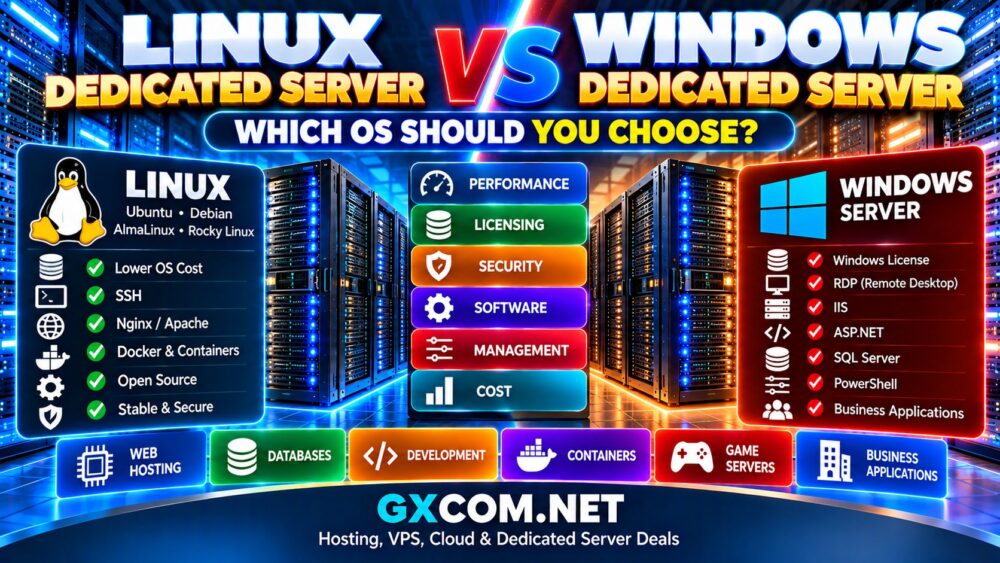
Linux vs Windows Dedicated Server: Quick Comparison
| 功能 | Linux 专用服务器 | Windows 专用服务器 |
|---|---|---|
| 操作系统许可 | Many distributions have no additional license fee | Windows Server licensing generally adds cost |
| 管理 | SSH and command line | RDP, PowerShell and GUI |
| Popular Web Servers | Nginx, Apache | IIS, plus other supported web servers |
| ASP.NET / Microsoft Stack | Some modern .NET workloads supported | Native Microsoft environment |
| Database Options | MySQL, MariaDB, PostgreSQL and more | SQL Server, MySQL and others |
| 控制面板 | cPanel, Plesk and others | Plesk and Windows-compatible panels |
| 远程访问 | SSH | RDP / PowerShell |
| Typical OS Cost | 较低 | 更高 |
| 最适合 | Web hosting, open-source stacks, containers | Microsoft and Windows-specific applications |
Neither operating system is universally better. Software requirements should normally determine the choice before small differences in server specifications are considered.
什么是 Linux 专用服务器?
A Linux dedicated server is a physical server running a Linux distribution rather than a virtual machine sharing the underlying host with other customers.
Popular dedicated server distributions include:
- Ubuntu 服务器
- Debian
- AlmaLinux
- Rocky Linux
Linux is heavily used for web hosting, databases, APIs, containers, development platforms, ecommerce, SaaS applications, and infrastructure services.
One of its biggest advantages is flexibility. Administrators can build a relatively minimal environment and install only the software required by the workload.
If you are deciding between distributions, our Linux Dedicated Server Guide compares Ubuntu, Debian, AlmaLinux, and Rocky Linux in greater detail.
什么是 Windows 专用服务器?
A Windows dedicated server is physical hardware running Microsoft Windows Server.
Windows is particularly relevant when applications depend on Microsoft's software ecosystem or when administrators prefer Windows-based server management.
常见的使用场景包括:
- IIS 网站托管
- ASP.NET 应用程序
- Microsoft SQL Server
- 远程桌面环境
- PowerShell administration
- Windows-only business applications
- Microsoft-oriented enterprise infrastructure
The underlying server can use similar Intel or AMD hardware to a Linux server. The major differences come from the operating system, software ecosystem, administration model, and licensing.
Linux vs Windows Dedicated Server Pricing
Cost is one of the clearest differences between the two platforms.
Ubuntu, Debian, AlmaLinux, and Rocky Linux can generally be installed without adding a commercial operating system license to the monthly dedicated server bill.
Windows Server normally requires commercial licensing. Hosting companies may charge separately for the Windows license or incorporate it into the configured server price.
A Windows deployment may also include additional costs for:
- Microsoft SQL Server
- 远程桌面服务的许可
- Plesk or another commercial control panel
- Windows management services
- Other Microsoft software
For identical physical hardware, Linux can therefore have a lower total monthly cost when the workload does not require commercial software licenses.
Does Linux Perform Better Than Windows?
There is no useful universal answer to this question.
Server performance depends heavily on:
- CPU型号和代数
- 内存容量
- NVMe 或 SSD 性能
- 应用程序架构
- 数据库配置
- Web 服务器配置
- 缓存
- 网络性能
- System administration
Linux can run a very minimal operating environment, which is useful when administrators want to dedicate as many resources as practical to applications.
Windows Server includes a different set of services and management components, but that does not mean every Windows workload will perform worse.
An application designed specifically around Microsoft technologies may perform and operate more appropriately in Windows than in a Linux environment requiring compatibility changes.
Linux vs Windows for Web Hosting
Linux dominates many traditional web hosting environments because technologies such as Nginx, Apache, PHP, MySQL, MariaDB, PostgreSQL, WordPress, and numerous open-source frameworks work extremely well on Linux.
Linux is particularly suitable for:
- WordPress
- WooCommerce
- PHP 应用程序
- Python 应用程序
- Node.js
- Ruby
- Open-source CMS platforms
- Nginx and Apache hosting
Windows becomes more compelling when the application is built around IIS or other Microsoft-specific technologies.
Linux vs Windows for WordPress
WordPress can operate on Windows, but Linux is generally the more common environment for dedicated WordPress hosting.
The typical Linux WordPress stack combines technologies such as:
- Nginx 还是 Apache
- PHP
- MySQL 或 MariaDB
- Redis
- FastCGI caching
If WordPress is the primary workload and there is no Windows-specific software requirement, paying additional Windows licensing costs usually provides little benefit.
Linux vs Windows for ASP.NET
The answer is more nuanced than it was historically because modern .NET is cross-platform and many .NET applications can run on Linux.
However, Windows remains important when an application depends on Windows-specific components, IIS functionality, legacy .NET Framework applications, or other Microsoft technologies that are not easily moved to Linux.
Before choosing the operating system, determine whether your application uses modern cross-platform .NET or has dependencies tied specifically to Windows.
Linux vs Windows for Databases
Both platforms can support powerful database workloads.
Linux is commonly used with:
- MySQL
- MariaDB
- PostgreSQL
- Redis
- MongoDB and other database technologies
Windows is particularly relevant for:
- Microsoft SQL Server
- Microsoft-oriented application stacks
- Business software designed around SQL Server
SQL Server can also run on supported Linux environments, so the presence of SQL Server alone does not automatically require Windows. Application dependencies and Microsoft licensing requirements should be evaluated together.
Linux vs Windows for Remote Server Management
The administration experience differs substantially.
Linux: SSH
Linux administrators typically connect through SSH and manage the server using command-line tools.
This is efficient for:
- 自动化
- Configuration management
- Remote administration
- Shell scripting
- DevOps workflows
Windows: RDP and PowerShell
Windows Server provides Remote Desktop for graphical administration and PowerShell for powerful command-line and automation tasks.
Administrators familiar with Windows desktop environments may initially find RDP easier, although professional Windows infrastructure increasingly relies heavily on PowerShell and automated management.
SSH vs RDP
| 功能 | SSH | RDP |
|---|---|---|
| Common Platform | Linux | Windows |
| 界面 | Primarily command line | Graphical desktop |
| Bandwidth Usage | Generally low | 通常较高 |
| 自动化 | 非常棒 | PowerShell complements RDP |
| Administration Style | CLI-focused | GUI + CLI |
The better method depends largely on administrator experience and operational requirements.
Linux vs Windows Dedicated Server Security
Neither operating system is automatically secure simply because it is Linux or Windows.
Server security depends heavily on configuration, patch management, exposed services, account security, application vulnerabilities, firewall policies, monitoring, and administrator practices.
Linux administrators should pay particular attention to:
- SSH 访问
- root权限
- Package updates
- 防火墙配置
- Unnecessary services
Windows administrators should carefully manage:
- RDP exposure
- Administrator accounts
- Windows 更新
- Network Level Authentication
- 防火墙规则
- PowerShell and application permissions
A well-maintained Windows server can be more secure than a badly maintained Linux server, and vice versa.
Linux vs Windows for Control Panels
Control panel requirements can determine the operating system before you deploy the server.
Linux supports a broad hosting ecosystem that can include cPanel, Plesk, DirectAdmin, and other platforms, depending on the currently supported operating system versions.
Windows hosting commonly relies on Plesk and Windows-compatible management tools.
Always check the control panel vendor's current compatibility list before installing an operating system because supported versions change over time.
Linux vs Windows for Docker and Containers
Linux is particularly strong for containerized infrastructure.
Docker, Kubernetes, container runtimes, orchestration platforms, and modern DevOps tooling have deep roots in the Linux ecosystem.
Windows also supports containers, particularly for Windows-specific workloads, but Linux remains the natural choice for many general-purpose container environments.
For Docker-heavy applications without Windows dependencies, Ubuntu or Debian can provide a straightforward dedicated server platform.
Linux vs Windows for Game Servers
The correct choice depends on the game server software.
Many popular dedicated game servers support Linux, making it possible to avoid Windows licensing while using a lightweight operating environment.
Other games or management tools may depend on Windows.
Check the official server software requirements before ordering hardware rather than assuming that every game supports both operating systems equally.
Linux vs Windows for Virtualization
Both operating system ecosystems can support virtualization, but administrators often use dedicated Linux servers with technologies such as KVM and related virtualization platforms.
Windows environments can use Microsoft's virtualization technologies where supported and properly licensed.
If virtualization is the main reason for buying dedicated hardware, consider:
- CPU virtualization support
- 内存容量
- 存储性能
- 网络配置
- Additional IP requirements
- Guest operating systems
- 许可
Which OS Uses Fewer Server Resources?
A minimal Linux installation can operate with relatively few background services and is often attractive for administrators who want a lean server environment.
Windows Server typically has different baseline resource requirements because of its operating system architecture, graphical management capabilities, and included services.
However, on a modern dedicated server with substantial RAM, the operating system's baseline memory consumption is often much less important than the resources required by the actual application.
Do not choose Linux simply to save a small amount of RAM if the application itself requires Windows.
Which OS Is Easier to Manage?
Ease of management depends strongly on experience.
A Windows administrator who has spent years working with PowerShell, IIS, Active Directory, and SQL Server may find Windows substantially easier to maintain.
A Linux administrator experienced with SSH, Bash, Nginx, systemd, Docker, and configuration management will probably find Linux easier.
The best operating system is often the one your technical team can maintain securely and efficiently.
Linux vs Windows Dedicated Server for Beginners
Windows can initially feel more familiar to users accustomed to graphical desktop administration because RDP provides a recognizable interface.
Ubuntu also provides an accessible entry point into Linux server administration because of its extensive documentation and large community.
However, neither unmanaged Windows nor unmanaged Linux dedicated hosting should be treated as a beginner-friendly consumer product. Production servers require security, backups, updates, monitoring, and troubleshooting regardless of operating system.
Managed vs Unmanaged Hosting
The operating system is only one part of the management decision.
With an unmanaged dedicated server, you are normally responsible for maintaining the operating system and applications yourself.
A managed dedicated server can reduce the administration burden, although the exact services included vary significantly between providers.
我们的 托管型专用服务器与非托管型专用服务器 该对比对这些差异进行了更详细的说明。.
Which Is Cheaper: Linux or Windows Dedicated Hosting?
For equivalent hardware, Linux is often cheaper because common distributions do not require an additional Windows Server license.
This difference becomes particularly important in budget hosting.
A dedicated server with an attractive hardware price can become substantially more expensive after Windows Server and other Microsoft licensing requirements are added.
If price is your priority and the application does not require Windows, Linux deserves serious consideration.
You can compare provider options in our Best Linux Dedicated Server Hosting Providers 指南。.
When Should You Choose Linux?
Linux is generally a strong choice when you need:
- WordPress or WooCommerce hosting
- PHP 应用程序
- Nginx 还是 Apache
- MySQL, MariaDB or PostgreSQL
- Docker and container workloads
- Node.js or Python applications
- DevOps infrastructure
- Lower operating system licensing costs
- SSH-based administration
When Should You Choose Windows?
Windows is generally more appropriate when you need:
- IIS
- Legacy .NET Framework applications
- 仅限Windows的软件
- Microsoft-oriented business applications
- Remote Desktop administration
- Specific SQL Server environments
- Windows-based development or testing
For provider-specific options, see our Best Windows Dedicated Server Hosting Providers 比较。.
What If Windows Licensing Is Too Expensive?
First determine whether Windows is technically required.
If your application can run natively on Linux, moving to Ubuntu, Debian, AlmaLinux, or Rocky Linux may remove the Windows Server licensing component from your hosting bill.
If Windows is required, compare the total configured price rather than the advertised bare metal price.
我们的 Cheap Windows Dedicated Servers guide focuses specifically on reducing the total cost of Windows bare metal.
Linux vs Windows Dedicated Server: How to Decide
Use the application as the starting point rather than choosing an operating system based on familiarity alone.
- List the software your server must run.
- Identify Windows-specific dependencies.
- Check whether your application supports Linux.
- Determine database requirements.
- Check control panel compatibility.
- Compare operating system and software licensing.
- Consider your administrator's experience.
- Evaluate automation and management requirements.
- Calculate the complete monthly cost.
- Choose the platform that requires the fewest unnecessary compromises.
Linux vs Windows Dedicated Server: Which Should You Choose?
Choose Linux when your workload is based primarily on open-source web technologies, containers, WordPress, PHP, Python, Node.js, Nginx, Apache, MySQL, MariaDB, PostgreSQL, or similar technologies and there is no technical reason to pay for Windows.
Choose Windows when your applications depend on IIS, Windows-specific software, legacy .NET Framework components, Microsoft-oriented business applications, or an operational environment built around Windows Server.
If both operating systems support your workload equally well, compare licensing cost, administration experience, automation, software ecosystem, and long-term maintenance before deciding.
结语
The Linux vs Windows dedicated server decision should begin with software compatibility, not brand preference.
Linux offers a flexible, widely supported environment for web hosting, databases, containers, development platforms, and open-source applications while avoiding an additional operating system license for many popular distributions.
Windows Server provides the native environment required by many Microsoft technologies and Windows-specific business applications while offering RDP, PowerShell, IIS, and deep integration with the Microsoft ecosystem.
Hardware still matters more than the operating system for many raw performance questions. Compare CPU generation, RAM, NVMe storage, network performance, application architecture, and configuration alongside the OS.
Choose the operating system that supports your applications and that your technical team can maintain securely. That will usually deliver more long-term value than choosing Linux or Windows based on price or familiarity alone.