JavaScript SEO rendering problems can prevent important website content from appearing in Google’s processed page, even when visitors see a complete layout in their browsers. Product descriptions, article text, navigation links, and metadata may depend on scripts that fail to load or execute during rendering.
However, missing search visibility does not automatically mean Google cannot run JavaScript. Google can render many JavaScript-powered pages, but crawling, rendering, and indexing are separate processes. Understanding where a failure occurs is the first step toward fixing it.
How Google Processes JavaScript Websites
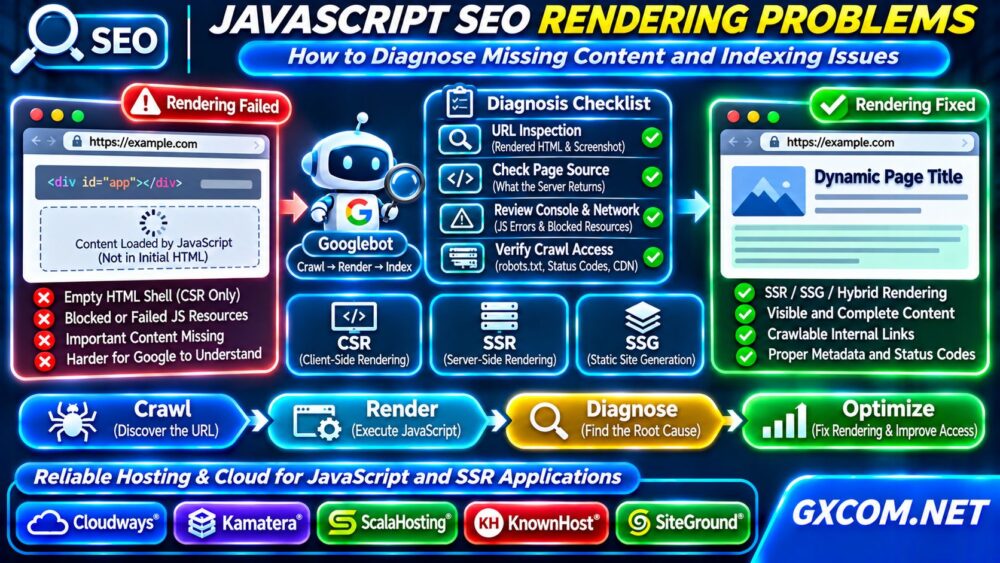
Google generally discovers URLs, fetches their HTML, and processes eligible pages for rendering. Its rendering system can execute JavaScript and use the resulting content for indexing. Rendering may happen after the initial crawl rather than during the same processing stage.
Client-side rendering (CSR) often delivers a minimal HTML shell and builds the page inside the browser. Server-side rendering (SSR) returns meaningful HTML from the server. Static site generation (SSG) produces HTML during the build process.
SSR and SSG can make essential content available without requiring client-side execution, although implementation quality still matters.
1. Check What the Server Actually Returns
Open the affected page and inspect its original HTML using View Page Source or a command-line request:
curl -L https://example.com/page/Search the response for the primary heading, important body text, canonical URL, and internal links. If the response contains only an empty application container, the page probably depends heavily on JavaScript rendering.
This does not automatically prevent indexing, but it creates another dependency. Compare the original response with the browser’s rendered DOM to identify content inserted after JavaScript execution.
2. Inspect the URL in Google Search Console
Use Google Search Console’s URL Inspection tool for the affected page. Review the indexed URL status, crawl information, and available page inspection details.
Run a live test when appropriate and inspect the rendered HTML and screenshot. Look for missing headings, incomplete product information, empty content sections, or unexpected error messages.
A successful live test does not guarantee indexing. Google also evaluates canonicalization, duplication, content quality, and other signals. Separate rendering failures from broader indexing decisions before changing infrastructure.
3. Find JavaScript Execution and Resource Errors
Open browser developer tools and examine the Console and Network panels. Look for uncaught exceptions, failed JavaScript bundles, blocked API requests, and resources returning HTTP errors.

Verify that essential scripts and stylesheets are accessible without authentication. Check robots.txt restrictions and ensure that required resources are not blocked from Googlebot.
Content that depends on cookies, browser storage, or a logged-in session may not appear during Google’s rendering process. Public indexable content should not require private user state.
4. Fix Content Hidden Behind User Interaction
Google’s renderer does not behave like a person exploring every interface. Essential text should not require clicking a button, submitting a form, or scrolling through an interaction-dependent workflow before it becomes available.
Lazy loading can work when implemented correctly, but important content should load through discoverable URLs and supported viewport behavior. Do not depend on user actions that automated rendering may never perform.
Use real HTML anchor elements with href attributes for important navigation. JavaScript click handlers without crawlable destinations can make content discovery harder.
5. Decide Whether SSR or SSG Is Appropriate
If critical content is consistently missing from rendered results, consider SSR, SSG, or a hybrid rendering approach. These strategies can deliver meaningful content earlier and reduce reliance on client-side execution.
React, Vue, Next.js, and Nuxt projects support different deployment patterns. Choose based on update frequency, personalization, caching, and application requirements rather than assuming one framework solves every SEO problem.
When adopting SSR, verify that the server returns the correct page content and status code. A server-rendered error page with HTTP 200 can still create indexing confusion.
6. Audit Canonical Tags, Metadata, and Status Codes
Check whether JavaScript changes the canonical URL, title, robots directives, or structured data after the initial response. Conflicting signals between server HTML and rendered content can complicate diagnosis.
Important pages should return appropriate HTTP status codes. Missing pages should not silently become successful application shells, and server errors should not be disguised as normal content.
请查看我们的 非托管服务器安全检查清单 when investigating server access controls or unexpected resource restrictions.
7. Identify Server Performance and Rendering Bottlenecks
JavaScript SEO issues sometimes originate outside the frontend. Slow API responses, overloaded Node.js processes, unstable deployments, and intermittent 5xx errors can prevent complete content delivery.
Measure response times, CPU and memory usage, application logs, and backend dependencies. If dynamic rendering requires substantial computation, evaluate caching, server capacity, and deployment architecture.
我们的 云服务器自动扩展指南 explains how infrastructure can respond to changing workloads. Scaling alone will not correct broken JavaScript or inaccessible content.
8. Validate Fixes Without Confusing Rendering With Indexing
After deployment, test representative URLs across templates: articles, product pages, categories, and pagination. Confirm that essential content and links appear in rendered HTML.
Use URL Inspection again and monitor Search Console indexing reports over time. Requesting indexing does not guarantee inclusion or immediate recrawling.
Track affected URL groups rather than judging success from a single page. Record changes to rendering strategy, deployment dates, and subsequent crawl results.
When Should You Upgrade Hosting or Cloud Infrastructure?
Changing hosting providers is unnecessary when the underlying issue is an incorrect canonical tag or a frontend exception. Infrastructure becomes relevant when your current environment cannot reliably run the required application runtime, handle SSR workloads, or provide adequate logging and deployment controls.

Cloudways may suit compatible managed cloud applications, while 卡马特拉 offers configurable cloud resources for custom deployments. ScalaHosting 以及 KnownHost are managed VPS options worth evaluating. SiteGround is relevant to WordPress-focused publishing environments.
Confirm Node.js support, process management, server access, caching, backups, and support responsibilities before selecting a plan. Compare options through our 托管云主机对比, 最佳VPS服务商指南, ,以及 Best Cloud Hosting Solutions comparison.
常见问题解答
Can Google Index JavaScript Content?
Yes. Google can render JavaScript, but content availability, resource access, rendering success, and indexing decisions all matter.
Is Server-Side Rendering Always Better for SEO?
No. SSR can improve initial content availability, but incorrect implementation, slow responses, or conflicting metadata can still cause problems.
Does Faster Hosting Guarantee Better Indexing?
No. Reliable infrastructure helps content delivery, but indexing also depends on technical signals, discoverability, and content value.
最终裁决
Diagnose JavaScript SEO rendering problems by comparing original HTML, rendered content, Google Search Console findings, and server behavior. Fix frontend errors first, adopt suitable rendering strategies, and consider infrastructure upgrades only when measurable hosting limitations prevent reliable content delivery.