Game server tick rate is one of the most important technical concepts behind responsive multiplayer gameplay. Whether you manage a competitive shooter, a Minecraft world, or a large online gaming community, understanding how frequently a server updates its simulation can help you identify performance problems and choose suitable hosting infrastructure.
However, a higher tick rate does not automatically mean a better gaming experience. CPU performance, server software, network latency, player activity, and the game's underlying architecture all influence the results.
This guide explains what server tick rate means, how it differs from FPS and ping, why tick time matters, and what to evaluate when choosing a game hosting provider.
What Is Game Server Tick Rate?
Game server tick rate refers to the number of simulation updates a server attempts to process every second. These updates are commonly called server ticks.
During a typical tick, a multiplayer server may process player inputs, update entity positions, evaluate game rules, calculate physics, and prepare information that clients need to receive.
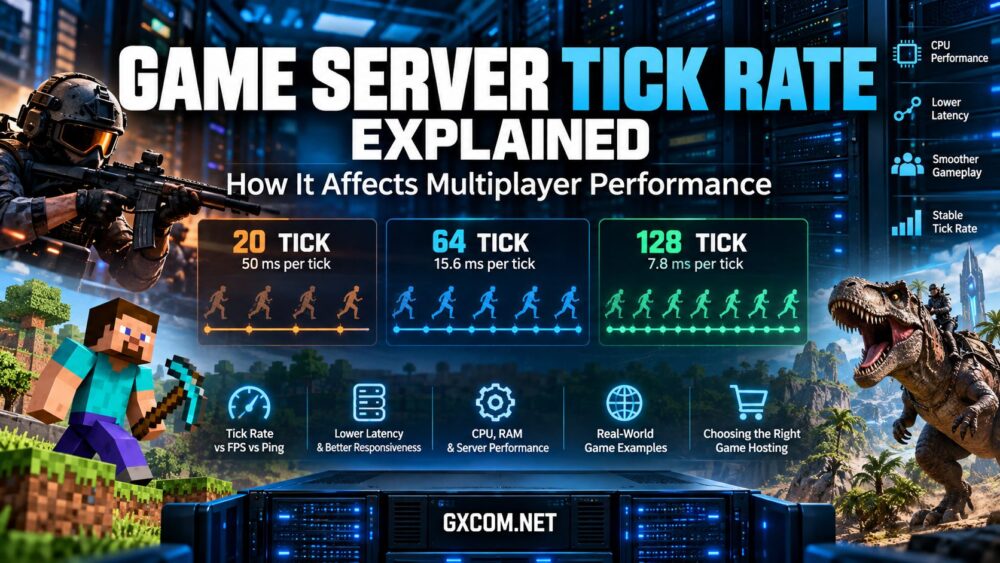
For example, a server operating at 64 ticks per second has a nominal simulation interval of approximately 15.6 milliseconds between ticks. A 128-tick simulation has a nominal interval of approximately 7.8 milliseconds.
The relationship is straightforward:
Tick interval (milliseconds) = 1,000 ÷ Tick rate (ticks per second)
| Tick Rate | Nominal Tick Interval | 其含义 |
|---|---|---|
| 20 TPS | 50 ms | Common default simulation target in Minecraft |
| 30 ticks/s | 33.3 ms | Illustrative simulation rate used by some game architectures |
| 64 ticks/s | 15.6 ms | Relevant to Counter-Strike 2's server simulation model |
| 128 ticks/s | 7.8 ms | Higher-frequency simulation used in certain supported environments |
These numbers describe timing intervals, not guaranteed performance. Games use different simulation models, and some do not expose a configurable tick rate at all.
How Does Tick Rate Affect Multiplayer Performance?
Tick rate affects how frequently a server advances its authoritative game state. In games where the simulation model supports it, more frequent updates can improve the temporal resolution of server-side calculations.
That can matter for movement, physics interactions, collision checks, and other time-sensitive gameplay events.
However, actual player responsiveness also depends on input handling, client prediction, interpolation, network updates, and the design of the game engine.
1. Player Movement and Position Updates
Multiplayer games continuously reconcile player movement with the server's authoritative simulation. If a server cannot process its scheduled updates consistently, movement may appear delayed, irregular, or out of sync.
Increasing the target tick rate can reduce the nominal interval between simulation steps in compatible games, but it also gives the server less time to complete each step.
2. Hit Registration and Competitive Gameplay
Competitive shooters often generate interest in tick rate because players want accurate hit registration and consistent interactions.
In traditional tick-based networking systems, the frequency of server simulation updates can influence how events are resolved. However, modern games may use additional timing techniques.
Counter-Strike 2, for example, uses a sub-tick architecture intended to record the timing of player actions more precisely within the server's simulation framework. It should not be described as simply a conventional 128-tick system.
For readers specifically comparing shooter hosting options, our CS2 server hosting comparison explores additional considerations such as location, management features, and server resources.
3. World Simulation and Entity Activity
In sandbox and survival games, ticks may govern world updates, entity behavior, environmental systems, and gameplay logic.
A heavily modified world with large numbers of active entities can require substantially more processing per tick than a relatively simple environment.
This is why tick consistency is often more useful than looking at the advertised CPU core count alone.
Tick Rate vs Tick Time: Why Both Matter
Tick rate describes how many updates the server targets per second. Tick time describes how long the server takes to process an individual simulation update.
These measurements are related, but they are not interchangeable.
For a server targeting 20 ticks per second, each tick has a nominal 50-millisecond interval. If the simulation consistently requires longer than that interval to complete, the server may fall behind its intended update schedule.
Similarly, a 64-tick simulation has approximately 15.6 milliseconds available per scheduled tick. Sustained processing time beyond that budget can lead to missed timing targets or other game-specific performance problems.
| 公制 | 测量内容 | 为何这很重要 |
|---|---|---|
| Tick rate | Simulation updates per second | Defines the target update frequency |
| Tick time | Processing time per simulation update | Shows whether the workload fits its timing budget |
| TPS | Ticks completed per second | Useful for monitoring simulation health in games such as Minecraft |
| Ping | Network round-trip latency | Indicates communication delay between client and server |
| Client FPS | Rendered frames per second | Describes local graphics rendering performance |
A server may maintain its target tick rate while some players experience high ping. Conversely, a player may have excellent network latency while the server struggles to complete its simulation workload.
Choosing Game Hosting for Stable Tick Performance
A stable multiplayer server depends on more than its advertised tick rate. CPU consistency, memory headroom, network quality, and game-specific configuration all contribute to reliable gameplay.
If your current server struggles to maintain its intended simulation timing, it may be worth comparing hosting providers before investing in additional resources.
When evaluating a hosting service, look beyond headline specifications. Consider the processor architecture, CPU allocation, available server regions, supported games, management tools, and whether the provider offers suitable upgrade options.

Game Hosting Providers Worth Considering
Godlike.Host offers game server hosting for titles including Minecraft, Rust, ARK, and Counter-Strike 2. Its hosting options make it a relevant starting point for administrators comparing server resources, management features, and geographic availability.
主持人哈沃克 provides managed hosting for a range of multiplayer games. Administrators can evaluate its game-specific plans, control panel features, and deployment locations when comparing operational requirements.
Sparked 主持人 offers hosting solutions for multiplayer games, including Minecraft and other supported titles. Buyers should review the hardware resources, management options, and available server locations for their intended workload.
GameServerKings is another game hosting provider worth investigating when comparing managed server options. Confirm current game availability, configuration capabilities, and product specifications before purchasing.
These providers are examples for further evaluation, not the results of a controlled tick-rate benchmark. GXCOM.NET does not claim that any provider delivers the highest TPS or lowest tick time without comparable testing.
For a broader buying comparison, explore our 最佳游戏服务器托管服务商 指南。.
重要提示: Higher advertised tick rates do not guarantee better performance. Consistent simulation timing under realistic player loads is the more useful goal.
Tick Rate vs FPS vs Ping: Understanding the Differences
These three terms are frequently confused when diagnosing multiplayer performance.
Server Tick Rate
Tick rate relates to server-side simulation frequency. It determines how frequently the authoritative game world advances according to the game's timing model.
Client FPS
Frames per second measure how often a player's computer or console renders images. FPS depends primarily on local graphics settings, hardware, and the game client.
A powerful graphics card cannot fix a server that is consistently missing simulation deadlines.
Network Ping
Ping usually refers to the round-trip time between the player's device and a remote endpoint. High latency can delay communication even when the server's simulation is operating normally.
Packet loss and jitter can also make gameplay feel inconsistent despite a relatively low average ping.
For a broader troubleshooting process, see our guide to reducing game server lag.
Does Higher Tick Rate Always Mean Better Performance?
No. Higher tick rate can improve simulation granularity in compatible games, but it increases processing demands and may introduce additional networking overhead.
A higher target is only useful when the server hardware, game engine, and network implementation can support it consistently.
Consider two hypothetical servers:
- Server A: Targets 128 ticks per second but regularly exceeds its tick-time budget during busy matches.
- Server B: Targets 64 ticks per second and maintains consistent simulation timing throughout the session.
Server B may provide the more stable experience, even though its nominal tick rate is lower.
These are illustrative examples rather than benchmark results. The actual outcome depends on the game's architecture and workload.
Some games also restrict or internally manage tick rate. Attempting unsupported configuration changes can cause timing errors, compatibility issues, or unexpected gameplay behavior.
How Tick Rate Works in Popular Multiplayer Games
Counter-Strike 2
Counter-Strike 2 uses a 64-tick server simulation with sub-tick input timing. Valve's sub-tick design addresses the timing of actions such as movement and shooting without relying solely on conventional tick-bound input evaluation.
Server quality still matters. Consistent CPU performance, reliable connectivity, and appropriate geographic placement remain important considerations for competitive communities.
《我的世界》
Minecraft normally targets 20 game ticks per second, corresponding to a 50-millisecond interval.
In Minecraft Java Edition, administrators can use game and server diagnostics to investigate tick performance. Supported versions also provide tick-related commands and debugging capabilities.
If simulation work takes too long, actual TPS can fall below the intended target, potentially slowing world activity and gameplay.
Chunk generation, entity counts, automation, plugins, and modpacks can all influence the amount of work required during each tick.
Rust and Other Survival Games
Rust and other survival games may experience changing server workloads as player populations, entities, structures, and active systems increase.
Administrators should use game-specific performance diagnostics rather than assume that every survival title operates at the same fixed tick rate.
Large persistent worlds can become CPU-intensive even when total RAM usage appears acceptable.
ARK and Heavily Modded Environments
ARK server performance depends on the game version, active world systems, player activity, and hardware resources.
Administrators should distinguish simulation performance from network latency and use diagnostics appropriate to the specific ARK release.
For these games, stable processing capacity and memory headroom are often more useful purchasing criteria than an unsupported claim about a higher tick-rate setting.
What Hardware Affects Game Server Tick Performance?
CPU Single-Thread Performance
Many game server workloads contain timing-sensitive simulation tasks that cannot be distributed evenly across all CPU cores.
Strong per-core performance, processor architecture, cache behavior, and predictable CPU scheduling can therefore be important.
Additional cores still matter for supporting background tasks, multiple server instances, and workloads capable of parallel execution.
我们的指南: 用于游戏服务器的高频CPU 解释了时钟频率、缓存和核心数如何影响主机选择。.
CPU Contention and Virtualization
On shared virtualized infrastructure, the number of advertised virtual CPUs does not necessarily indicate how much processing time is consistently available.
Heavy contention between virtual machines can reduce performance predictability. Administrators should evaluate CPU allocation policies and sustained workload behavior where possible.
RAM and Memory Pressure
Insufficient RAM can cause memory pressure, excessive garbage collection in some runtimes, or operating-system swapping.
These problems can increase processing delays and affect tick consistency, particularly in modded environments or large persistent worlds.
Storage and World Saving
Storage performance becomes relevant when a game saves world data, loads assets, or performs frequent disk operations.
NVMe storage can help reduce certain I/O bottlenecks, but faster storage does not automatically solve CPU-bound simulation delays.
网络质量
Good network connectivity cannot compensate for a severely overloaded simulation thread. However, low latency, stable routing, and minimal packet loss are essential for delivering timely updates to players.
Server location should be selected based on where the majority of the gaming community is located.
How to Diagnose Low Tick Rate or High Tick Time
Before purchasing a larger hosting plan, investigate the actual bottleneck.
- Identify the game's target simulation rate. Check official documentation or supported server diagnostics rather than assuming that a higher setting is available.
- Measure actual tick performance. Look for TPS, average tick time, simulation timing, or equivalent game-specific metrics.
- Observe CPU usage during peak activity. Pay attention to per-core load, throttling, and virtualization contention.
- Review active entities and plugins. Large entity counts, poorly optimized plugins, and complex automation can increase simulation work.
- Check memory pressure. Review available RAM, swapping, and runtime garbage-collection behavior where applicable.
- Inspect storage activity. Determine whether saves, backups, or world loading coincide with performance spikes.
- Measure network conditions separately. Use latency, packet-loss, and jitter measurements to distinguish connectivity problems from server simulation problems.
- Test changes individually. Compare results under similar player counts and workloads before deciding that an upgrade is necessary.
Recording measurements before and after each change makes troubleshooting more reliable than adjusting multiple settings simultaneously.
How to Evaluate a Game Hosting Plan Before Buying
After identifying your game's simulation requirements, compare hosting plans using practical criteria rather than relying only on advertised CPU cores or memory.
| 主机因素 | 需要检查的内容 | 为何这很重要 |
|---|---|---|
| CPU 性能 | Processor generation, per-core performance, and CPU allocation | Helps maintain consistent simulation timing |
| 记忆 | Available RAM and upgrade options | Supports world data, plugins, and active players |
| 存储 | SSD or NVMe storage and backup options | Supports world loading, saves, and recovery |
| 网络 | Server regions, latency, routing, and DDoS protection | Helps maintain stable multiplayer connectivity |
| 管理 | Control panel, logs, configuration access, and updates | Makes troubleshooting and maintenance easier |
| 可扩展性 | Resource upgrades and migration options | Supports growing communities and changing workloads |
For additional planning guidance, read our 游戏服务器配置指南 covering CPU, RAM, storage, and bandwidth considerations.

When Should You Upgrade Your Game Server?
Consider an upgrade when monitoring shows sustained processing delays that remain after reasonable configuration and software optimization.
可能的预警信号包括:
- Tick time regularly exceeds the game's intended simulation budget.
- TPS falls during predictable periods of high player activity.
- One or more CPU threads remain saturated during gameplay.
- Modded or entity-heavy worlds experience persistent simulation slowdowns.
- Performance improves when player counts or active entities are reduced.
An upgrade should address the measured limitation. A faster CPU may help a CPU-bound server, while additional RAM is more relevant when memory pressure is the problem.
If you need more predictable resource access, a gaming VPS with appropriate CPU allocation or a dedicated game server may be worth evaluating. However, neither option guarantees better performance without suitable hardware and configuration.
Before upgrading, compare the actual resource limits of your existing plan with the requirements of your game, player count, and installed modifications.
常见问题解答
Is 128 Tick Better Than 64 Tick?
A 128-tick simulation has a shorter nominal interval than a 64-tick simulation. However, it also requires more frequent processing. Whether it improves gameplay depends on the game engine, supported networking model, server capacity, and stability. Counter-Strike 2 should not be evaluated as though it were a conventional 128-tick system.
What Is a Good Tick Rate for a Game Server?
There is no universal ideal tick rate. The appropriate target depends on the game and its simulation architecture. Maintaining the intended rate consistently is generally more important than forcing an unsupported higher value.
Does Tick Rate Affect Ping?
Tick rate and ping measure different things. Tick rate describes simulation frequency, while ping measures network round-trip latency. Poor performance in either area can affect gameplay, but increasing tick rate does not directly reduce network ping.
Can More RAM Increase Server Tick Rate?
More RAM can help when memory pressure or swapping is causing delays. It will not necessarily improve tick performance if the main bottleneck is CPU processing capacity.
Why Is My Minecraft Server Running Below 20 TPS?
Possible causes include overloaded simulation tasks, excessive entities, chunk generation, plugins, mods, memory pressure, or insufficient CPU resources. Use supported profiling tools to identify the actual cause before changing hosting plans.
Does NVMe Storage Improve Game Server Tick Rate?
NVMe storage can reduce some world-loading and saving delays, but it does not directly increase the simulation capacity of a CPU-bound game server. Its benefit depends on the workload.
Final Verdict: Consistency Matters More Than a Bigger Tick-Rate Number
Game server tick rate is an important measure of how frequently a multiplayer server updates its simulation, but it should never be considered in isolation.
Stable tick timing depends on the game engine, CPU performance, memory availability, software configuration, and workload intensity. Network latency and packet loss introduce additional factors that must be evaluated separately.
For most server administrators, the best approach is to understand the game's intended simulation model, monitor actual tick performance, identify bottlenecks, and select hosting resources that can maintain consistent performance under realistic player activity.
When comparing hosting providers, focus on measurable stability, suitable hardware, supported management tools, and a server location that serves your community effectively.