A cloud server can fail because of accidental deletion, a faulty update, ransomware, or infrastructure trouble. The recovery method you purchase determines how much data you lose and how quickly services return. Yet many buyers treat snapshots and backups as interchangeable.
理解 cloud VPS snapshots vs backups helps you choose protection that fits your application rather than paying for storage that cannot solve your worst failure scenario. A snapshot is often convenient for rolling back a virtual machine. A properly designed backup strategy protects recoverable copies across failures, retention periods, and potentially separate locations.
Start with the underlying hosting architecture in our 云托管与VPS对比, then define which recovery capabilities your business actually requires.
What Is a Cloud VPS Snapshot?
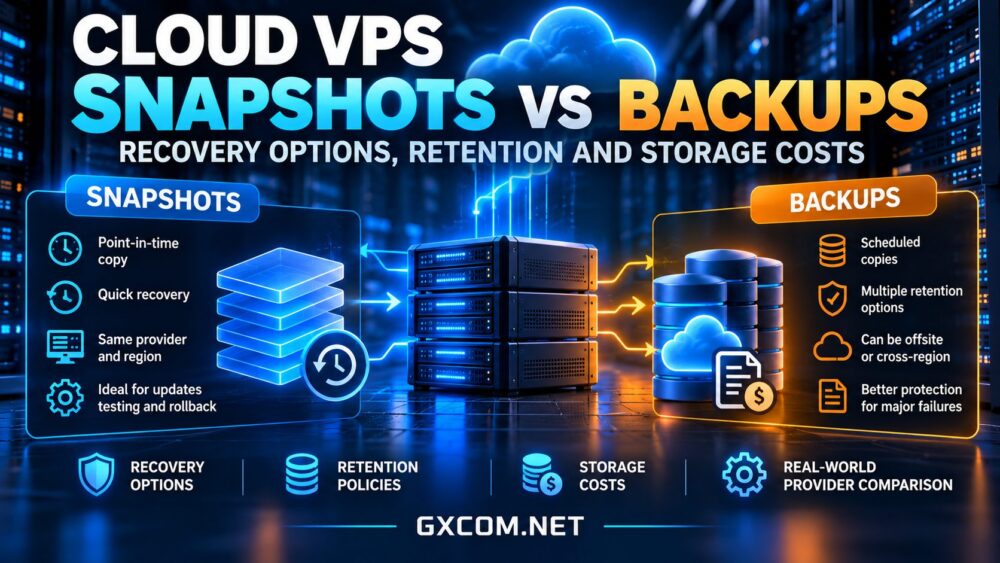
A snapshot captures a provider-defined state of a virtual disk or instance at a particular moment. Depending on the platform, it may use incremental changed blocks, a full disk image, or another storage mechanism. Snapshots are useful before software upgrades, configuration changes, and infrastructure migrations.
However, a snapshot is not necessarily an independent backup. It may remain within the same provider, account, region, or storage system as the original server. Deleting the instance or account, exceeding retention rules, or suffering a platform-wide incident can limit recovery options.
Crash-Consistent vs Application-Consistent Copies
A disk snapshot taken while an application is running may be crash-consistent: it resembles a disk after an unexpected power interruption. Databases might need transaction-log recovery. Application-consistent protection coordinates writes, database checkpoints, or filesystem freezing so the restored workload has a cleaner state. Check which method your provider actually supports.
What Makes a Backup Different?
A backup is a recoverable copy managed under a defined protection policy. Good backup design addresses where copies live, how often they are created, who can delete them, how long they remain available, and whether restoration has been tested.
Backups may be file-level, image-level, database-level, or application-specific. Some provider backup services use snapshots internally, so the distinction is operational rather than purely technical. What matters is independence, retention, recoverability, and documented restore behavior.
For important workloads, consider separate credentials, offsite storage, and immutable or otherwise deletion-resistant copies. Neither the word backup nor an automated schedule guarantees protection from ransomware or administrative mistakes.

Recovery Objectives: RPO and RTO
Recovery point objective (RPO) describes the maximum acceptable amount of recent data loss, measured in time. If a backup runs every 24 hours, losing nearly a day’s changes may be possible. Recovery time objective (RTO) describes how quickly service must be restored after disruption.
A snapshot can shorten restoration of a broken operating-system update, while database point-in-time recovery may provide a smaller RPO for transactional data. Neither automatically ensures a fast RTO: downloading images, rebuilding networks, updating DNS, and validating applications can consume hours.
For an ecommerce checkout or customer database, define RPO and RTO before comparing plans. A low-cost snapshot schedule may be acceptable for a staging server but inadequate for a busy production application.
Comparing Cloud VPS Backup Options by Provider
Provider features change by product family and region. The following companies are useful candidates for a shortlist, but verify backup availability, restore workflow, retention limits, and billing directly in the selected plan.
Vultr
Vultr offers cloud infrastructure where buyers can evaluate instance snapshots and backup options. Ask whether snapshots are manual or scheduled, whether automatic backups are separately billed, and what happens to copies after instance deletion. Test a full restore before relying on any schedule.
Akamai 云
Akamai Cloud(原名 Linode) is another option for comparing server backup services with user-managed recovery approaches. Review the current backup service’s eligible instances, recovery points, and restoration limitations instead of assuming every product has identical coverage.
OVHcloud
OVHcloud offers multiple infrastructure product lines, so distinguish VPS backup features from Public Cloud snapshot and backup capabilities. Check which copies are retained, whether additional storage is charged, and whether a restored server requires separate configuration.
卡马特拉
卡马特拉 is relevant for configurable cloud server deployments. Ask how snapshots, scheduled protection, external storage, and recovery support are handled for the specific service. A customizable server does not automatically include an independent offsite backup policy.
Cloudways
Cloudways provides a managed-cloud perspective for teams prioritizing operational convenience. Its backup workflow should be assessed alongside application restore needs, retention settings, and management responsibilities. Compare managed options using our 托管云主机对比.
Retention Policies and Storage Costs
Backup cost depends on more than allocated VPS disk space. Providers may charge for snapshot capacity, backup add-ons, retained versions, object storage, retrieval, or cross-region transfer. Incremental copies can reduce changed-data storage, but long retention and frequent modifications still increase usage.
Consider a hypothetical 100 GB server with 20 GB of changed data per day. Keeping multiple daily restore points could cost considerably more than retaining one short-lived snapshot, depending on deduplication and provider billing. This is an illustrative workload, not a price quotation or universal storage formula.
Compare total monthly costs including the server, backup service, extra storage, restore operations, and data transfer. Our 经济实惠的云VPS优惠 guide is a starting point, but a low instance price is not necessarily a low recovery cost.
Building a Practical Recovery Strategy
- Classify workloads: Separate disposable development servers from production databases and customer-facing applications.
- Set recovery targets: Define acceptable RPO and RTO for each system.
- Use layered protection: Combine quick rollback snapshots with independently retained backups when the risk warrants it.
- Protect credentials: Limit deletion permissions and consider separate accounts or immutable storage.
- Test restoration: Recover into an isolated environment, verify database integrity, and document the actual time required.
Storage performance matters during both normal operations and restoration. Read our NVMe VPS 性能指南 to distinguish disk-speed benefits from backup durability.

Which Option Should You Buy?
Choose snapshots when you need fast, short-term rollback before maintenance or experimentation. Choose scheduled backups when consistent recovery points and retention matter. For business-critical services, use both where appropriate, with at least one protected copy outside the original failure domain.
Before purchasing, compare the provider’s restore interface, backup frequency, deletion behavior, storage location, and recurring charges. Our 最佳VPS服务商对比 can help narrow the hosting shortlist before evaluating each candidate’s protection policy.
最终裁决
Snapshots are valuable recovery tools, but they are not automatically substitutes for independent backups. A sound cloud VPS strategy combines realistic recovery objectives, suitable retention, protected copies, and regular restore tests. Buy the recovery outcome you need, not simply the cheapest checkbox on a server order form.