Choosing between Cloudflare SSL Full vs Full (Strict) affects how securely Cloudflare communicates with your origin server. Both modes encrypt traffic between Cloudflare and the origin, but only Full (Strict) validates the origin certificate. That difference matters when protecting websites, customer accounts, and sensitive application traffic.
Incorrect configuration can trigger Cloudflare Error 526, TLS handshake failures, or unexpected HTTPS behavior. This guide explains the differences, certificate requirements, troubleshooting steps, and secure deployment practices.
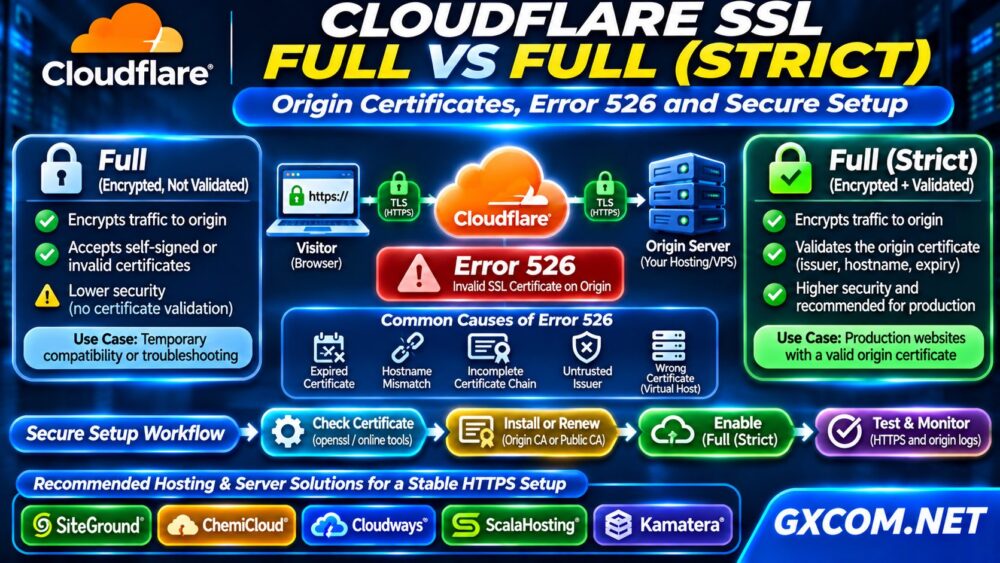
How Cloudflare SSL Connections Work
When Cloudflare proxies a website, HTTPS normally involves two separate connections: the visitor connects to Cloudflare, and Cloudflare connects to the origin server.
The visitor-facing certificate is managed separately from the certificate installed on your hosting server. A valid browser connection therefore does not prove that Cloudflare has validated the origin certificate.
Understanding these two connections helps explain why an apparently secure website can still have origin-side certificate problems.
Cloudflare SSL Full vs Full (Strict)
The main distinction is certificate validation.
| 功能 | 完整 | Full (Strict) |
|---|---|---|
| Encrypted origin connection | 是的 | 是的 |
| Origin certificate validation | 不 | 是的 |
| 自签名证书 | Accepted | Only if trusted by Cloudflare |
| 证书已过期 | May be accepted | Rejected |
| Recommended production setting | Temporary compatibility | Preferred |
Full encrypts the origin connection without authenticating its certificate. Full (Strict) requires a valid, unexpired certificate with a matching hostname, issued by a publicly trusted certificate authority or Cloudflare Origin CA.
For most production websites, Full (Strict) provides the stronger security model.
What Is a Cloudflare Origin CA Certificate?
Cloudflare Origin CA issues certificates intended to secure connections between Cloudflare and your origin server.
These certificates are trusted by Cloudflare, not generally by ordinary web browsers. If visitors connect directly to an origin using only an Origin CA certificate, they may encounter a certificate trust warning.
A publicly trusted certificate, such as one issued through an appropriate ACME service, is preferable when direct browser access must also work.
How to Configure Full (Strict) Safely
Step 1: Check the Origin Certificate
Confirm that your web server presents a certificate covering the requested hostname. Verify its expiration date, issuer, and certificate chain.

For a publicly trusted certificate, check that intermediate certificates are installed correctly. A missing intermediate can cause validation failures.
Step 2: Install or Renew the Certificate
Use your hosting control panel, certificate automation system, or Cloudflare Origin CA to install an appropriate certificate.
Protect private keys, configure the correct virtual host, and reload the web server after validating its configuration. Avoid sharing certificate private keys with third parties.
Step 3: Enable Full (Strict)
In Cloudflare, open SSL/TLS → Overview 然后选择 Full (Strict) after confirming that the origin certificate is valid.
Test the website, administrative login, and important application routes. Monitor origin logs for new TLS errors.
Cloudflare Error 526: Causes and Fixes
Error 526 indicates that Cloudflare could not validate the origin server’s SSL certificate. It commonly appears when Full (Strict) is enabled and the certificate fails validation.
Typical causes include:
- An expired or not-yet-valid certificate.
- A hostname missing from the certificate.
- An incomplete certificate chain.
- An untrusted certificate issuer.
- The wrong certificate served by a virtual host.
Inspect the origin directly using OpenSSL:
openssl s_client -connect origin.example.com:443 -servername www.example.com -showcertsReplace both example hostnames with your actual origin endpoint and requested hostname. Review the presented certificates and validation output. For Cloudflare Origin CA certificates, ordinary operating-system trust stores may report an untrusted issuer even when Cloudflare accepts the certificate.
Correct the certificate rather than permanently weakening validation by switching to Full.
Error 525 vs Error 526
Error 525 means Cloudflare could not complete the SSL handshake with the origin. Error 526 means the origin certificate failed validation.
For Error 525, investigate TLS protocol compatibility, port 443 availability, SNI configuration, firewall restrictions, and web server health.
For Error 526, prioritize certificate validity, hostname coverage, issuer trust, and chain configuration.
If your server also experiences connection timeouts or HTTP failures, consult our Googlebot Crawl Errors troubleshooting guide for broader availability diagnostics.
Prevent HTTPS Redirect Loops
Redirect loops can occur when an origin application repeatedly redirects requests based on an incorrect understanding of the visitor’s original protocol.
Confirm that WordPress, reverse proxies, and server redirect rules correctly recognize HTTPS requests forwarded through Cloudflare.
Review WordPress Site Address settings, application proxy configuration, and existing redirect rules before enabling additional redirects.
Use Cloudflare’s Always Use HTTPS setting where appropriate, but avoid conflicting redirect logic across multiple layers.
Check Server Security and TLS Performance
Certificate validation is only one part of a secure deployment. Keep supported TLS versions enabled, maintain current server software, restrict origin access, and monitor certificate expiration.
我们的 非托管服务器安全检查清单 covers additional protections for self-managed infrastructure.
Also monitor server response times. Slow TLS handshakes or overloaded backend services can affect website reliability even when certificates are configured correctly.
什么时候应该考虑更换更好的主机服务?
An SSL configuration error usually requires a configuration fix, not a new server. However, repeated certificate management failures, limited administrative access, or unreliable infrastructure may justify comparing hosting options.
SiteGround 以及 ChemiCloud are relevant for users seeking WordPress-oriented hosting and managed website operations. Cloudways offers managed cloud environments for applications needing more flexible resources.

ScalaHosting provides managed VPS options, while 卡马特拉 offers configurable cloud servers for administrators who need greater control over Apache, Nginx, and TLS settings.
Compare certificate automation, technical support, origin access, backup policies, and actual plan resources. Features vary by product.
我们的 托管云主机对比 helps evaluate managed infrastructure choices.
For organizations considering greater administrative control, review our 托管型与非托管型VPS指南.
常见问题解答
Is Cloudflare Full SSL Secure?
Full encrypts origin traffic but does not validate the origin certificate. Full (Strict) is preferable because it adds certificate authentication.
Does Cloudflare Origin CA Work Without Cloudflare?
Not as a generally browser-trusted certificate. Direct browser connections usually require a publicly trusted certificate.
Should I Switch to Full to Fix Error 526?
Switching may bypass certificate validation, but it does not repair the underlying problem. Correct the certificate and restore Full (Strict).
最终裁决
Cloudflare Full (Strict) is the preferred setting for production websites with correctly configured origin certificates. It combines encryption with origin certificate validation.
When Error 526 appears, verify certificate validity, hostname matching, and trust before changing hosting infrastructure. Reliable HTTPS depends on sound configuration, maintenance, and monitoring—not simply selecting a more expensive server.