Bare metal server private networking becomes important when applications expand beyond one physical machine. Database replication, distributed storage, virtualization clusters, and internal APIs all generate traffic between servers. Sending every connection across public interfaces can complicate security, performance planning, and bandwidth billing.
A private VLAN or dedicated network interface can simplify this architecture, but private connectivity is not automatically free, encrypted, or guaranteed to operate at 10GbE. This guide explains the technical tradeoffs and purchasing questions that matter.
What Is Bare Metal Private Networking?
Private networking connects dedicated physical servers through provider-managed switching or routing infrastructure. Servers typically communicate using private IP addresses, with public connectivity handled separately.
A common design places web servers on public-facing interfaces while databases, storage nodes, and internal services communicate through private connections. This reduces unnecessary exposure and separates operational traffic from customer requests.
However, private addressing alone does not create a security boundary. Access controls, firewall policies, and provider network isolation remain necessary.
How VLANs Work on Dedicated Servers
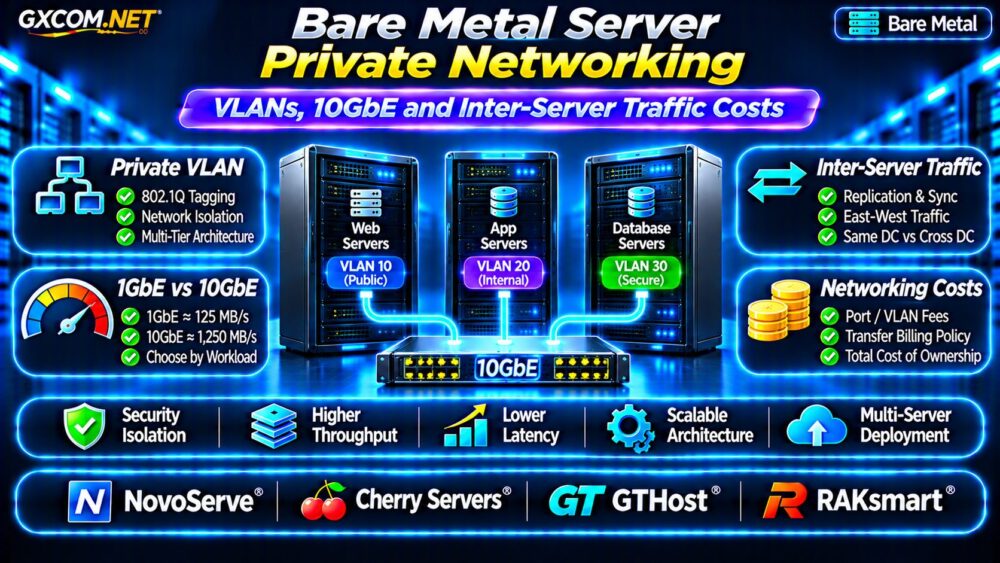
A virtual LAN separates Ethernet traffic into logical broadcast domains. IEEE 802.1Q tagging allows multiple VLANs to share compatible physical links while remaining logically distinct.
Private VLAN vs Private Subnet
A private subnet describes IP addressing. A VLAN describes Layer 2 segmentation. They often work together but are not interchangeable.
For example, application nodes may use one VLAN while database nodes occupy another. A firewall or router can control traffic between them.
Ask whether your hosting provider offers customer-isolated VLANs, dedicated switch ports, or routed private networking. Shared infrastructure can still provide logical isolation when correctly configured.
Does a VLAN Encrypt Traffic?
No. VLAN tagging does not encrypt packets. Sensitive replication traffic may still require TLS, IPsec, or another suitable encryption method, depending on the threat model and compliance requirements.
1GbE vs 10GbE for Inter-Server Traffic
Port speed determines a theoretical link ceiling, not guaranteed application throughput. A 1GbE connection offers approximately 125MB/s before overhead, while 10GbE provides approximately 1,250MB/s.
Actual performance depends on NIC capabilities, switch configuration, CPU processing, storage speed, packet size, and network contention.
When Is 10GbE Worth the Upgrade?
Consider 10GbE when large database replicas, backup transfers, distributed storage, or frequent virtual-machine migrations consistently saturate 1GbE links.

For example, transferring 1TB theoretically takes about 2.2 hours at 1Gbps or 13.3 minutes at 10Gbps. These idealized figures exclude protocol overhead, disk limitations, and competing traffic.
If the workload transfers only small API messages, upgrading the network may provide little measurable benefit.
Inter-Server Traffic Costs Explained
Private traffic billing varies considerably. Some providers include local private transfers, while others charge for switch ports, VLAN provisioning, dedicated links, or measured traffic.
Charges may differ for servers in the same rack, separate racks, different data centers, or different geographic regions.
Do not assume that traffic between two servers from the same company is free. Ask whether both machines must be in the same facility or private-network segment.
Example: Monthly Replication Traffic
Suppose a database generates 2TB of replication traffic daily. Over 30 days, approximately 60TB moves between servers, excluding protocol overhead and additional backup operations.
If that traffic is included locally, the network bill may be predictable. If it crosses a metered interconnect, transfer charges could materially change the hosting budget.
For a related comparison of transfer billing, read our 云VPS带宽费用指南.
Latency, MTU and Network Performance
High bandwidth does not automatically mean low latency. Database applications with frequent synchronous requests can be sensitive to round-trip time even when throughput is modest.
Jumbo frames may reduce packet-processing overhead for suitable workloads, but every relevant interface and network path must support the configured MTU.
Use tools such as iperf3 to measure throughput and ping or application telemetry to investigate latency. Test under representative load rather than relying on advertised port speeds.
有关更广泛的基础设施规划,请参阅我们的 云服务器容量规划指南.
Four Bare Metal Networking Providers to Compare
The following approved providers are candidates for multi-server deployments. Their network features, pricing, and availability must be verified for the specific location and configuration.
NovoServe: Private VLAN and Bandwidth Options
NovoServe has publicly announced private VLAN functionality and aggregated bandwidth billing options. Ask whether the required VLAN topology is available in your chosen facility, how private ports are provisioned, and whether traffic aggregation applies to your contract.
Cherry Servers: Cluster Networking Requirements
Cherry 服务器 is worth evaluating for compute-intensive bare metal clusters. Request written details about private connectivity, supported NIC speeds, network isolation, and any additional charges.
GTHost: Dedicated Network Configuration
GTHost can be considered when location and network characteristics influence deployment. Confirm private-network availability, supported port speeds, and whether inter-server transfers count against traffic allowances.
RAKsmart: VLAN and Regional Deployment
RAKsmart has referenced private VLAN setup in its infrastructure updates. Verify which locations support the required configuration and whether bandwidth-based or traffic-based billing applies.
Compare providers using identical requirements instead of assuming that advertised public 10Gbps ports include equivalent private-network connectivity.
Design a Secure Three-Tier Bare Metal Network
A practical deployment separates public web traffic, application-to-database connections, and management access. Use firewall rules between tiers and restrict administrative interfaces to authorized networks.
Maintain independent monitoring and backup paths where appropriate. Private networking reduces public exposure but does not replace host security or recovery planning.
我们的 非托管服务器安全检查清单 provides complementary hardening guidance.
Calculate Total Private Network Costs
Consider a hypothetical three-server cluster with $150 monthly rental per machine, a $40 private-network service, and a $60 port upgrade.

The total is $550 monthly, or $6,600 annually, before backups, software, and additional traffic charges. These are illustrative assumptions rather than provider quotations.
Compare this model with alternatives in our 专用服务器与云服务器的对比.
Bare Metal Private Networking Buying Checklist
- Confirm VLAN isolation, routing, and private IP allocation.
- Verify private NIC speed and sustained throughput policies.
- Check same-rack, same-facility, and cross-region traffic billing.
- Request VLAN, switch-port, and setup fees in writing.
- Test latency, MTU compatibility, and replication performance.
- Document firewall rules, encryption, and recovery procedures.
常见问题解答
Is Private Traffic Between Dedicated Servers Free?
Not necessarily. It depends on the provider, location, network service, and contract.
Does 10GbE Guarantee 10Gbps Transfers?
No. Storage performance, protocol overhead, CPU capacity, and shared infrastructure can reduce throughput.
Can Private VLANs Connect Different Data Centers?
Sometimes, but cross-facility connectivity generally requires additional provider networking or routed services.
最终裁决
Effective bare metal server private networking requires more than selecting a fast port. Evaluate VLAN isolation, real throughput, latency, geographic restrictions, and complete inter-server traffic costs.
Compare NovoServe, Cherry Servers, GTHost, and RAKsmart using written network specifications and realistic workload estimates. Choose the architecture that meets measurable application needs without unnecessary networking expenses.