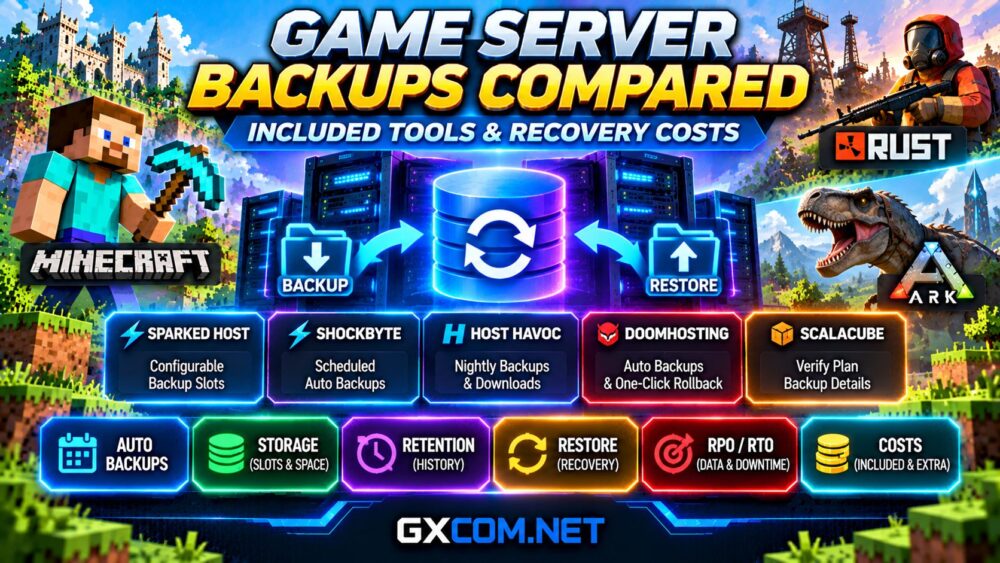
Game server hosting backups can protect months of player progress, but not every provider includes the same recovery tools. Some offer automatic backups, others limit storage slots, and certain plans charge extra for retention.
This comparison examines Sparked 主持人, Shockbyte, 主持人哈沃克, DoomHosting, ,以及 ScalaCube, focusing on Minecraft, Rust, and ARK. We explain what backup features actually provide, how restoration works, and which hidden costs deserve attention.
Game Server Hosting Backups: Quick Verdict
The best backup system is one that creates usable recovery points, preserves enough history, and allows administrators to restore data without unnecessary delays.
Sparked Host offers configurable backup allocations, Shockbyte documents scheduled backups, Host Havoc provides downloadable backup archives, and DoomHosting advertises automatic recovery tools.
However, these features are not equivalent. Compare retention, storage limits, download access, and additional charges before choosing a provider.
Check Sparked Host Backup Options
为什么游戏服务器备份很重要
Minecraft worlds contain structures, inventories, player records, and configuration files. Rust servers maintain maps, player information, and potentially blueprint progression. ARK servers preserve characters, dinosaurs, structures, and world states.
Updates, incompatible mods, accidental deletion, and storage failures can damage these files.
Without a usable backup, recovery may require rebuilding the server or accepting permanent progress loss.
Administrators should therefore treat backup planning as part of hosting selection rather than an optional maintenance task.
Game Hosting Backup Features Compared
| 服务提供商 | Documented Tools | 重要限制 |
|---|---|---|
| Sparked 主持人 | Apollo backups and selectable slots | Game-specific pricing |
| Shockbyte | Scheduled automatic backups | Three-backup limit in documentation |
| 主持人哈沃克 | Automatic attempts, manual restore, downloads | Typically saves and settings |
| DoomHosting | Scheduled backups and rollback advertised | Verify retention and quotas |
| ScalaCube | Confirm current plan-specific tools | Published allowances require verification |
These descriptions reflect published documentation, not independent restoration tests or guarantees for every package.
Sparked Host: Backup Slots and Pricing
Sparked Host’s Apollo panel includes a backup interface where administrators can create named backups, exclude selected directories, and lock backups against accidental deletion.
Its Minecraft configurator lists backup allocations as paid options, including three slots for an additional $1 monthly.
Other supported games may have different allowances, including complimentary backup slots.
Consequently, customers should check the exact game configurator rather than assuming a universal backup policy.
我们的 Sparked Host Minecraft panel review explains file management and backup administration in greater detail.

Shockbyte: Automatic Backup Scheduling
Shockbyte documents automated backups through its control panel. Administrators can select the target instance or database, configure a schedule, and specify a repeating interval.
Its published instructions describe a maximum of three stored backups and an option to replace older copies automatically.
This creates a practical tradeoff: frequent backups improve recovery-point freshness but may overwrite useful historical versions sooner.
Before relying on automation, confirm the applicable package limits and download options.
For modded communities, see our Shockbyte modded Minecraft hosting review.
Host Havoc: Backups and Manual Recovery
Host Havoc’s documentation states that its game panel automatically attempts a nightly backup at 2:45 AM.
Administrators can also create backups manually, restore saved copies, and download ZIP archives through file management or FTP.
The provider notes that backups typically contain save data and settings rather than every installed server file.
That distinction matters when recovering custom mods, plugins, or additional dependencies.
Stop the server before restoration to reduce file conflicts, and keep independent copies of critical configuration data.
DoomHosting: Scheduled Backups and Rollback
DoomHosting advertises automatic backups, manual recovery points, and one-click rollback through its game management panel.
These features are relevant to Rust and ARK administrators who frequently update mods, change maps, or perform maintenance.
However, published feature descriptions do not establish identical retention allowances across every plan.
Confirm backup frequency, storage location, quotas, and restoration limitations before ordering.
请阅读我们的 DoomHosting Rust and ARK review for additional hosting considerations.
Explore DoomHosting Game Server Options
ScalaCube: What Buyers Should Verify
ScalaCube is another approved Minecraft hosting option worth evaluating, particularly for administrators using modpacks.
However, buyers should not assume that backup scheduling, storage, or restoration services are identical across packages.
Request confirmation of included backup slots, retention periods, download access, and any additional recovery charges.
A large modpack library is useful, but it does not replace dependable world protection.
Automatic Backups vs Manual Snapshots
Automatic backups reduce the risk of forgetting routine protection. Manual snapshots are useful immediately before software upgrades, plugin changes, or major configuration adjustments.
Both approaches have limitations.
Automatic schedules may preserve corrupted files if problems remain undetected. Manual backups depend on administrator discipline.
A sensible strategy combines scheduled copies, pre-update snapshots, and independent off-server storage.
Recovery Point and Recovery Time Objectives
Two concepts help compare backup systems.
恢复点目标(RPO) describes how much recent data loss is acceptable. A six-hour backup interval can potentially leave several hours of progress unprotected.
恢复时间目标(RTO) describes the desired time needed to restore service after an incident.
These are planning targets, not guarantees supplied automatically by a hosting company.
Large ARK worlds and heavily modified Minecraft servers may take longer to restore than small vanilla instances.
Hidden Backup and Recovery Costs
Backup expenses can include additional storage slots, external storage, data transfer, administrative labor, and downtime.
For example, a hypothetical $2 monthly backup add-on costs $24 annually before taxes.
If an incident requires three hours of administrator work valued at $15 hourly, the labor component adds another $45.
These figures illustrate cost calculation rather than actual provider pricing.
Compare annual hosting expenses alongside realistic recovery requirements.
Minecraft, Rust and ARK Backup Differences
Minecraft administrators should protect world directories, player data, plugins, and mod configurations.
Rust communities need to distinguish map wipes from blueprint wipes and preserve relevant server identity and configuration files.
ARK administrators should verify world saves, player profiles, tribe information, and cluster transfer data where applicable.
我们的 ARK cluster hosting vs separate servers comparison 阐述了其他基础设施方面的注意事项。.

Backup Checklist Before Buying
- Are automatic backups included in the selected plan?
- How many historical recovery points are retained?
- 备份可以单独下载吗?
- Are databases, mods, and configuration files included?
- Can administrators restore without paid support?
- What happens when backup storage reaches capacity?
- Are restoration fees or transfer restrictions disclosed?
Answers to these questions are often more valuable than promotional claims about unlimited storage.
常见问题解答
Are game server backups always free?
No. Included storage and paid backup options vary by provider, game, and hosting package.
Do automatic backups prevent all data loss?
No. Scheduling failures, corruption, and limited retention can still create recovery gaps.
Should I download my game server backups?
Yes. Independent copies reduce reliance on a single provider or control panel.
Can backups restore a corrupted Minecraft world?
A valid backup from before the corruption may restore the world, provided the necessary files are preserved.
Final Verdict: Which Backup System Is Best?
There is no universal winner without testing recovery success, retention, and total cost under comparable conditions.
Sparked Host offers configurable backup allocations, Shockbyte documents automated scheduling, Host Havoc provides downloadable archives, and DoomHosting promotes integrated rollback tools.
Choose the provider whose backup policy matches your game’s data requirements, acceptable data-loss window, and recovery budget.
Before purchasing, confirm the exact plan terms and perform a test restoration whenever possible.