You just deployed a new unmanaged VPS.
The server is online, you have the IP address, and SSH access works. It can be tempting to immediately install WordPress, Docker, a database or your application stack.
Security should come first.
An internet-facing VPS can begin receiving automated scans and login attempts shortly after it becomes reachable. With unmanaged hosting, securing the operating system and the services running inside it is primarily your responsibility.
The good news is that you do not need dozens of security tools to establish a solid baseline.
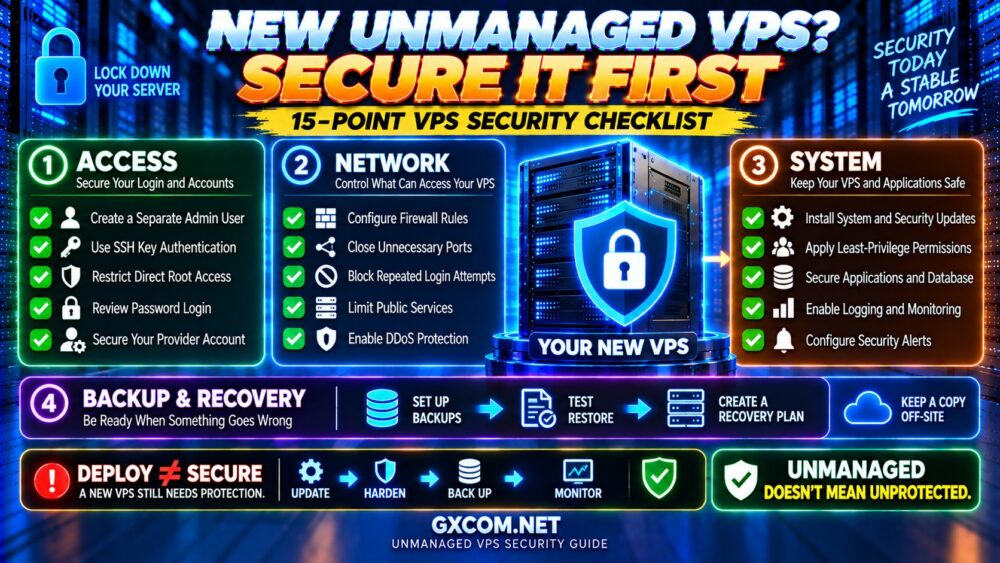
这个 unmanaged VPS security checklist covers 15 important steps to take after deployment, from installing security updates and protecting SSH to configuring backups, monitoring logs and preparing for recovery.
The goal is simple:
DEPLOY → SECURE → VERIFY → MONITOR → MAINTAIN.
Why Unmanaged VPS Security Is Your Responsibility
With unmanaged VPS hosting, the provider generally maintains the physical infrastructure, networking and virtualization platform.
You normally manage what happens inside your virtual server.
| Provider Typically Handles | You Typically Handle |
|---|---|
| 物理硬件 | 操作系统 |
| Datacenter infrastructure | 用户账户 |
| Host networking | SSH 安全性 |
| 虚拟化平台 | 防火墙规则 |
| Hardware failures | 软件更新 |
| Host availability | Applications and databases |
| Infrastructure-level controls | Backups and monitoring |
The exact responsibility model varies by provider, so always read the support scope before purchasing.
If you are new to this type of server, read our 什么是非托管型VPS主机? guide first.
Unmanaged VPS Security Checklist: Quick Overview
- Install system and security updates
- Create a separate administrative user
- Configure SSH key authentication
- Restrict direct root access
- Review password authentication
- 配置防火墙
- Close unnecessary ports and services
- Protect against repeated login attempts
- Apply least-privilege permissions
- Secure applications and databases
- Configure automatic security updates where appropriate
- Set up reliable backups
- Enable logging and monitoring
- Configure security and availability alerts
- Create and test a recovery plan
Now let's look at each step in more detail.
1. Install System and Security Updates
One of the first things to do after deploying a VPS is check for available operating system and security updates.
A newly created server image may not include every patch released after the image was built.
Updates can address vulnerabilities in:
- The Linux kernel
- System libraries
- SSH
- Networking components
- System utilities
- Installed packages
For Debian and Ubuntu systems, package management commonly uses APT. RHEL-family distributions use tools such as DNF.
Use the appropriate update process for your operating system and review whether a reboot is required afterward.
NEW SERVER ≠ FULLY PATCHED SERVER.
2. Create a Separate Administrative User
Many VPS deployments initially provide root access or an initial privileged account.
For routine administration, it is generally better to create an individual administrative user and grant only the privileges that user requires.
This provides several benefits:
- Reduces unnecessary direct root usage
- Improves accountability
- Supports least-privilege administration
- Makes access easier to manage as administrators change
Administrative privileges can typically be granted through mechanisms such as sudo, depending on the Linux distribution.
Before changing root access, verify that the new administrative account works correctly.
TEST NEW ACCESS BEFORE DISABLING OLD ACCESS.
3. Configure SSH Key Authentication
SSH keys are one of the most important protections for remote Linux server administration.
Instead of authenticating with a reusable password, SSH public-key authentication uses a cryptographic key pair.
The public key is installed on the VPS.
The private key remains with the administrator and should be protected carefully.
福利包括:
- Strong resistance to password guessing
- Reduced exposure to credential stuffing
- Better support for controlled administrative access
- Ability to use protected private keys and SSH agents
Where supported by your workflow, protect private keys with an appropriate passphrase and never upload or share private keys unnecessarily.
For more detail, see our SSH Security Best Practices 指南。.
4. Restrict Direct Root Login
The root account has unrestricted administrative privileges.
Allowing routine direct remote root access increases the impact of a compromised authentication method.
A common approach is:
ADMIN USER
↓
SSH AUTHENTICATION
↓
SUDO WHEN REQUIRED
而不是:
REMOTE LOGIN → ROOT FOR EVERYTHING.
However, do not disable root access until you have confirmed that another administrative account and your recovery method work correctly.
If you make a mistake in SSH configuration, you may otherwise lock yourself out of the server.
5. Review SSH Password Authentication
After verifying that SSH key authentication works reliably, consider whether password-based SSH authentication is needed at all.
If your environment does not require SSH passwords, disabling password authentication can eliminate an entire category of password-guessing attacks against SSH.
Before doing so:
- Test your SSH key
- Test your administrative account
- Keep a secure backup of required keys
- Know how to use the provider's recovery console
Do not disable an authentication method blindly.
SECURITY THAT LOCKS OUT THE ADMINISTRATOR IS NOT A SUCCESSFUL DEPLOYMENT.
是否应该更改默认的 SSH 端口?
Changing SSH from port 22 to another port can reduce automated scanning noise and some opportunistic login attempts.
But it should not be treated as a primary security control.
An attacker can still discover an SSH service running on another reachable port.
Your primary protections should remain:
- 强认证
- SSH密钥
- Restricted privileged access
- 防火墙控制
- Login monitoring
CHANGING THE PORT HIDES SOME NOISE.
STRONG AUTHENTICATION PROVIDES THE REAL PROTECTION.
6. 配置防火墙
A firewall limits which network services can be reached.
A simple public web server might need only:
- SSH for administration
- HTTP
- HTTPS
Your workload may require additional services, but the basic principle should be:
ALLOW WHAT YOU NEED.
BLOCK WHAT YOU DON'T.
Common Linux firewall management options include UFW, firewalld and nftables, depending on the distribution and configuration.
Some VPS providers also offer an infrastructure-level or cloud firewall outside the operating system.
Using multiple security layers can be useful, provided you understand which layer controls each rule.
7. Close Unnecessary Ports and Disable Unused Services
Every publicly reachable service increases the server's attack surface.

Review which ports are listening and ask:
DOES THIS SERVICE ACTUALLY NEED TO BE PUBLIC?
Examples that often deserve careful review include:
- Database ports
- 开发服务器
- 管理面板
- 监控仪表盘
- Redis or caching services
- Container management interfaces
A database used only by an application on the same VPS generally does not need to be exposed to the entire internet.
Likewise, uninstall or disable software you do not use.
LESS EXPOSED SOFTWARE = SMALLER ATTACK SURFACE.
8. Protect Against Repeated Login Attempts
Public SSH services commonly receive automated login attempts.
Tools such as Fail2ban can monitor relevant logs and temporarily block sources that repeatedly trigger defined authentication failures.
Similar rate-limiting or abuse-control mechanisms can also be implemented at other layers.
This is useful for reducing repetitive attacks and log noise.
但请记住:
FAIL2BAN ≠ REPLACEMENT FOR STRONG AUTHENTICATION.
Use it as another layer rather than the foundation of SSH security.
9. Apply the Principle of Least Privilege
Every user, process and application should receive only the permissions it actually needs.
Avoid running applications as root unless there is a legitimate requirement.
评论:
- 用户账户
- Group memberships
- File ownership
- File permissions
- 服务账户
- Sudo 权限
- Application access
If an application is compromised, unnecessary privileges can increase the damage an attacker can cause.
目标是:
MINIMUM REQUIRED ACCESS → MINIMUM POSSIBLE IMPACT.
10. Secure Your Applications and Databases
A hardened operating system can still be compromised through an insecure application.
Your security process should therefore cover the complete software stack.
For a web server, that might include:
- Nginx 还是 Apache
- PHP
- MySQL 或 MariaDB
- PostgreSQL
- Redis
- WordPress
- Docker
- Application frameworks
Keep applications updated and remove unused plugins, themes, packages and services.
For databases:
- Use strong credentials
- Avoid unnecessary public exposure
- Use appropriate user permissions
- Remove unnecessary accounts
- Back up important data
SECURE LINUX + VULNERABLE APPLICATION = VULNERABLE SERVER.
11. Configure Automatic Security Updates Where Appropriate
Security patches are most useful when they are actually installed.
For suitable systems, automated security updates can reduce the period during which known vulnerabilities remain unpatched.
Automation is particularly useful for routine security fixes.
But major software changes should still be approached carefully.
A sensible model is:
AUTOMATE SAFE ROUTINE PATCHES
+
REVIEW MAJOR CHANGES
+
MONITOR RESULTS
After updates, verify that critical services remain healthy and determine whether the system requires a reboot.
12. Configure Reliable Backups
Security is not only about preventing attacks.
It is also about limiting the damage when something goes wrong.
You may need backups after:
- 误删
- 数据库损坏
- 更新失败
- Application compromise
- 勒索软件或破坏性攻击
- 配置错误
- Infrastructure failures
For important workloads, do not rely exclusively on a copy stored inside the same VPS.
If the server is destroyed or compromised, a local backup can disappear with it.
Consider independent or off-server copies of important data.
Snapshot ≠ Complete Backup Strategy
Provider snapshots can be extremely useful for quick recovery and rollback.
But ask:
- Can the snapshot be deleted with the VPS?
- Is it stored within the same provider account?
- How long is it retained?
- Can individual files be restored?
- What happens if the account itself is compromised?
For critical data, combine convenient provider recovery tools with an independent backup strategy appropriate to your risk level.
And most importantly:
TEST THE RESTORE.
A backup that has never been restored is not proven recovery.
13. Enable Logging and Monitoring
You cannot protect a server effectively if you have no visibility into what it is doing.
Monitor important areas such as:
- Authentication activity
- System events
- Web server requests
- 应用程序错误
- CPU 使用率
- 内存使用情况
- 磁盘空间
- 磁盘I/O
- 网络流量
- 服务可用性
Authentication logs can help identify repeated login attempts.
Web logs can reveal unusual request patterns.
Resource monitoring can expose unexpected workloads.
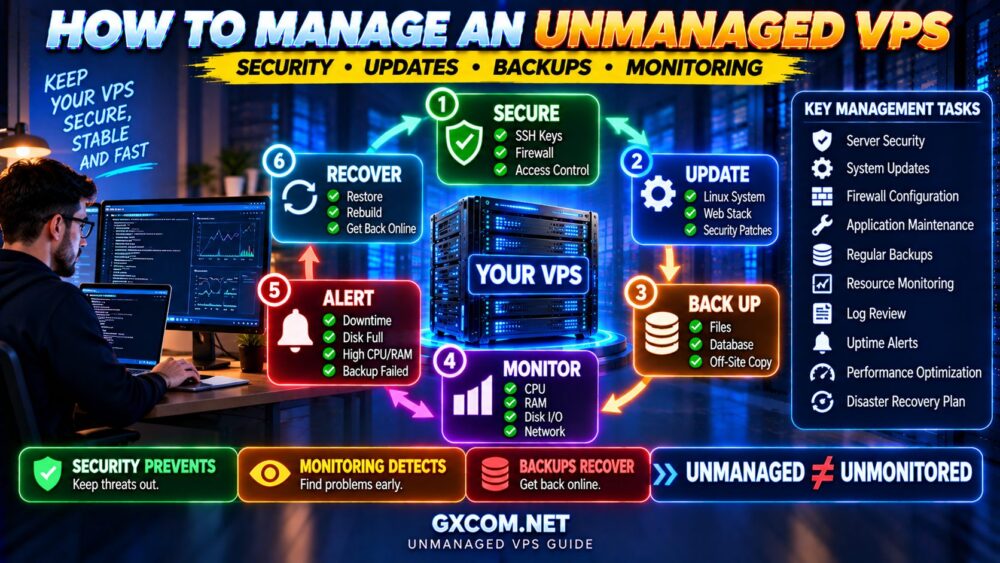
For ongoing operations, see How to Manage an Unmanaged VPS.
14. Configure Security and Availability Alerts
Monitoring becomes much more useful when it tells you that something needs attention.
Useful alerts can include:
- Website unavailable
- Server unreachable
- 多次身份验证失败
- Disk space running low
- Unexpected CPU load
- 内存压力
- Backup failure
- SSL certificate approaching expiration
Avoid generating an alert for every minor event.
If your monitoring system produces constant noise, important warnings can be ignored.
GOOD ALERT → CLEAR PROBLEM → CLEAR ACTION.
15. Create and Test a Recovery Plan
The final security step is preparing for the possibility that your protections fail.
Ask yourself:
IF THIS VPS DISAPPEARED RIGHT NOW, COULD I REBUILD IT?
You should know:
- Where your backups are stored
- How to deploy a replacement VPS
- How to restore application files
- How to restore the database
- How to restore configuration files
- How to update DNS if necessary
- How to verify the restored application
Also know how to access your provider's console or rescue environment if normal SSH access stops working.
The complete security model becomes:
PREVENT
↓
DETECT
↓
RESPOND
↓
恢复
Bonus: Protect Your VPS Provider Account
You can harden Linux perfectly and still lose control of the VPS if the hosting account itself is compromised.
Your provider account may allow someone to:
- Reset the server
- Access consoles
- Create snapshots
- Delete the VPS
- Modify networking
- Change DNS-related resources
Protect the hosting account with:
- A unique strong password
- Multi-factor authentication when available
- Secure recovery methods
- Restricted API credentials
- Regular access review
This security layer exists outside the VPS itself, but it is just as important.
What About DDoS Protection?
A local firewall can help control unwanted traffic, but it cannot stop every denial-of-service attack.
If an attack saturates the provider's upstream network capacity before traffic reaches your VPS, local firewall rules cannot restore that lost bandwidth.
Depending on your workload, protection may involve:
- Provider-level DDoS mitigation
- CDN or reverse proxy protection
- 速率限制
- Application-level controls
- Network filtering
如需更详细的说明,请阅读我们的 如何防范DDoS攻击 指南。.
Common Unmanaged VPS Security Mistakes
Even technically experienced users can make simple mistakes.
Watch for these:
- Using weak SSH passwords
- Running everything as root
- 留有不必要的开放端口
- Exposing databases publicly without need
- 忽略安全更新
- Installing unnecessary software
- Never reviewing logs
- Keeping backups only on the production VPS
- Never testing recovery
- Assuming the hosting provider manages the operating system
Another common mistake is focusing on one security trick while ignoring the larger system.
例如:
CHANGED SSH PORT
+
WEAK PASSWORD
+
NO FIREWALL
+
NO UPDATES
is not a secure server.
Unmanaged VPS Security: Defense in Depth
No single security control is perfect.
Good VPS security uses multiple layers:
PROVIDER ACCOUNT SECURITY
↓
NETWORK / FIREWALL
↓
SSH / AUTHENTICATION
↓
OPERATING SYSTEM
↓
APPLICATIONS
↓
监测
↓
备份
If one layer fails, another layer may reduce the impact.
This concept is known as defense in depth.
How Much Time Does Unmanaged VPS Security Require?
Initial hardening requires some setup time, but routine security should become part of normal server maintenance.
Many tasks can be automated:
- 安全更新
- 备份
- Uptime monitoring
- Resource alerts
- Certificate renewal
- Log rotation
Automation reduces repetitive work, but you still need to verify that automated systems are functioning.
AUTOMATE → MONITOR → VERIFY.
When Is Managed VPS a Better Choice?
If this checklist feels like more administration than you want to handle, unmanaged VPS hosting may not be the best fit.
Managed VPS can make more sense when:
- You do not have Linux administration experience
- You cannot monitor the server reliably
- The website is business-critical
- You do not want responsibility for routine system maintenance
- Your time is more valuable elsewhere
Managed hosting does not eliminate every customer security responsibility, but it can shift a substantial portion of server administration to the provider.
Compare the two approaches in our 托管型与非托管型VPS 指南。.
Choosing an Unmanaged VPS Provider
Security responsibility does not mean provider quality is irrelevant.
When comparing self-managed VPS infrastructure, look beyond CPU and RAM.
Developer-focused platforms such as DigitalOcean 以及 Vultr are relevant options for users comfortable managing their own server environments.
Users comparing alternative VPS configurations may also evaluate providers such as 数据库集市 以及 RackNerd.
Regardless of provider, check:
- Console or rescue access
- Snapshot options
- 备份可用性
- 防火墙功能
- DDoS protection scope
- Account MFA
- 支持边界
- Datacenter locations
The cheapest unmanaged VPS is not necessarily the cheapest server to recover after a serious incident.
15-Point Unmanaged VPS Security Checklist
Before deploying a production workload, verify:
- ✓ System packages are updated
- ✓ Separate administrative user exists
- ✓ SSH key authentication works
- ✓ Direct root access is appropriately restricted
- ✓ SSH password authentication has been reviewed
- ✓ Firewall rules are configured
- ✓ Unnecessary ports and services are disabled
- ✓ Repeated login attempts are controlled
- ✓ Least-privilege permissions are applied
- ✓ Applications and databases are secured
- ✓ Security update policy is configured
- ✓ Independent backups exist
- ✓ Logging and monitoring are active
- ✓ Important alerts are configured
- ✓ Recovery has been documented and tested
And add one more account-level check:
✓ MFA IS ENABLED ON THE VPS PROVIDER ACCOUNT WHEN AVAILABLE.
Unmanaged VPS Security FAQ
Is an unmanaged VPS secure by default?
A newly deployed VPS may include reasonable default settings, but you should not assume it is fully hardened for your workload. Security depends on the operating system image, provider configuration, exposed services and the applications you install.
What should I do first after deploying a VPS?
Start by checking system updates and confirming secure administrative access. Then configure SSH, firewall rules, required services, backups and monitoring before placing an important production workload on the server.
我应该禁用 root 的 SSH 登录吗?
Restricting direct remote root access is a common security practice. Before changing it, make sure a tested administrative account with appropriate privileges and a recovery method are available.
Should I disable SSH password login?
If your workflow supports reliable SSH key authentication and you do not require password-based SSH access, disabling SSH passwords can reduce exposure to password-guessing attacks. Test key access and recovery options first.
Does changing the SSH port make a VPS secure?
No. It may reduce automated scanning noise, but it does not replace SSH keys, strong authentication, access controls, firewall rules and monitoring.
Do I need Fail2ban on a VPS?
Fail2ban can be useful for automatically responding to repeated authentication failures, but whether you need it depends on your architecture and other protections. It should complement rather than replace strong authentication.
Should a MySQL database port be open to the internet?
Not unless the architecture genuinely requires remote database access. If the application and database run on the same server, unnecessary public database exposure should generally be avoided.
Are VPS snapshots enough for backups?
Snapshots are useful recovery tools but may not provide sufficient isolation, retention or file-level recovery for every workload. Important data should have a backup strategy designed around its recovery requirements.
How often should I check VPS security?
Security is an ongoing process. Automate appropriate updates, backups and monitoring, review important alerts continuously, and periodically audit accounts, services, firewall rules and recovery procedures.
Is managed VPS more secure than unmanaged VPS?
Not automatically. Managed VPS can reduce operational risk for users who lack server administration expertise because the provider handles more maintenance tasks. Security still depends on the provider, configuration and applications.
Final Thoughts: Secure the VPS Before You Build on It
An unmanaged VPS gives you extensive control, but that control comes with responsibility.
The most important time to establish a security baseline is immediately after deployment—not after the first suspicious login, outage or compromise.
Think of VPS security as a sequence:
更新
↓
SECURE ACCESS
↓
LIMIT EXPOSURE
↓
PROTECT APPLICATIONS
↓
返回
↓
MONITOR
↓
恢复
No single setting makes a VPS secure.
Security comes from layers working together.
SSH KEYS PROTECT ACCESS.
FIREWALLS REDUCE EXPOSURE.
UPDATES REMOVE KNOWN VULNERABILITIES.
MONITORING DETECTS PROBLEMS.
BACKUPS LIMIT DAMAGE.
And remember the rule that matters most for unmanaged hosting:
UNMANAGED DOES NOT MEAN UNPROTECTED.