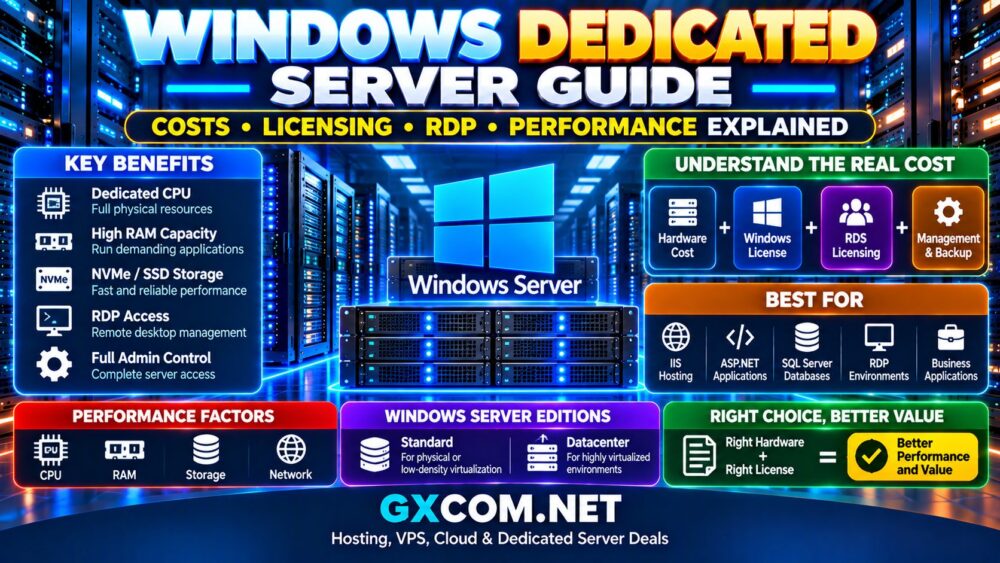
A Windows 专用服务器 combines Microsoft Windows Server with an entire physical machine reserved for your workload. It can be an excellent platform for IIS, ASP.NET applications, Microsoft SQL Server, Remote Desktop environments, Windows-only business software, development systems, and enterprise applications.
However, choosing Windows bare metal is more complicated than comparing CPU cores, RAM, and storage. Windows Server licensing, Remote Desktop Services, management, backups, software licenses, and hardware configuration can significantly affect the final monthly cost.
这个 Windows Dedicated Server Guide explains how Windows dedicated hosting works, what it costs, how Windows Server licensing and RDP affect your budget, which hardware matters most for performance, and when a dedicated Windows server makes more sense than a VPS.
什么是 Windows 专用服务器?
A Windows dedicated server is a physical server assigned to a single customer and running Microsoft Windows Server.
Unlike a Windows VPS, where the operating system runs inside a virtual machine, dedicated hosting gives you access to the resources of the physical server.
Depending on the provider and configuration, these resources can include:
- Intel Xeon, Intel Core, AMD EPYC, or AMD Ryzen processors
- Dedicated physical RAM
- SSD 或 NVMe 存储
- Multiple physical drives
- RAID configurations
- 专用网络连接
- 远程管理工具
- Full Windows administrative access
This makes Windows dedicated hosting particularly useful when an application requires substantial or predictable resources.
Windows Dedicated Server: Quick Overview
| 功能 | Windows 专用服务器 |
|---|---|
| 基础设施 | Physical bare metal server |
| 操作系统 | Microsoft Windows Server |
| 远程管理 | RDP and PowerShell |
| Web Server | IIS and other compatible software |
| Microsoft Applications | Strong compatibility |
| 虚拟化 | Available with appropriate hardware, configuration and licensing |
| 操作系统许可 | Commercial licensing generally applies |
| 最适合 | Windows-specific and resource-intensive workloads |
Windows Server 2025 Standard vs Datacenter
One of the first decisions is selecting the appropriate Windows Server edition.
Windows Server Standard
Windows Server Standard is generally designed for physical servers or environments with relatively low virtualization density.
典型用例包括:
- IIS web servers
- 应用服务器
- Small business infrastructure
- 数据库服务器
- Low-density virtualization
Windows Server Datacenter
Datacenter is designed primarily for highly virtualized and software-defined data center environments.
When properly licensed based on physical cores, Datacenter provides much broader virtualization rights than Standard.
For a straightforward physical Windows application server that does not require extensive virtualization, paying for Datacenter may provide little benefit.
How Windows Server Licensing Works
Licensing is one of the most important differences between Windows and Linux dedicated hosting.
Windows Server 2025 Standard and Datacenter use a core-based licensing model. When licensing a physical server, all physical processor cores must be licensed, subject to Microsoft's minimum licensing requirements.
At the time of writing, the key minimums are:
- Minimum 8 core licenses per physical processor
- Minimum 16 core licenses per physical server
- Additional physical cores must also be licensed
This means an inexpensive high-core-count server may become less attractive after Windows licensing is added.
Why CPU Core Count Can Affect Windows Server Cost
Imagine two dedicated servers:
- Server A: older 24-core processor
- Server B: newer 8-core processor
Server A may initially appear to offer better value because it has three times as many physical cores.
But Windows Server licensing and application performance can change the calculation.
If your application benefits primarily from fast individual cores rather than massive parallel processing, the newer lower-core-count CPU may provide better application performance while avoiding unnecessary licensing complexity.
The correct approach is therefore:
Workload → CPU requirements → Core count → Windows licensing → Total cost
Windows Server CALs Explained
The operating system license is not necessarily the end of Windows Server licensing.
Microsoft's licensing model can also require Client Access Licenses, commonly known as CALs, for users or devices accessing Windows Server services, subject to Microsoft's licensing terms and applicable exceptions.
This is especially important for organizations deploying Windows Server internally for employees rather than simply operating a public website.
Because licensing requirements vary according to how the server is used, businesses should verify their specific scenario against Microsoft's current licensing terms or their licensing provider.
RDP Is Not the Same as Windows Server Licensing
Remote Desktop Protocol, or RDP, is one of the biggest reasons people choose Windows hosting.
It allows administrators to connect to a Windows Server remotely and interact with a graphical desktop environment.
But there is an important distinction between using Remote Desktop for server administration and deploying Remote Desktop Services for multiple end users.
Do not assume that purchasing a Windows Server license automatically provides unrestricted multi-user Remote Desktop Services access.
What Are RDS CALs?
Remote Desktop Services can require additional RDS Client Access Licenses for users or devices accessing an RDS Session Host.
Microsoft provides two common approaches:
- RDS Per User CAL
- RDS Per Device CAL
Per User licensing can make sense when an individual connects from multiple devices, while Per Device licensing can be appropriate when multiple users share the same licensed devices.
If your plan is to deploy a Windows dedicated server as a multi-user remote desktop platform, calculate RDS licensing before ordering the hardware.
How Much Does a Windows Dedicated Server Cost?
There is no single Windows dedicated server price because several components contribute to the final monthly cost.
一个有用的计算方法是:
Server Hardware + Windows License + RDS/Software Licensing + Management + Backup + Network Extras = Total Cost
The underlying hardware might appear inexpensive, but Windows licensing can make the configured server considerably more expensive.
Hardware Costs
The base dedicated server price usually depends on:
- CPU型号和代数
- 核心数
- 内存容量
- NVMe、SSD 或 HDD 存储
- Number of drives
- RAID
- 端口速度
- 包含的带宽
- 数据中心位置
Previous-generation dedicated hardware can reduce the monthly server rental substantially.
However, buying an old high-core-count machine solely because it looks inexpensive can be a poor strategy if Windows licensing or weak single-core performance offsets the savings.
Windows Licensing Costs
Some hosting providers include a Windows license in a Windows dedicated plan, while others show the bare metal price first and add Windows as a separate monthly option.
Always compare the final configured price.
A Linux dedicated server advertised at an attractive price should not be assumed to cost the same after Windows Server is selected.
如需了解注重价格的选项,请参阅我们的 Cheap Windows Dedicated Servers 比较。.
SQL Server Can Add Another Cost Layer
Microsoft SQL Server deserves separate consideration.
If your application requires a commercial SQL Server edition, database licensing can become a significant part of the infrastructure budget.
Before choosing a server, determine:
- Which SQL Server edition you require
- How the application is licensed
- How much RAM the database requires
- How many CPU cores it can effectively use
- How much storage I/O it generates
Do not select the hardware first and investigate SQL licensing afterward.
RDP Performance: What Actually Matters?
A fast Remote Desktop experience depends on more than server RAM.
重要因素包括:
- CPU性能
- 可用内存
- 存储延迟
- 网络延迟
- Available bandwidth
- Number of simultaneous users
- Applications running inside sessions
- Graphics requirements
For ordinary administration, RDP itself does not require an enormous server.
Requirements increase considerably when multiple users simultaneously run browsers, office applications, development environments, databases, or resource-intensive software.
CPU: Core Count vs CPU Generation
Do not choose a Windows dedicated server based on core count alone.
Compare the exact processor model.
A useful CPU comparison should consider:
- 处理器代数
- Physical cores
- Threads
- 时钟频率
- Single-thread performance
- Multi-core performance
- 能效
For many business applications, IIS workloads, game servers, and interactive RDP applications, strong per-core performance can be more important than having a very large number of slow cores.
How Much RAM Does a Windows Dedicated Server Need?
RAM requirements depend primarily on the applications running on top of Windows Server.
| 工作量 | Practical Starting Range |
|---|---|
| Small application / test server | 8–16 GB |
| 通用商业应用程序 | 16–32 GB |
| Multiple applications / moderate databases | 32–64 GB |
| Heavy databases / virtualization | 64 GB+ |
These are general planning ranges rather than fixed requirements.
A lightweight application can run well with modest memory, while SQL Server, virtualization, or multiple simultaneous users can consume large amounts of RAM.
More RAM does not automatically make a server faster if memory is not the bottleneck.
NVMe vs SSD vs HDD for Windows Server
NVMe
NVMe is generally the preferred choice for performance-sensitive applications.
It is particularly useful for:
- SQL Server
- Busy IIS websites
- 虚拟机
- 开发工作负载
- Applications with frequent disk access
SATA 固态硬盘
SATA SSD remains an excellent general-purpose choice and can be more affordable than premium NVMe configurations.
HDD
Traditional hard drives still make sense for:
- 备份
- Archives
- Large file storage
- Media libraries
A common strategy is to use NVMe or SSD storage for Windows and applications while keeping large-capacity backup data on less expensive storage.
Windows Dedicated Server for IIS
Internet Information Services is one of the strongest reasons to choose Windows Server.
IIS integrates naturally into Microsoft's server ecosystem and can host websites, APIs, ASP.NET applications, and other supported web workloads.
For an IIS server, prioritize:
- Modern CPU performance
- Enough RAM for application pools
- 高速存储
- 可靠的网络连接
- Application monitoring
- 定期备份
Windows Dedicated Server for ASP.NET
Modern .NET is cross-platform, so not every .NET application requires Windows.
Windows remains important when an application depends on IIS-specific functionality, legacy .NET Framework components, Windows APIs, or other Microsoft technologies.
Before paying for Windows Server, check whether the application is truly Windows-dependent.
If both Linux and Windows support the application, our Linux Dedicated Server vs Windows Dedicated Server guide compares the two platforms in detail.
Windows Dedicated Server for SQL Server
Database workloads can benefit significantly from dedicated hardware because SQL Server can use large amounts of RAM, CPU, and storage I/O.
Prioritize:
- 高速 NVMe 存储
- Large RAM capacity
- 现代CPU架构
- Reliable backup storage
- Appropriate RAID configuration
- Database monitoring
For database workloads, spending more on fast storage and adequate RAM can provide more value than simply buying the server with the largest advertised CPU core count.
Windows Dedicated Server for Remote Desktop
A dedicated server can be useful for organizations that require centralized Windows applications or remote working environments.
However, a multi-user Remote Desktop Services deployment should be planned as an infrastructure project rather than simply enabling RDP and creating many user accounts.
请考虑:
- RDS licensing
- Concurrent user count
- Per-user RAM requirements
- Application CPU usage
- 网络延迟
- Profile management
- 安全政策
- 备份
Windows Dedicated Server vs Windows VPS
| 功能 | Windows 专用服务器 | Windows VPS |
|---|---|---|
| 基础设施 | Physical machine | 虚拟机 |
| 资源控制 | 更大 | 虚拟分配 |
| 起始成本 | 更高 | 较低 |
| 硬件控制 | 更大 | 限量版 |
| 缩放 | Hardware-dependent | 通常更容易 |
| Large RAM / Storage | Often cost-effective at scale | 可能会很贵 |
| 部署 | 通常较慢 | Usually faster |
A Windows VPS is often sufficient for smaller websites, development environments, light RDP use, and modest business applications.
Dedicated hardware becomes more attractive when you consistently require substantial CPU, RAM, storage, or greater control over the physical environment.
Windows 专用服务器与 Linux 专用服务器对比
Windows is not automatically better because it provides a graphical desktop, and Linux is not automatically better simply because it can reduce operating system licensing costs.
Choose the operating system according to the workload.
Windows makes sense when you require:
- IIS
- Windows-specific applications
- Legacy .NET Framework
- 面向微软的商业软件
- RDP-based environments
Linux is often preferable for:
- WordPress
- PHP
- Nginx
- Apache
- Docker
- Open-source application stacks
托管型与非托管型 Windows 专用服务器
Many lower-cost dedicated servers are unmanaged.
With an unmanaged Windows server, you may be responsible for:
- Windows installation
- Windows 更新
- 防火墙配置
- RDP 安全
- IIS administration
- SQL Server administration
- 应用程序部署
- 监测
- 备份
- Recovery
A managed server costs more but can reduce the technical burden if your organization does not have experienced Windows administrators.
请参阅我们的 托管型专用服务器与非托管型专用服务器 comparison for the differences.
How to Secure RDP
RDP security deserves particular attention because Remote Desktop services exposed to the public internet can attract automated login attempts and attacks.
Consider security measures such as:
- Network Level Authentication
- Strong administrator credentials
- Multi-factor authentication where supported
- 防火墙限制
- VPN or secure gateway access
- Account lockout policies
- Regular Windows updates
- Monitoring failed login attempts
Avoid treating a public RDP port protected only by a password as a complete security strategy.
Backups Are Still Required on Dedicated Hardware
Dedicated does not mean failure-proof.
Physical drives can fail, applications can corrupt data, administrators can make mistakes, and malware can damage files.
Maintain backups independently from the production server whenever possible.
A practical backup strategy may include:
- Local recovery points
- 远程备份存储
- 数据库备份
- Off-site copies
- Regular restore testing
如何选择 Windows 专用服务器
Use this process before ordering:
- Identify the Windows-specific applications you need.
- Choose the appropriate Windows Server edition.
- Determine licensing requirements.
- Calculate RDS requirements if applicable.
- Choose a modern CPU appropriate for the workload.
- Estimate RAM based on applications and users.
- Choose NVMe, SSD, or HDD storage.
- Check bandwidth and network location.
- Decide between managed and unmanaged hosting.
- Calculate the complete monthly cost.
If you are still selecting a hosting company, our Best Windows Dedicated Server Hosting Providers comparison covers provider selection and infrastructure options.
Who Should Use a Windows Dedicated Server?
Windows bare metal can make sense for:
- Businesses running Windows-only software
- IIS hosting environments
- ASP.NET applications with Windows dependencies
- SQL Server workloads
- Remote application infrastructure
- 软件开发与测试
- Enterprise Microsoft environments
- Applications requiring substantial dedicated resources
Who Probably Does Not Need One?
A dedicated server may be unnecessary when:
- Your application uses very little CPU
- You need only a few gigabytes of RAM
- A Windows VPS already performs well
- You need rapid vertical scaling
- Your workload does not require Windows
- You do not need physical hardware control
Buying dedicated hardware before your workload needs it increases both cost and administration.
结语
A Windows dedicated server can provide a powerful platform for IIS, Microsoft applications, SQL Server, Remote Desktop environments, development systems, and other Windows-dependent workloads.
But the hardware price is only part of the decision.
Windows Server licensing, CPU core count, CALs, RDS requirements, software licensing, management, backups, and network services can all influence the real cost.
Start with the workload. Determine exactly which Microsoft technologies you require, how many users will access the environment, how much CPU and RAM the applications consume, and whether dedicated hardware is actually necessary.
Then select the hardware and licensing model around those requirements. A properly sized Windows dedicated server can deliver excellent performance and control, while an oversized or poorly licensed server can become unnecessarily expensive.